8
Preparation before use
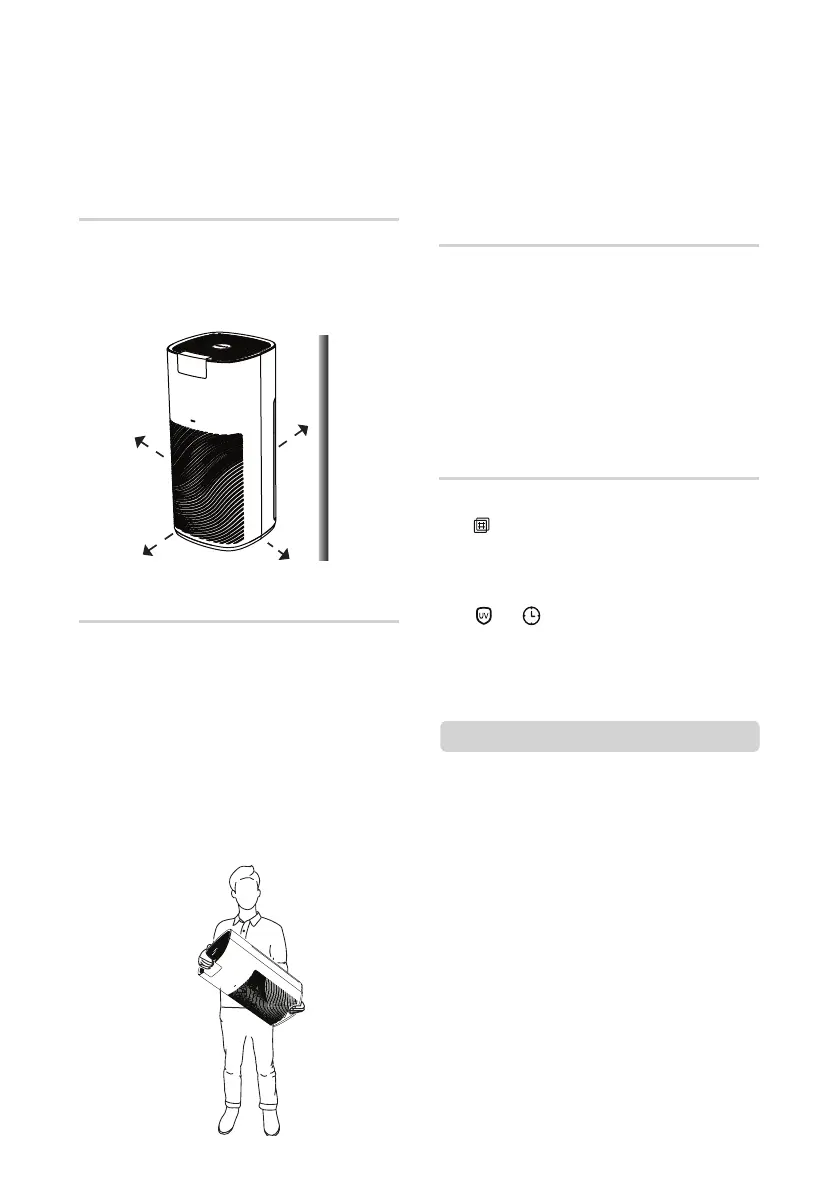
Placing the uAlpine Smart 2
• Make sure there is an allowance of at least
30 cm from the wall when in use.
• Ensure that the power cord is not placed
under the uAlpine Smart 2.
Removing plastic cover from
filter before use
Moving the uAlpine Smart 2
• Make sure rear cover is closed properly
before switching on the product.
• Only reset the filter usage time after
replacing the filter.
Note
• Open up the rear cover.
• Pull out the filter.
• Remove the outer plastic cover from filter.
• Place the filter with the pull tab facing
outwards in order to pull the filter out
easily for replacement.
• Close the rear cover.
• Lift the uAlpine Smart 2 by holding both side
of the product as shown.
• Do not lift the product by the rear cover as it
may open up causing product to drop.
• When moving product, always lift it up and
avoid dragging it.
• Do not drop or put anything into the top
air outlet as it could cause product to
malfunction.
30 cm
Replacement of filter
• The red filter replacement icon indicator
[ ] will be turned on with 1 long ‘beep’
sound when the filter needs to be
changed.
• After replacing the filter, press and hold
[ ] + [ ] buttons 5 secs. There will be 1
‘beep’ sound to indicate filter usage time
has been reset. The red filter replacement
icon indicator will then be turned off.
u
A
l
p
i
n
e
S
m
a
r
t
2
uAlpine
Smart
2


 To Next Page