User’s Manual (Confidential)
OsteoSys Co., Ltd.
Model Designation : SONOST 3000 DOC. No. : OT06-2R7124
43
- Information : Display information about the program and device.
3.4.3 Setting of the incipient environment
Click the <Setup>button on the Home Screen, then environment window appears.
<‘Set up’ Window>
- <Settings> : Fundamental settings related to the software.
- <System> : Settings related to Operating System.
- <Cleaning> : Manually set the probes to move for the user's to clean the probes.
- <Backup> : Control of measured data.
- <Patch> : Software upgrade.
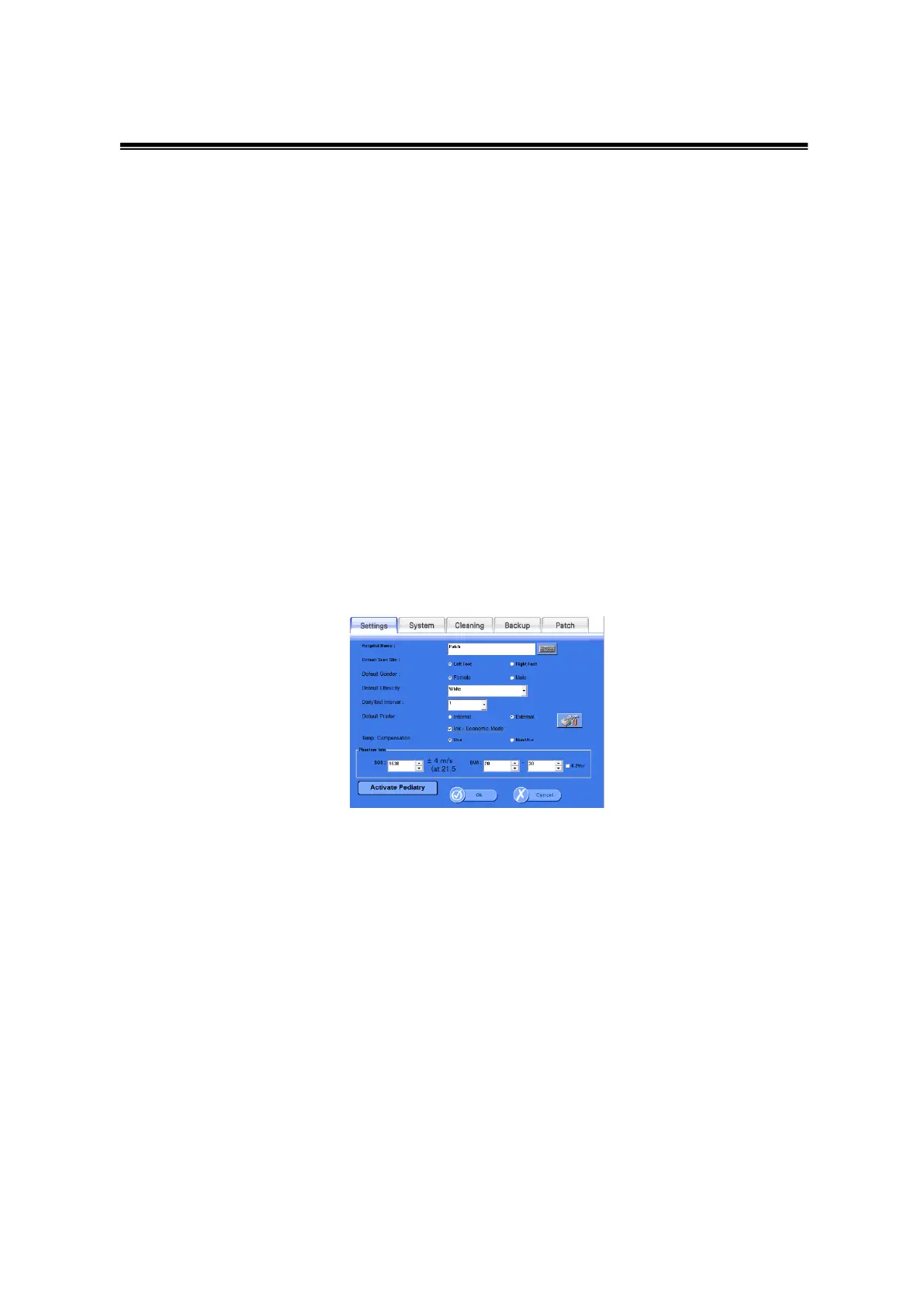
① Settings: Change fundamental settings related to the software.
<Setup>Settings Window
- Hospital Name : Insert the hospital name which will be printed on the report.
- Default Scan Site : Select the default scan site when performing a measurement.
- Default Gender : Choose the default gender when registering a new patient.
- Default Ethnicity : Choose the default ethnicity when registering a new patient.
- DailyTestInterval : Fix the interval of Daily Test
- Default Printer : Choose the default between the internal thermal printer or an
externally connected printer.
- Print Graph : Choose whether or not to print the graph when printing using the
internal printer
- Ink-Economic : Choose the Ink-Economic mode when using an external printer.



 To Next Page