English-10
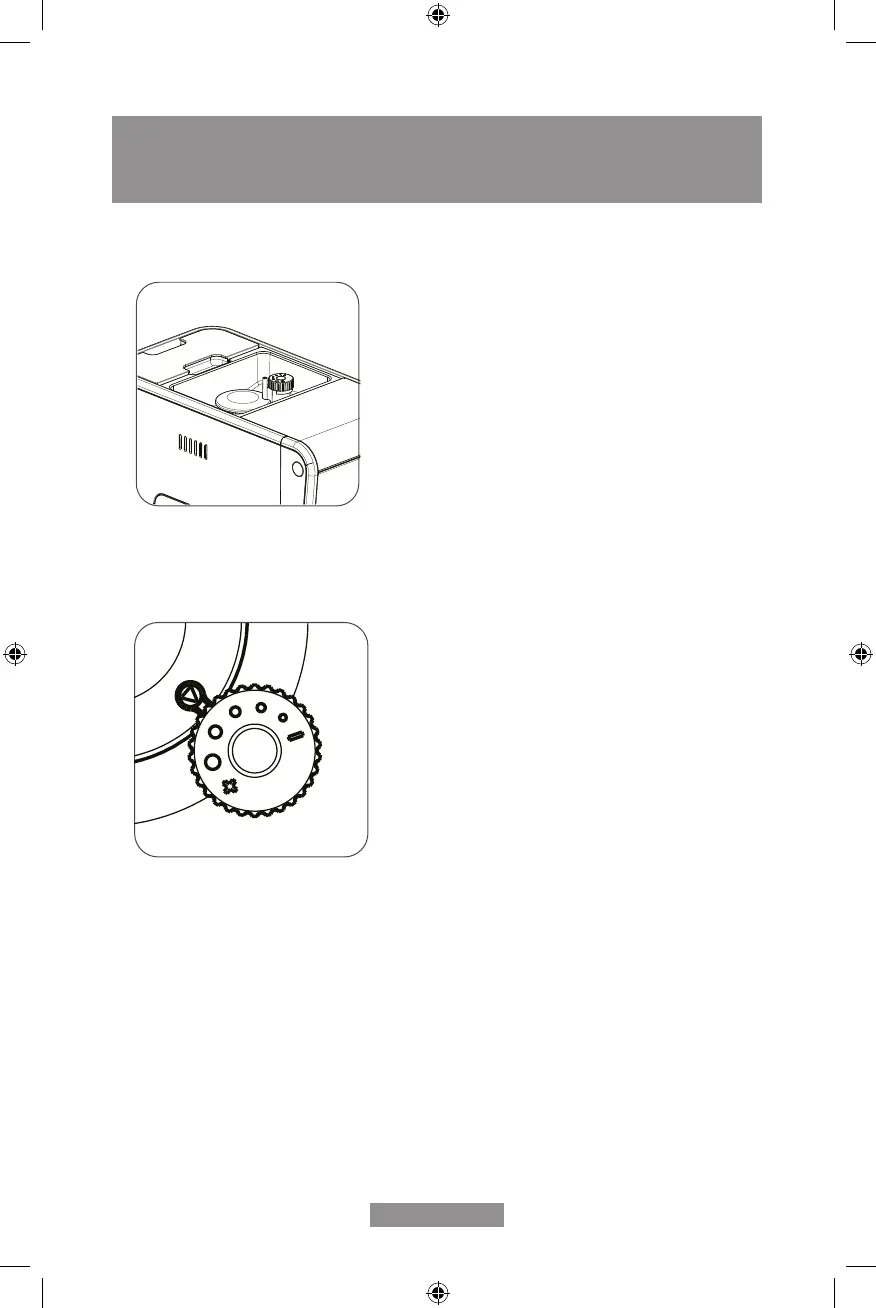
USE OF GRINDING SETTINGS
NOTE: Never adjust the grinder when it is not operating, as it may damage it.
1. Locate the 5 levels of grinding inside the coffee bean hopper to set the grinding
preference.
2. Turning the level knob towards the position marked with “+” will set a thicker grind
and turning it in the opposite direction (-) will set a ner grind. For more robust or dark
coffee beans, a thicker grind setting is recommended, and for lighter coffee beans
using a ner grind is recommended.
HELPFUL TIPS: If the espresso is brewing too slowly, it is recommended to use a thicker
grind setting as it can mean that the coffee grounds are too ne. On the other hand, if the
brewed coffee is owing out rapidly, it means that the coffee grounds are too thick, and it
will be necessary to set a ner grind.



 To Next Page