English-24
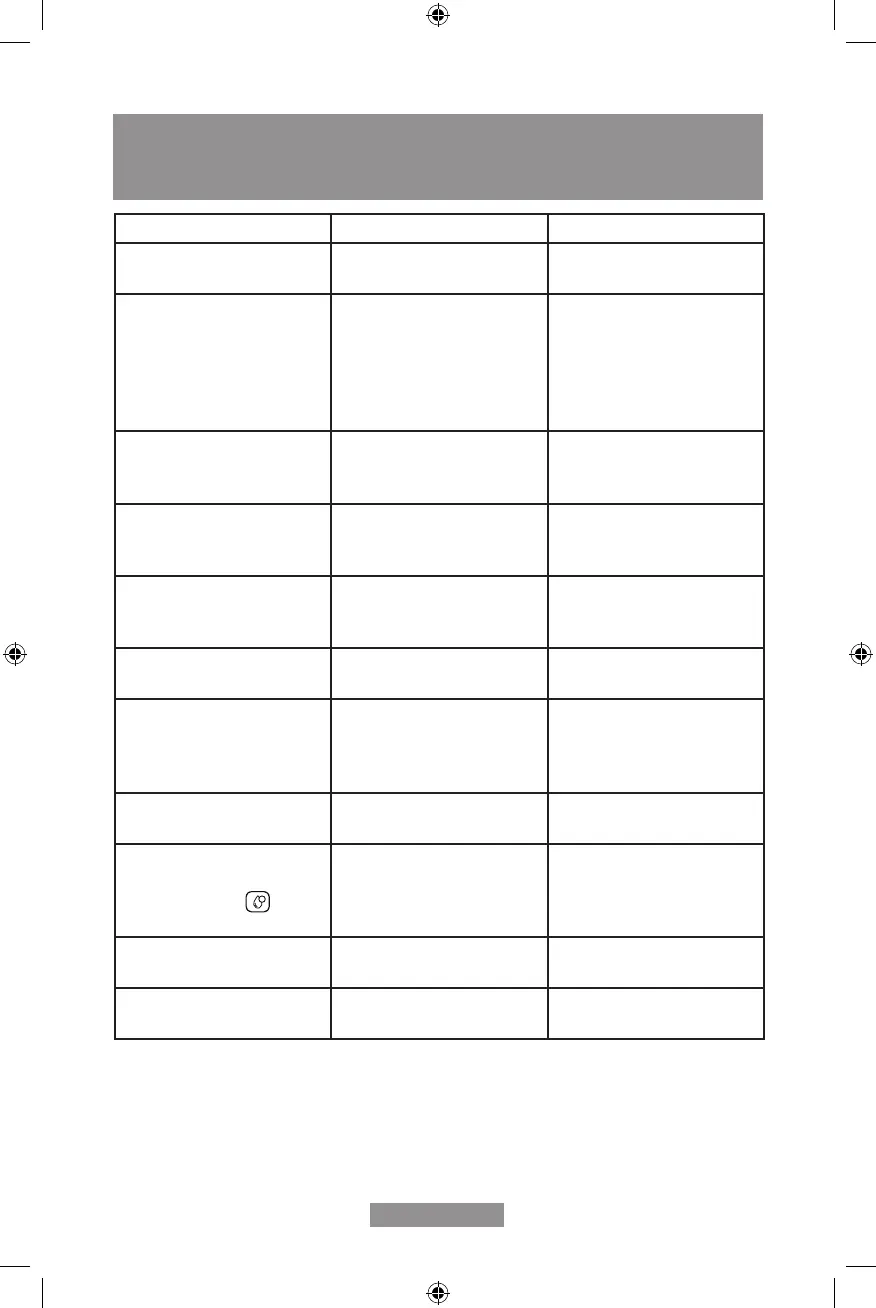
PROBLEMS, CAUSES AND SOLUTIONS
PROBLEM CAUSE SOLUTION
The appliance does not work. The appliance is not plugged
in to an outlet.
Plug in and press the switch.
Check the cable and the plug.
No or delayed response in
several trials of pressing on
function key on the panel.
Appliance is under an
electromagnetic interference.
Control panel is dirty.
Unplug the appliance. Restart
after few minutes.
Clean the panel with the cloth
provided.
The coffee is not hot enough. The cups have not been
preheated.
The brewing unit is too cold.
Rinse the appliance at least
3 times before making the
coffee.
The coffee cannot come out
from spout.
Empty system function maybe
used before.
Press the hot water button
until water comes out from
spout.
The rst cup of coffee is poor
quality.
Not enough coffee was
grinded.
Throw the coffee away. The
other coffees will always be of
good quality.
Coffee has no crema. Coffee beans are not fresh. Change to a more fresh coffee
bean.
The touch buttons are not
sensitive.
Not pressing the touch button
from the front direction of the
appliance.
Press the lower bottom part
of the icon of the touch button
from the front direction of the
appliance.
The appliance takes too long
to warm up.
Excessive scale has built up. Descale the appliance.
The water tank is removed /
the water level is very low in
the water tank but
!
does
not light up.
The area near the water tank
connector is wet.
Wipe the water around the
water tank connector.
Internal drip tray is lled with
water.
Coffee powder too ne, which
blocks water from pouring.
Adjust the coffee neness to
bigger dot in grinder hopper.
Coffee is being brewed too
slowly - droplets only.
Coffee powder too ne, which
blocks water from pouring.
Adjust the coffee neness to
bigger dot in grinder hopper.



 To Next Page