English-20
MODE SELECTION
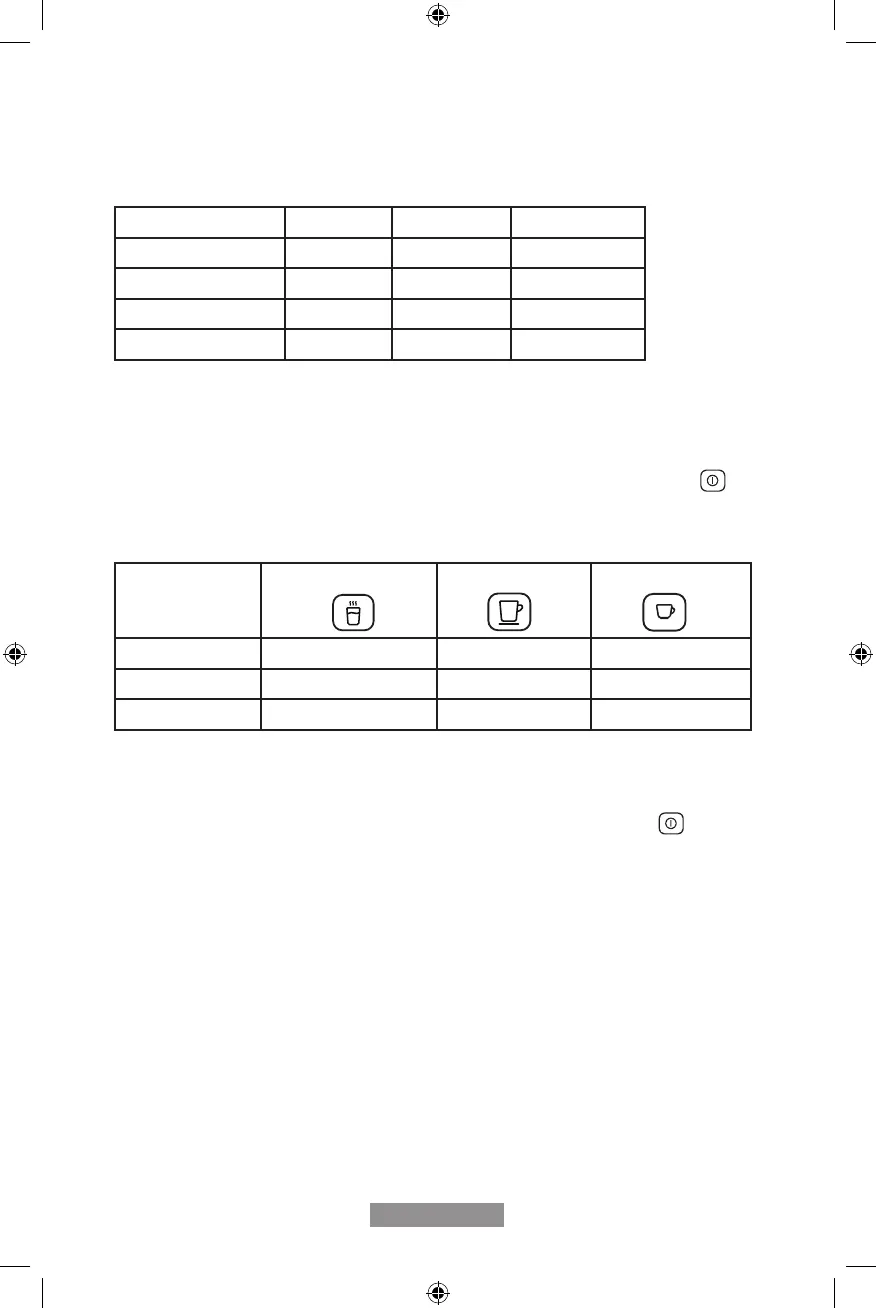
The espresso maker has three different settings: default setting, ECO mode and speed
mode. In ECO mode, the appliance helps to save more energy. In speed mode, the user
can make their coffee faster than in default setting.
*Note: The pre-brewing function moistens the coffee grounds in the brewer with a small
amount of water before full extraction. This expands the coffee grounds to build up a
greater pressure in the brewer which help extraction of all the oils and full avor from the
coffee grounds.
1. When the espresso maker is on standby, press and hold the ON/OFF button
for
5 seconds.
2. The function buttons will have their lights on or ashing as follows.
Press the Hot water button for ECO mode, Lungo for default mode and Espresso for
speed mode. Two Beep sounds indicate that the mode is being selected. (Note: If you
are pressing the button for each mode, the espresso maker will not response).
4. If you would like to leave the setting unchanged, press ON/OFF button
again or
wait for 5 seconds for the espresso maker to return to the standby condition.
ECO Mode Speed Mode Default Setting
Illumination Light No Yes Yes
Pre-brewing* Yes No Yes
Auto shut-off time 10mins 30mins 20mins
Cup Volume memory Yes Yes Yes
Hot water Lungo button Espresso button
In ECO Mode Light ON Flashing Flashing
In Speed Mode Flashing Flashing Light ON
In Default Setting Flashing Light ON Flashing



 To Next Page