English - 9
3-Way Auto-Off Feature
This feature automatically turns the iron off if left in one position too long to avoid
accidents.
IF YOU LEAVE IRON ON:
• Horizontally without moving it, or accidentally tip the iron over, it will automatically stop
heating after 30 seconds. The green light blinks when auto-off is activated.
• Vertically (on its heel rest) without moving it, the iron will automatically turn off after 15
minutes. The green light blinks when auto-off is activated.
IMPORTANT: When the auto-off feature has been activated, the indicator light will blink.
TO RESET: Move iron back and forth and reheat until the “Ready” Indicator Light turns
solid green.
NOTE: The 3-way auto-off feature only works when the iron is in corded mode.
Caring For Your Iron After Use
Storing Your Iron
1. To turn off the iron, move the Steam Lever to Dry setting and unplug the iron.
WARNING: NEVER yank power cord when unplugging iron. This can damage the cord.
2. If you do not use your iron on a daily basis, empty the water reservoir after each use
for a longer iron life. To do so, unplug the iron, turn the iron upside down, open the
Water Fill Hole Cover, and allow water to ow from the Fill Hole. Shake the iron gently
to remove trapped water drops.
1. Unplug iron and allow to cool.
2. Empty water reservoir after each use and move Steam Lever to the Dry setting.
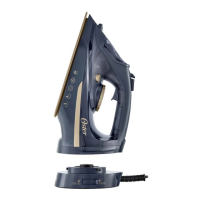
3. Loosely loop the power cord around the iron and store iron in vertical position on the
charging base .
CAUTION: Wrapping the cord around the charging base too tightly can damage the cord.
GCSTCC5000_22SEPM1 (LA).indd 9GCSTCC5000_22SEPM1 (LA).indd 9 2022/9/14 10:35 AM2022/9/14 10:35 AM


 To Next Page