Home
oticon
Hearing Aid
Alta 2
Page 21 (Put on the Hearing Instrument with Mould)
oticon Alta 2 - Put on the Hearing Instrument with Mould
64 pages
Manual
Save Page as PDF
To Next Page
To Next Page
To Previous Page
To Previous Page
Loading...
21
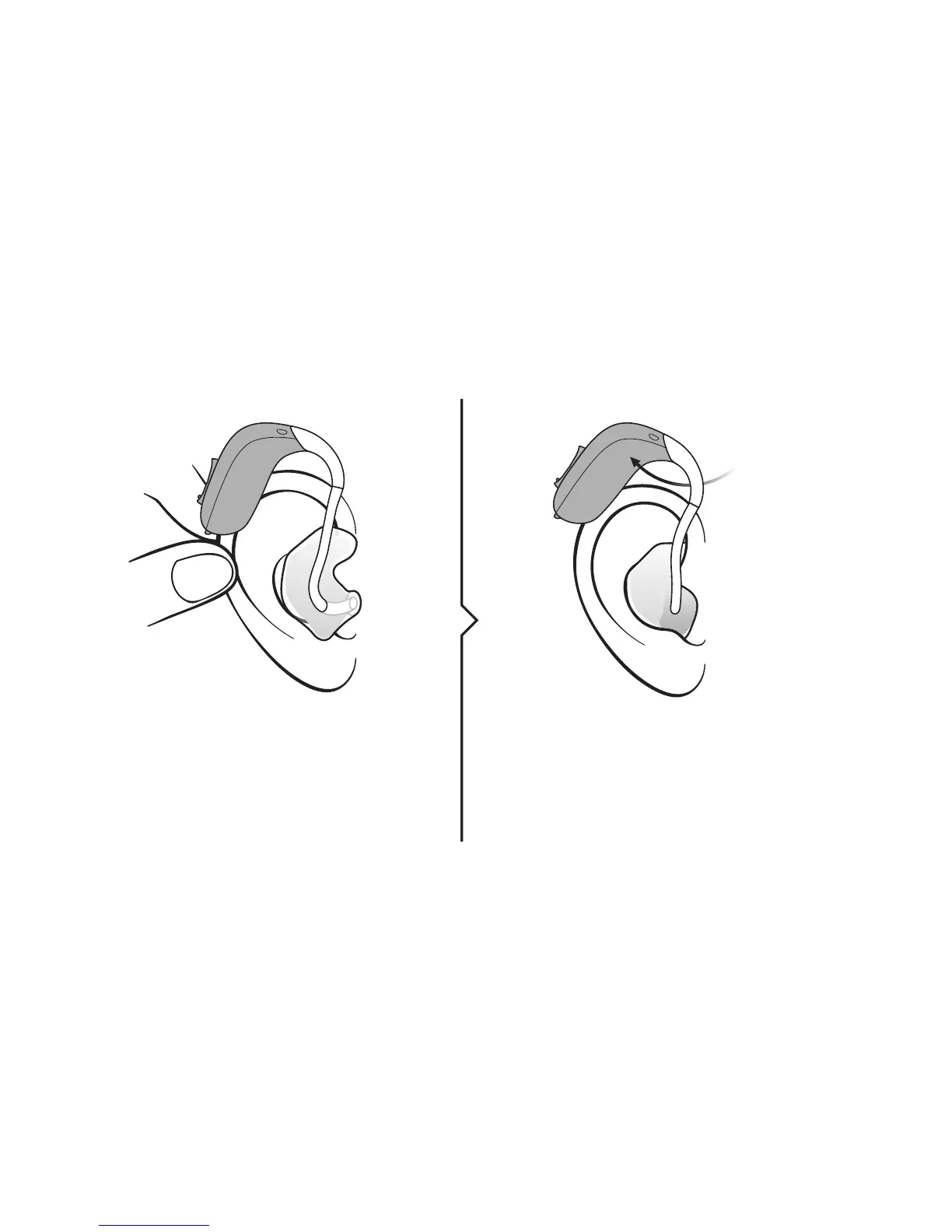
Put on the hearing instrumen
t with mould
Gen
tly pull your ear outw
ar
ds
and press the mould in the
direction o
f the ear canal,
twisting sligh
tly
.
Place the hearing instrumen
t
behind y
our ear
.
St
ep 1
St
ep 2
www
.o
tic
on.com/put-on-mould
20
22
Table of Contents
Main Page
Intended Use
3
Table of Contents
4
Identify Your Hearing Instrument Style and Ear Piece
6
Sound Hook and Mould
8
Thin Tube (Corda Minifit)
10
Identify Left and Right Hearing Instrument
12
Battery (Size 13)
13
Turn the Hearing Instrument on and off
14
When to Replace the Battery
15
How to Replace the Battery
16
Caring for Your Hearing Instrument
18
Sound Hook with Mould
20
Put on the Hearing Instrument with Mould
21
Clean the Mould
22
Wash the Mould
23
Thin Tube (Corda Minifit)
24
Put on the Hearing Instrument with Thin Tube
25
Clean the Thin Tube
26
Thin Tube with Dome
28
Replace the Dome
29
Thin Tube with Micro Mould
30
Clean the Micro Mould
31
Options Optional Features and Accessories
32
Mute the Hearing Instrument (Optional)
33
Change Volume (Optional)
34
Change Programs (Optional)
36
Other Options (Optional)
38
Wireless Accessories (Optional)
40
Tamper-Resistant Battery Drawer (Optional)
42
Warnings Warnings
44
More Info Troubleshooting Guide
50
Water Resistant (IP58)
52
Conditions
53
Warranty Certificate
54
International Warranty
55
Mobile Phone
56
Technical Information
58
Related product manuals
oticon Alta
78 pages
oticon Alta Pro
26 pages
oticon miniBTE Alta
72 pages
oticon Ria 2
64 pages
oticon Opn 2
35 pages
oticon Ruby 2
106 pages
oticon Xceed 2
40 pages
oticon Opn 2 miniRITE
42 pages
oticon Opn S 2 miniRITE R
42 pages
oticon Zircon 2 miniRITE T
88 pages
oticon Play PX 2 miniRITE R
88 pages
oticon Opn Play 2 miniRITE R
42 pages




 To Next Page