Step 1: Connect the TV Adapter 3.0 box to the television
See the Instructions for Use booklet that comes with the TV adapter.
Four methods are available to support a wide variety of connection needs.
Step 2: Turn both hearing aids off and back on
(Please see the Instructions For Use Turning Hearing Aids
On/Off for your device.)
Step 3: Start TV sound using the hearing aids
To listen to TV, simply make long presses on the button on the hearing aids
to cycle through the programs until you reach the TV listening program.
The program cycle will depend on how many programs have already been
set up.
To stop the sound from the TV, simply cycle back to the desired program in
the hearing aids.
Step 4:
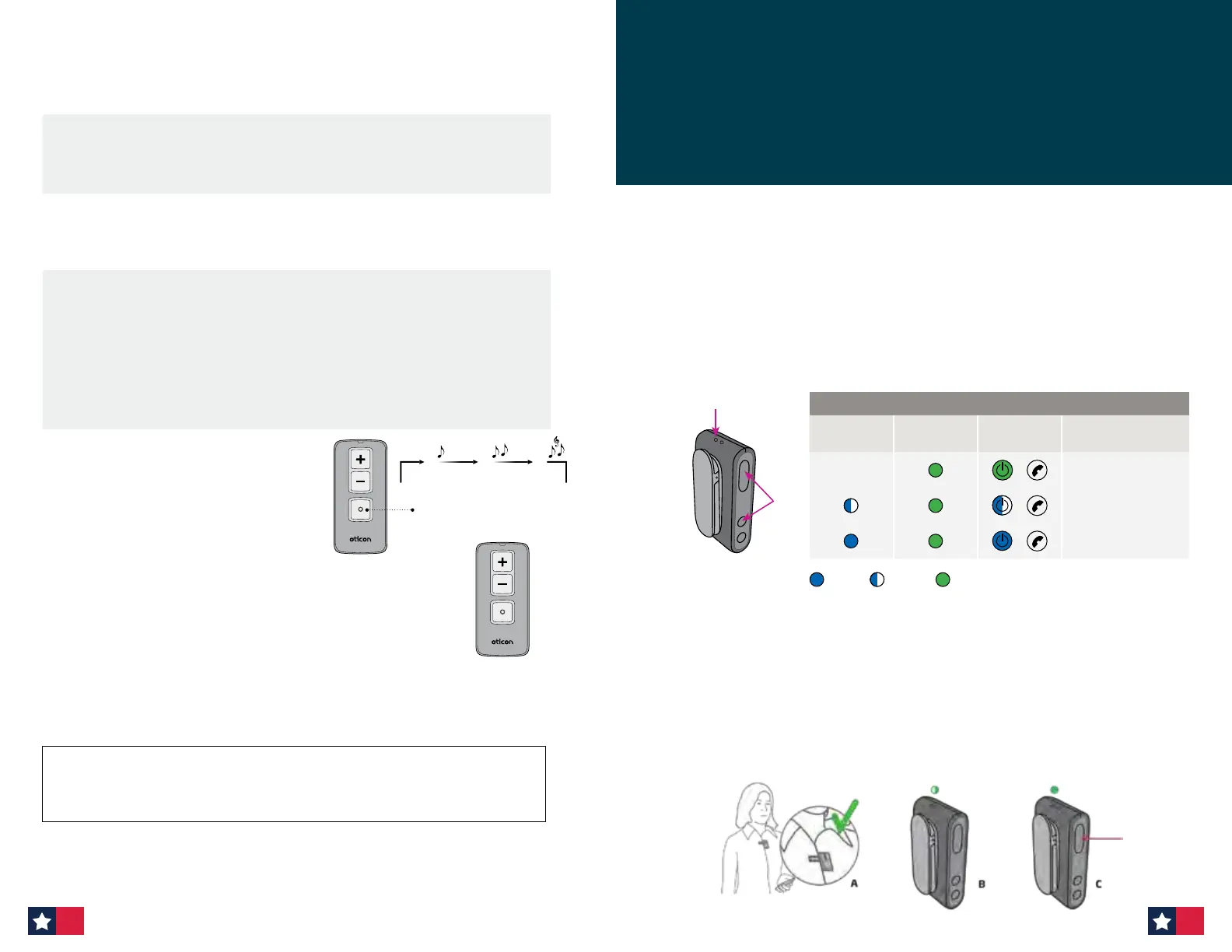
Alternatively, you can also start TV
sound and adjust volume with the
optional hearing aid Remote Control
3.0 accessory.
Note: The optional Oticon Companion App also lets
you access the TV listening program and adjust
volume control.
Using TV Adapter 3.0
Change program
P2 TVP1
Adjust the volume by
pressing up or down
briefly. Repeat the
brief press for further
adjustments.
Reset TV Adapter 3.0: Press and hold the setup button for more than 5 seconds.
Indicators will fade blue to indicate no pairings. Re-pair by following the steps
outlined above.
Incoming calls
Make sure that your patient is able to speak into the ConnectClip microphone (A).
When the landline phone rings, your patient will hear an incoming call alert in the hearing
aids. The phone indicator on the Phone Adapter will blink green and at the same time the
status indicator on the ConnectClip will blink green (B).
Press the multibutton on the ConnectClip briefly (C) to answer the call. You will hear a short
confirmation beep in the hearing aids. The status indicator on the ConnectClip and the phone
indicator on the phone adapter will now be steady green.
To end the call, simply press the multibutton on the ConnectClip briefly and the status
indicator turns blue.
The very first time the ConnectClip is used with the Phone Adapter, it must be paired to
the Phone Adapter.
B
Status
Pairing ConnectClip
ConnectClip
Status
ConnectClip
Power
Phone
Adapter
Description
ConnectClip and
Phone Adapter on
ConnectClip in
pairing mode
Pairing complete
Steady Blinking Power
For pairing:
1. Make sure the Phone Adapter is powered on, i.e. the power indicator is steady green.
2. Press the multibutton AND volume up button on the ConnectClip (B) for about
6 seconds until status indicator starts blinking blue.
3. Place the ConnectClip on top of the Phone Adapter — the pairing takes around
20–60 seconds.
4. The pairing is completed when the power indicator on the Phone Adapter and the
status indicator on the ConnectClip turns steady blue. Pairing is done only once and
will normally not have to be repeated.
Phone Adapter 2.0 with ConnectClip
60 61


 To Next Page
 Loading...








