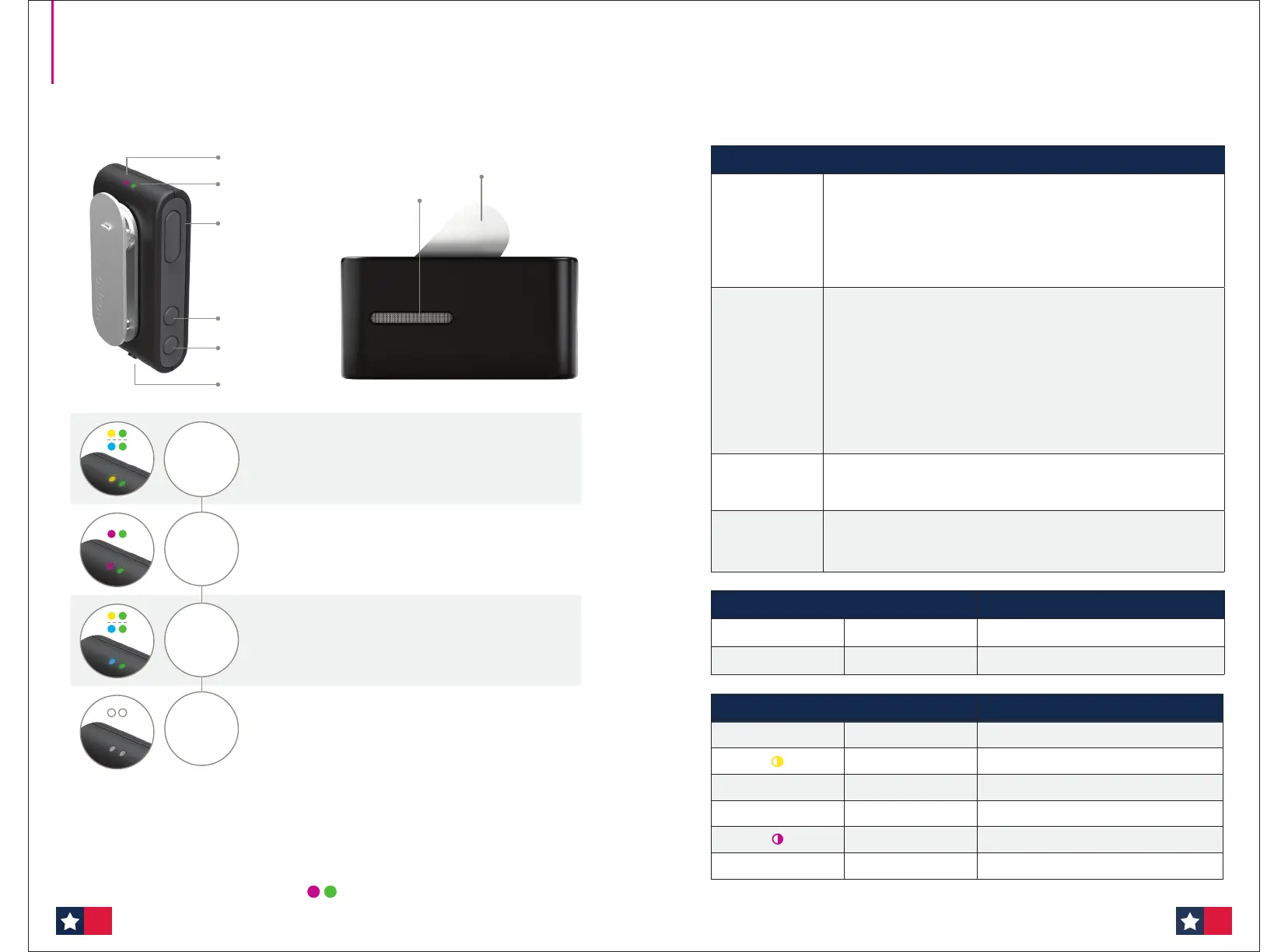
• Press the multi‑button for 3 seconds, until the power
indicator (right) shows steady green
• When the status indicator (left) shows steady yellow or blue,
ConnectClip is connected to the hearing aids
• Select the remote microphone mode by pressing the
multi‑button for 3 seconds, until the status indicator shows
steady magenta
• To mute/pause the remote microphone streaming, press the
multi‑button for 3 seconds. The status indicator (left)
changes to steady yellow or blue
• To unmute/restart streaming, press the multi‑button for 3
seconds, until the status indicator shows steady magenta again
• Turn ConnectClip off by pressing the multi‑button for 6
seconds, until both the power indicator and the status
indicator are off
2
Microphone
mode
1
Power
on
3
Mute
4
Power
off
Problem Action
No power/no
LED light
Check ConnectClip is paired with the hearing aids
Does the status light show steady yellow or blue?
If not, see the Instructions for Use.
Has ConnectClip been turned off or disconnected?
Reconnect to the hearing aids by turning ConnectClip off and on again.
Note: ConnectClip needs to be within 6 feet of the hearing aids.
There’s no
sound from
the ConnectClip
Check the battery power
Does the power indicator light show steady green?
Check ConnectClip is in remote microphone mode
Does the status indicator light show steady magenta?
Check ConnectClip is attached properly
Is it in an upright position, close to the mouth and not covered by clothes?
Check the volume and range
Is the range within 65 feet?
Try increasing the microphone volume with the volume‑up button.
The sound is too
quiet or too loud
Adjust the microphone volume with the volume up and volume down
buttons.
Note: The hearing aid wearer can control the volume with the Oticon ON app.
ConnectClip runs
out of battery
Turn ConnectClip off whenever you are not using it
You can also charge it up during breaks.
Note: Battery life in remote microphone mode is 8.5 hours.
Power Indicator Description
•
Steady green Power on
•
Steady red
Battery low
Status Indicator Description
•
Steady orange
Streaming
Blinking yellow Searching for hearing aids
•
Steady yellow
Connected to hearing aids
•
Steady blue Connected to a mobile phone
Blinking magenta Remote microphone reconnecting
•
Steady magenta Remote microphone mode
Troubleshooting
ConnectClip
Quick guide to the remote microphone
Attach to the person speaking
Attach the ConnectClip to the speaker’s clothing about 8 inches below their mouth. Make sure the
microphone is pointing towards the mouth and is not covered by clothes or in a shirt pocket, etc.
You can also use the lanyard provided to hang the ConnectClip over the speaker’s clothes.
Rotating clip
Microphone
Power indicator
Status indicator
Multi‑button
Volume down
Volume up
Charging socket
TIP: Check that the status indicator is magenta and the power indicator is green —
especially if you have been out of range.
5554








 To Next Page