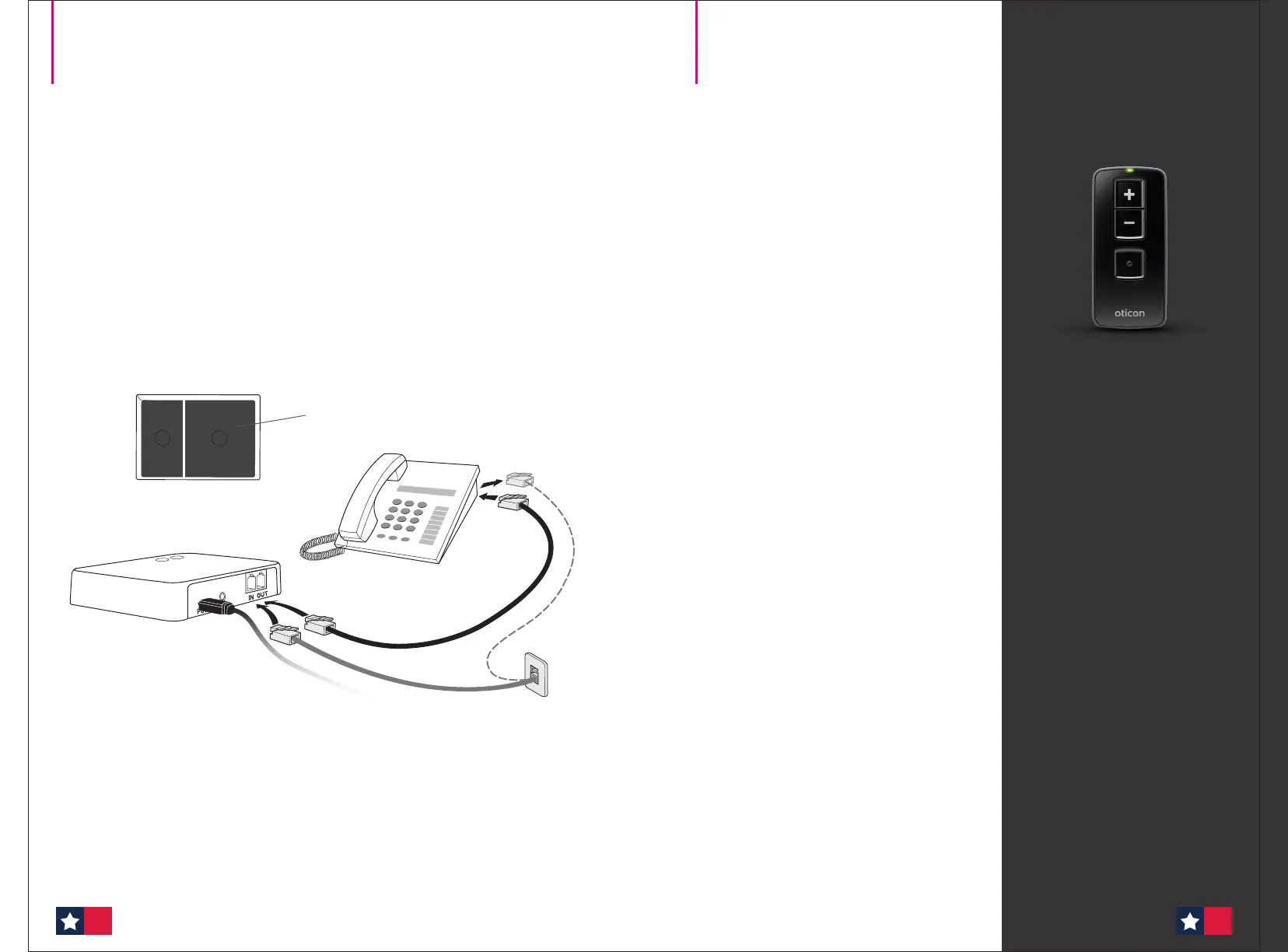
Connecting to a phone line and landline phone
Place the Phone Adapter in a suitable spot near your landline phone or base station.
1. Unplug the phone line from the landline phone (or base station).*
2. Plug the phone line from the wall outlet into the Phone Adapter “IN” connector.
3. Plug the phone cable from box 2 in the Phone Adapter “OUT” connector.
4. Plug the other end of the phone cable into the landline phone (or base station).*
Lift off the handset from your landline phone – you should now be able to hear
the dial tone from the handset speaker.
* If your main phone or base station does not have a detachable plug for the landline connection,
you should either try using an alternative phone or a technician must be contacted to complete
the installation.
1 2
Box 2
3.
2.
1.
4.
Remote Control 3.0
Remote Control 3.0 is a
discreet and elegant solution
for all users of Oticon hearing
aids with 2.4 GHz radio
technology.
Full discretion
Oticon Remote Control 3.0 oers an
intuitive, straightforward and discreet
way to operate hearing aids.
With the remote control, the hearing
aid user can perform the most common
everyday adjustments without drawing
attention to the hearing aids:
• Volume up/down
• Select program
• Mute hearing aids
Full discretion is oered, since the
remote control can operate the
hearing aids from a distance of up to
approximately 6 ft. (1.8 m) without a
direct line of sight between the remote
control and the hearing aids.
Easy to operate
The remote control buttons are clearly
visible and easy to operate.
Every time a button is pressed, a
notication is heard in the hearing aids.
At the same time the remote control
conrms the action with a visual
indication and a discreet click that
can be heard and felt.
Technical Data Sheet
Wireless accessories
68 69
Phone Adapter with ConnectClip (cont’d)








 To Next Page