4
Step 1 Unplug your monitor
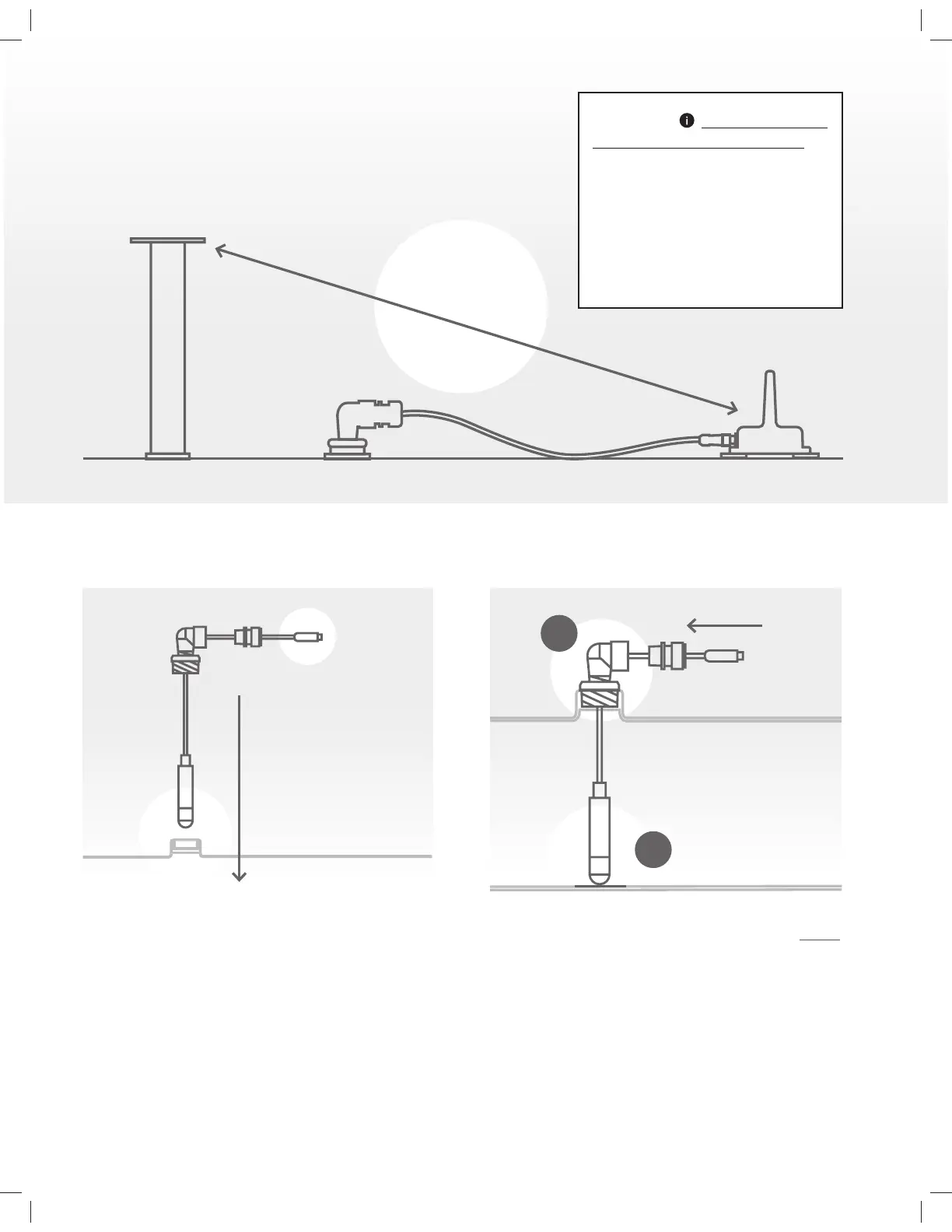
a. Unplug the cable from the communicator by carefully
turning the connector’s front holding nut counter-clockwise.
Insert the sensor into the tank
b. Loosen the cover nut and remove the cord grip from
the elbow to allow the cable to move;
c. Then push the cable through the elbow until most of
the cable is hanging with the sensor, ensuring the sensor will
touch the bottom when inserted in the tank;
d. Gently pull/tug the cable to straighten it. Please DO NOT
pull from the sensor or connector;
e. Slowly insert the sensor into the tank until it is skimming
the bottom;
f. Slide reducer, elbow and cord grip through the cable
until touching the bung hole.
f
e
Installation Instructions
Safety
5 FEET MINIMUM (125CM)
FROM T-VENT
IMPORTANT ALWAYS FOLLOW YOUR
LOCAL REGULATIONS AND STANDARDS.
Consult with certified personnel to ensure
your installation is compliant.
Mounting fittings, such as elbow fitting,
are not part of the certification for model
TM7530HP. Final installation shall be
subjected to acceptance by the Local
Authority Having Juristiction.


 To Next Page