5
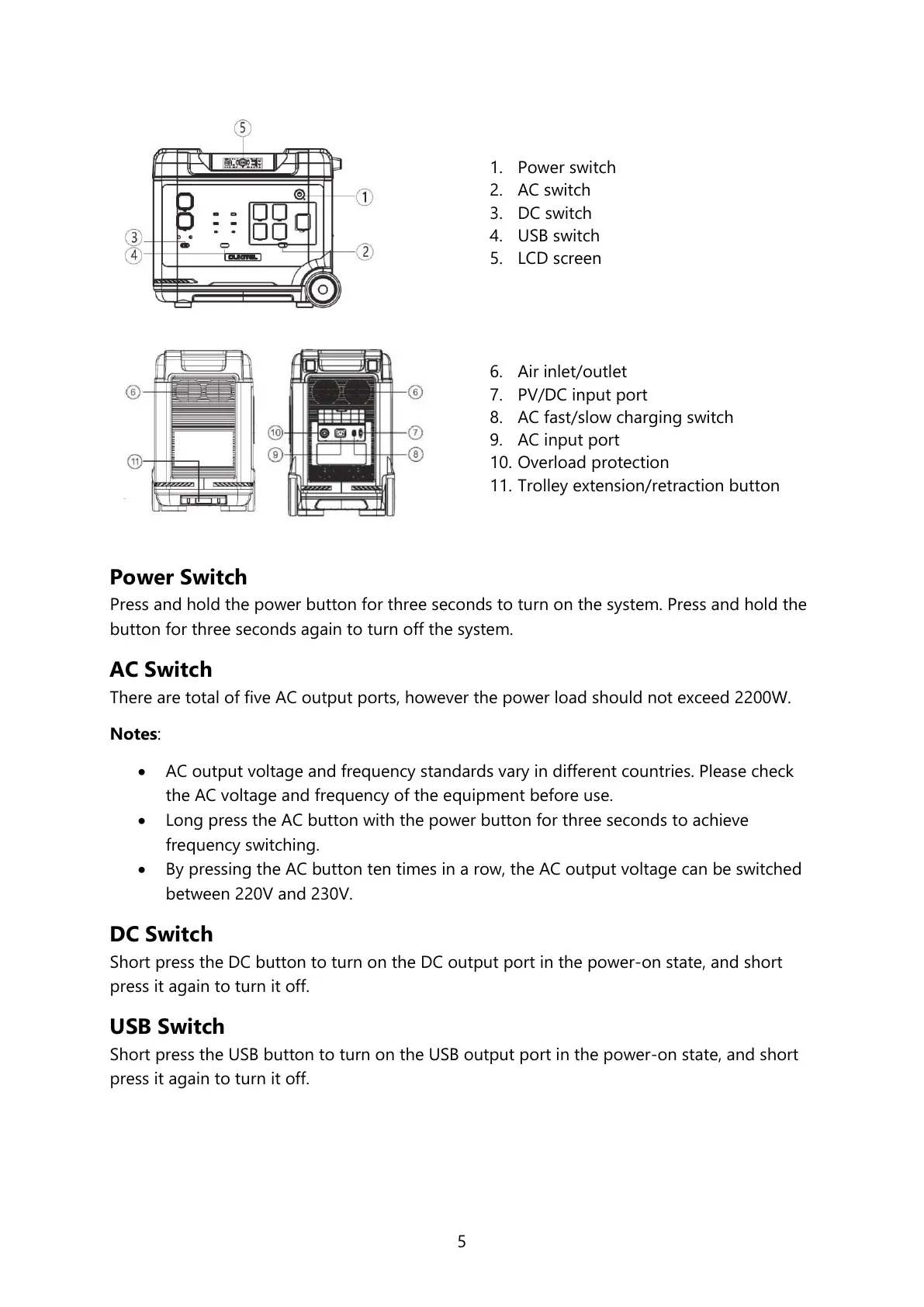
1. Power switch
2. AC switch
3. DC switch
4. USB switch
5. LCD screen
6. Air inlet/outlet
7. PV/DC input port
8. AC fast/slow charging switch
9. AC input port
10. Overload protection
11. Trolley extension/retraction button
Power Switch
Press and hold the power button for three seconds to turn on the system. Press and hold the
button for three seconds again to turn off the system.
AC Switch
There are total of five AC output ports, however the power load should not exceed 2200W.
Notes:
AC output voltage and frequency standards vary in different countries. Please check
the AC voltage and frequency of the equipment before use.
Long press the AC button with the power button for three seconds to achieve
frequency switching.
By pressing the AC button ten times in a row, the AC output voltage can be switched
between 220V and 230V.
DC Switch
Short press the DC button to turn on the DC output port in the power-on state, and short
press it again to turn it off.
USB Switch
Short press the USB button to turn on the USB output port in the power-on state, and short
press it again to turn it off.


 To Next Page