8
Icons on the Display
When this icon is on, please ensure that the air inlet on both
sides of the product is not blocked.
When the indicator flashes, it means that the internal
temperature of the machine is either too high or too low, at
which time the device turns on the intelligent protection
program, forcing the machine to stop working normally. Wait for
the machine to return to normal temperature, then you can
resume using it.
When the indicator icon is flashing, it means the utility input is
abnormal, please check the charging end connection.
When the indicator if flashing, it means the corresponding port
output is abnormal, please check the load situation.
Press and hold the USB button for 2 seconds to enter silent
mode.
Double click the AC button to enter constant power mode.
UPS Mode
The power station has a bypass mode that can complete the output directly from AC power
without the need to pass through the battery. In UPS mode, when the AC input is suddenly
interrupted, the product can automatically switch to battery power within 10ms, guaranteeing
the normal operation of AC equipment.
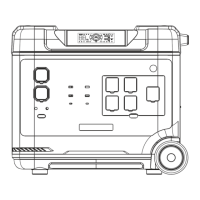
UPS Connection Diagram
As shown in the figure below, the product is connected between the socket and the electrical
appliances, and the power station is powered on.


 To Next Page