EasyManua.ls Logo

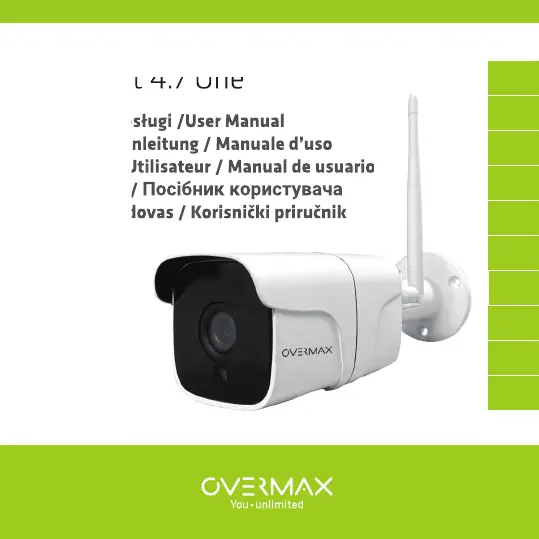
Overmax Camspot 4.7 One - User Manual

Overmax Camspot 4.7 One
68 pages
Go to English
Print Icon
To Next Page IconTo Next Page
Loading...
Instrukcja obsługi /User Manual
Bedienungsanleitung / Manuale d’uso
Manuel de l’Utilisateur / Manual de usuario
Handleiding / Посібник користувача
Vartotojo vadovas / Korisnički priručnik
Camspot 4.7 One
Instrukcja obsługi /User Manual
Bedienungsanleitung / Manuale d’uso
Manuel de l’Utilisateur / Manual de usuario
Handleiding /
Посібник користувача
Vartotojo vadovas / Korisnički priručnik
spot 4.7 One
IT
UK
EN
ES
HR
PL
FR
LT
DE
NL

Questions and Answers

  • B
    Brianna CarlsonAug 10, 2025
    Why won't my Overmax Security Camera display a preview?
    • E
      eschmittAug 10, 2025
      If your Overmax Security Camera isn't displaying a preview, the first step is to check your Wi-Fi signal strength. Try placing the camera closer to your router. If the problem persists, reset the device and try again.
  • B
    Brian PerryAug 16, 2025
    Why can't I add a device when pairing my Overmax Camspot 4.7 One Security Camera to the network?
    • B
      Brianna GarciaAug 16, 2025
      If you're having trouble adding a device while pairing your Overmax Security Camera to the network, ensure that both your phone and the camera are connected to a 2.4 GHz router and that the Wi-Fi password you entered is correct.
  • B
    Brandon NealAug 22, 2025
    How to connect my Overmax Camspot 4.7 One Security Camera to another router?
    • T
      Todd HartAug 22, 2025
      To connect your Overmax Security Camera to a different router, first log into the application to delete and reset the device. Then, re-configure the device through the application.
  • J
    Julie FernandezAug 28, 2025
    What to do if I still cannot add my Overmax Camspot 4.7 One device after rescanning?
    • D
      darrellmillerAug 28, 2025
      If you still can't add your Overmax Security Camera device after rescanning, try resetting the camera or switching it off and then on again before attempting to add it.
  • C
    Cynthia CampbellSep 3, 2025
    Why is my Overmax Camspot 4.7 One Security Camera still on the device list after resetting it?
    • S
      Sara BrownSep 3, 2025
      The "Reset device" option resets only the camera's network configuration and does not remove the device from the application's list. To remove the Overmax Security Camera from the list, you need to log in to the application and delete it manually.

Overmax Camspot 4.7 One Specifications

General IconGeneral
Night visionYes
IR distance10 m
Memory card slotYes
Max. memory card size128 GB
Tilt range90°
Two-way audioYes
Weather ResistanceIP66
Viewing angle90°
Power supply12V DC
Pan range355°
ConnectivityWi-Fi

Related product manuals