54 GB/IE
Calling up the time zone
The default display shows the time zone according to the information
provided by the DCF radio signal.
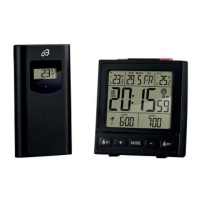
Press the MODE button
18
. The second time zone symbol
25
and the according time appear in the LC display.
Press the MODE button
18
again to return to the default display.
Setting the alarm time
You can set two different alarm times.
1. Press and hold down the
SET button
20
or SET button
16
for about 3 seconds.
Note: If an alarm time has been set before, then that previously
set alarm time appears in the LC display. If not, then the display
shows 0:00 or AM 12:00.
2. The hour display flashes. Press the + button
19
or – button
17
to set the desired value.
3. Press the
SET button
20
or SET button
16
to confirm your
settings. The minute display flashes.


 To Next Page