User Manual - FUNSTRIP LED V1.0 05/2021 12/24
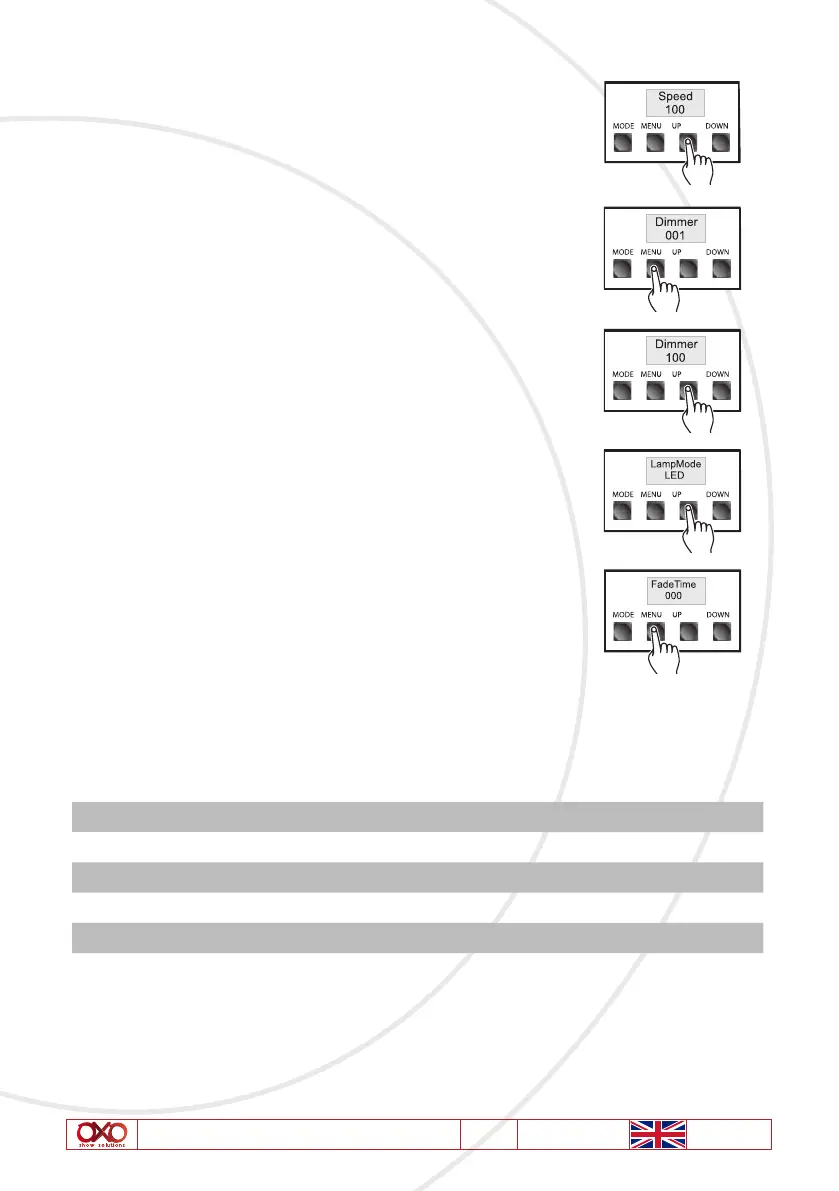
Use the «UP « and «DOWN» buttons to adjust the chase speed
from 001 thru 100. A set value of 100 will give you the fastest
chase speed(approx.1/10th of a second) . While a set value of
001 will give you the slowest chase speed (once every 30 second.).
3. Master (Intensity) Menu: To adjust the output intensity, you must
activate the Chase Dimmer Menu as the previous step. Press “MENU”
button and select “Chase Dimmer” menu, the LCD will display
“Dimmer” followed by three digits.
Use the «UP» and «DOWN « buttons to adjust the light output intensity
between 000 ~ 100. A set value of 000 will give you the weakest
output intensity and a set value of 100 will give you the full intensity.
4. Lamp Mode Menu: Press “MENU” button and select “Lamp Mode”
menu, the LCD will display “LampMode Tungdten”, user can press
“UP” or “DOWN” button to switch to “LampMode LED” menu
5. Fade Time Menu: Press “MENU” button and select “Fade Time”
menu, the LCD will display “FadeTime” followed by three digits, user
can press “UP” or “DOWN” button set the desired Fade time value
from 000 to 100.
10. Technical specifications
Power Thru/Input AC 230V, 50Hz, Max 16A
Fuse T 3.15A 250V 5*20mm
Power Consumption 90W
IP Rating IP20
Weigh 6,3Kg
Dimension 1040(L)*130(W)*140(H)mm
Please note: Specifications and improvements in the design of this product and this manual
are subject to change without any prior notice.



 To Next Page