User Manual - FUNSTRIP LED V1.0 05/2021 8/24
7. Operation Mode
The “LED Funstrip DMX” has two different operation modes. It can be used as a 07, 08, 10,11,
16 channel DMX dimmer. Tap “Mode” button to switch the operation mode between “Receive
Mode” and “Chase Mode”.
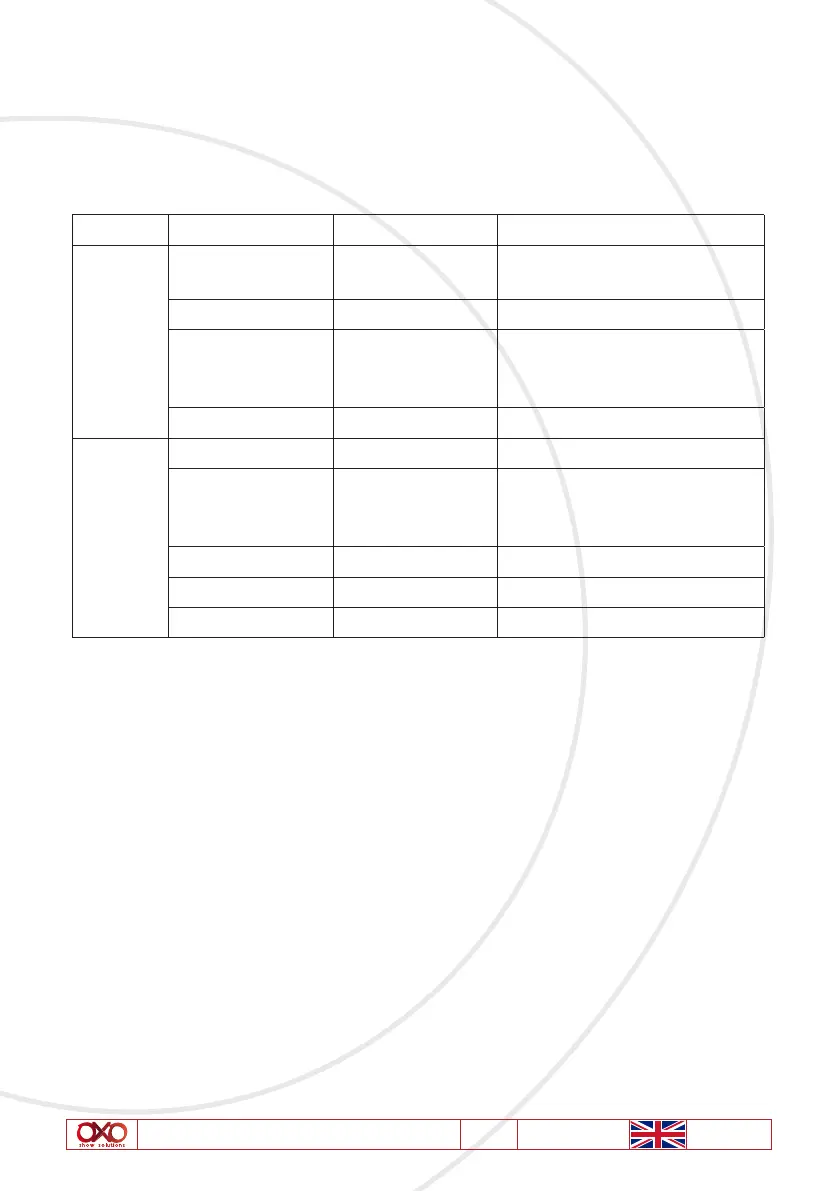
Please follow illustrations below to operate the unit in your desired mode.
Mode Parameter Parameter Value Function
DMX
Address 001-512 To set the initial DMX receiving
address
Channel 07/08/10/11/16 To set the DMX Control Mode
No DMX OFF/ Hold/Program To set the status of the fixture
when
DMX signal is input
Glide OFF/ON To set the output of the DMX Data
Program
Program Full/01--16/AUTO To select a built-in program
Speed 01-100 To set the speed level of the built-
in
Program
Master 00-100 To set the intensity
Lamp Mode Tungsten/LED To set the mode of Lamp
Fade Time 00-100 To set the speed of the Fadetime
8. DMX Mode
Use this operation mode only when you are about to use the unit as a DMX dimmer. This
function can allow you set your unit dimmer function as a 07, 08, 10,11 or 16 channel DMX
dimmer and DMX address.



 To Next Page