User Manual - FUNSTRIP LED V1.0 05/2021 7/24
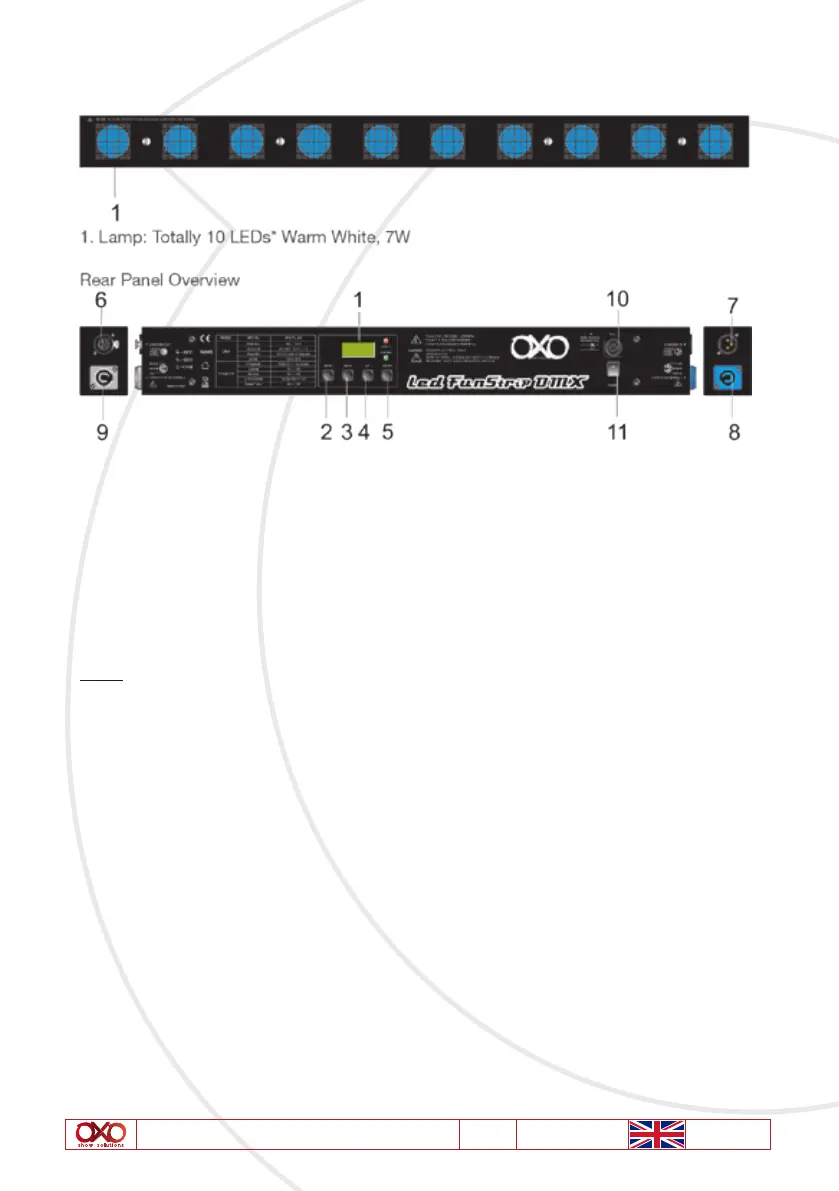
6. Overview
1. LCD Display This multi-function display will detail all DMX Address, Chase ,
Program, Speed activity that pertains to the current operation mode of
the unit
2. Mode button This button will call up the unit operation mode between DMX and
Chase mode.
3. Menu button This button will active the different functions in Receive and Chase
modes.
Note:
In the Chase mode, Menu key is used to only activate Chase Dimmer, Chase Program,
Chase Speed, Fade Time and Lamp Mode. While in the « Receive « mode, only used to only
select DMX Address, Channel.
4. UP Key This button will increase the displayed value in the LED display
5. Down Key This button will decrease the displayed value in the LED display
6. DMX Out This connector sends your DMX signal through to the next unit
7. DMX In This connector accepts your DMX input signal
8. Power Input AC100-240V~50/60Hz, Max15A. The supply power is input into your
unit via this connector. Be sure to always connect to proper voltage
9. Power Thru AC 230V, 50Hz, Max 15A. This connector sends the supply power to
the next unit
10. Fuse F3.15A 250V 5*20mm. These fuses prevent you from overloading
damaging your unit. Be sure to always replace with the exact same
type fuse
11. Power Switch Turn on/off the power supply



 To Next Page