EasyManua.ls Logo

Ozito CPPAS-800 - User Manual

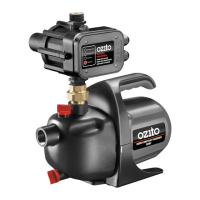
Ozito CPPAS-800
8 pages
Print Icon
To Next Page IconTo Next Page
Loading...
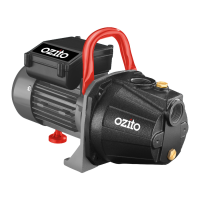
CONSTANT
PRESSURE
PUMP
800W
INSTRUCTION MANUAL
SPECIFICATIONS
Motor: 800W
Max. Flow Rate: 3,600 l/h
Max. Lift: 8m
Max. Head: 40m
Inlet: 25.4mm (1”BSP) Female
Outlet: 25.4mm (1“BSP) Male
Water Temp.: 1ºC to 35ºC
IP Rating: IPX4
Weight: 7.8kg
CPPAS-800
WHAT’S IN THE BOX
IN ORDER TO MAKE A CLAIM UNDER THIS
WARRANTY YOU MUST RETURN THE PRODUCT
TO YOUR NEAREST BUNNINGS WAREHOUSE WITH
YOUR BUNNINGS REGISTER RECEIPT. PRIOR TO
RETURNING YOUR PRODUCT FOR WARRANTY
PLEASE TELEPHONE OUR CUSTOMER SERVICE
HELPLINE:
Australia 1800 069 486
New Zealand 0508 069 486
3 YEAR REPLACEMENT WARRANTY
Your product is guaranteed for a period of 36 months from
the original date of purchase. If a product is defective it will
be replaced in accordance with the terms of this warranty.
Warranty excludes consumable parts, for example: O-rings, bearing,
seals gaskets.
WARNING
The following actions will result in the warranty being void.
If the tool has been operated on a supply voltage other
than that specified on the tool.
If the tool shows signs of damage or defects caused
by or resulting from abuse, accidents or alterations.
Failure to perform maintenance as set out within the
instruction manual.
If the tool is disassembled or tampered with in any way.
Professional, industrial or high frequency use.
WARRANTY
TO ENSURE A SPEEDY RESPONSE PLEASE
HAVE THE MODEL NUMBER AND DATE OF
PURCHASE AVAILABLE. A CUSTOMER SERVICE
REPRESENTATIVE WILL TAKE YOUR CALL
AND ANSWER ANY QUESTIONS YOU MAY
HAVE RELATING TO THE WARRANTY POLICY
OR PROCEDURE.
OZITO Australia/New Zealand (Head Office) 1-23 Letcon Drive, Bangholme, Victoria, Australia 3175.
The benefits provided under this warranty are in addition
to other rights and remedies which are available to you at law.
Our goods come with guarantees that cannot be excluded
at law. You are entitled to a replacement or refund for a major
failure and for compensation for any other reasonably foreseeable
loss or damage. You are also entitled to have the goods repaired
or replaced if the goods fail to be of acceptable quality and the
failure does not amount to a major failure.
Generally you will be responsible for all costs associated with
a claim under this warranty, however, where you have suffered
any additional direct loss as a result of a defective product you
may be able to claim such expenses by contacting our customer
service helpline above.
ozito.com.au
0217
Constant Pressure Pump
Teflon Tape

Questions and Answers

  • K
    Kathleen SmithAug 6, 2025
    Why won't my Ozito CPPAS-800 start?
    • T
      Tammie JacksonAug 6, 2025
      If your Ozito Water Pump won’t start, first check if the power is switched on and that the green light is illuminated. If not, examine the mains supply. Also, if the failure light is red, the pump may require restarting. Push and hold the Restart button for 5 seconds until the red failure light turns off.
  • D
    Daniel BishopAug 13, 2025
    How to fix Ozito CPPAS-800 Water Pump when it operates but no water flows?
    • A
      alex61Aug 13, 2025
      If your Ozito Water Pump is running but not pumping water, several issues could be the cause. First, ensure the pump is correctly primed by following the priming instructions. Check for any blockages in the suction pipe and clean it if necessary after disconnecting the power supply. Also, inspect the external in-line filter, if installed, and clean it. Verify that the inlet and outlet pipes or hoses are correctly connected, ensuring no leaks, and use Teflon tape on all connections. Confirm that your water supply source has sufficient water. You may also need to disconnect the power supply, open the priming screw, and manually fill the pump head with water. Finally, ensure all joints are tightly sealed with Teflon tape.
  • J
    jamesonealAug 29, 2025
    What to do if the failure light stays red on my Ozito CPPAS-800 Water Pump after resetting?
    • J
      Jenna NguyenAug 29, 2025
      If the failure light remains red on your Ozito Water Pump after pressing the reset button, inspect the suction line connections for any air leaks and tighten or fix them where necessary. Also, check that the pump is building up enough pressure to start operation by again checking the suction line connections for air leaks and ensuring they are tight. Finally, ensure that the water source tank has water in it. If these steps don't resolve the issue, there may be an electrical fault with the pump.
  • H
    Heidi BellNov 19, 2025
    What to do if my Ozito CPPAS-800 keeps stopping?
    • B
      Bruce RushNov 19, 2025
      If your Ozito Water Pump keeps stopping, there are several potential causes. First, verify that there is no power failure or disconnection from the mains. If the power supply is okay, check for air in the pump head; if present, disconnect the pump from the power supply, open the priming screw, and fill the pump with water. Ensure the suction pipe and external in-line filter (if installed) are free from blockages by disconnecting from the power supply and cleaning them. Also, confirm that the inlet and outlet pipes or hoses are correctly connected and sealed tightly with Teflon tape to prevent leaks. Check that the water tank has enough water. It's also possible that the system has reached its preset cut-off pressure, which is normal; the pump should restart automatically when the outlet sy...

Summary

Whats In The Box

Warranty Information

3 Year Replacement Warranty

Details the 36-month warranty period, terms, and conditions for product replacement.

Know Your Product

Setup & Preparation

Setting Up the Pump

Provides guidance on positioning the pump on a level surface and ensuring proper ventilation.

Connecting the Suction Inlet

Connecting to the Discharge Outlet

Operation

Priming the Pump

Step-by-step guide to fill the pump with water, essential for purging air before operation.

Starting the Pump

Procedure for turning on the pump and ensuring water flow, including troubleshooting initial start-up.

Installation

Pump Operation Indicators

Explains the meaning of the lights on the Pump Control Unit for status and fault indication.

Recommended Setup Configurations

Illustrates various connection methods for tanks below, level with, or above the water pump.

Maintenance

Cleaning and Storage

Guidelines for cleaning the pump housing and storing it safely in a dry, protected location.

Dismantle and Store Procedures

Steps for safely dismantling, draining, and storing the pump, especially to protect against frost.

Troubleshooting

Description of Symbols

Caring for the Environment

Spare Parts Information

Electrical Safety

General Power Tool Safety Warnings

Pressure Pump Safety Warnings

Ozito CPPAS-800 Specifications

General IconGeneral
Motor800W
Max. Suction Height8m
Power800W
Cable Length10m
Inlet/Outlet1 inch
Voltage230-240V

Videos

How to Safely Use the Ozito CPPAS-800 Pump

Related product manuals