14
Removing the Tool Heads
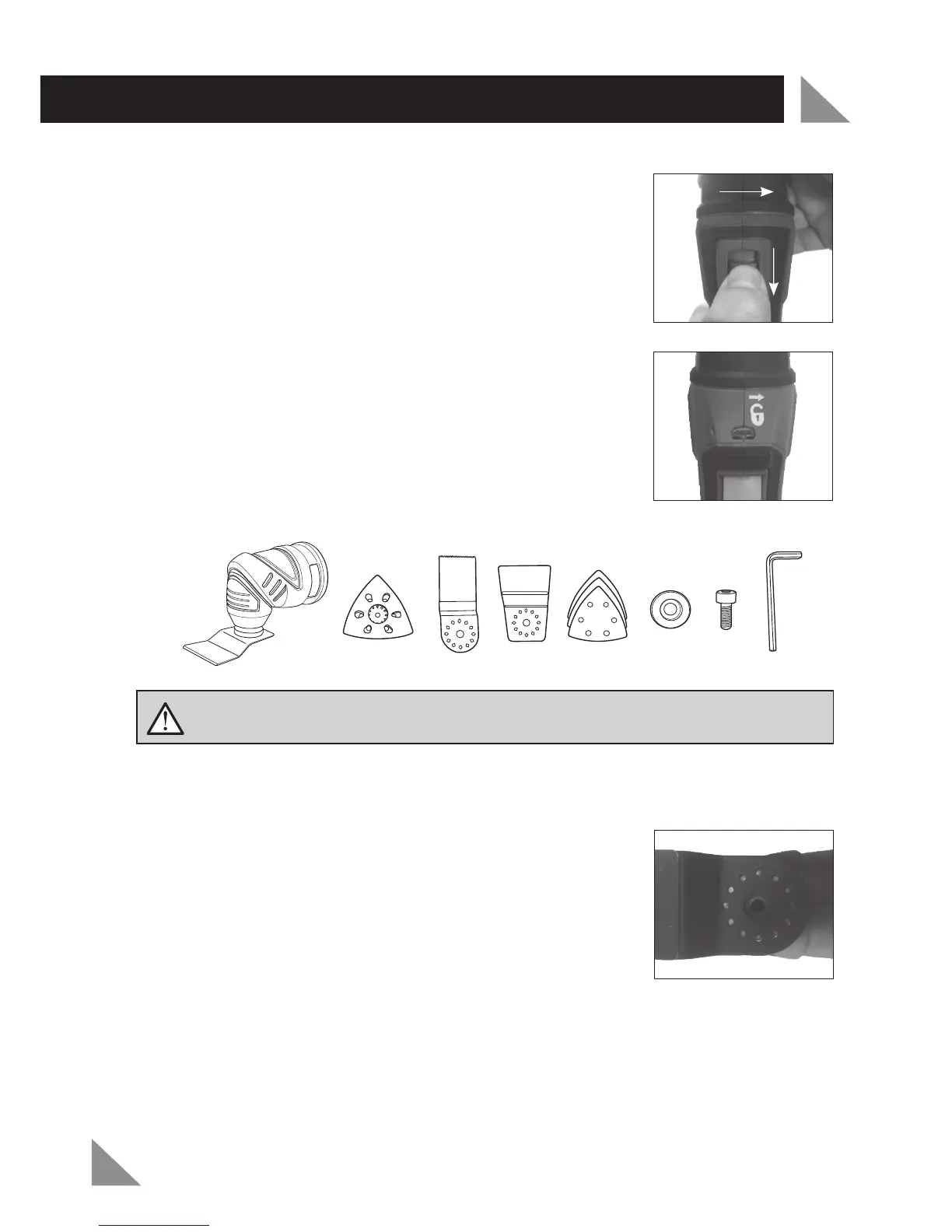
Slide the attachment lock (1) to the unlock position and hold.
Twist the tool head and pull it away from the multi tool body.
(Fig. 5)
Note:
The symbol on the tool body indicates the correct direction
to twist the head in order to unlock and remove it. (Fig. 6)
Attaching Your Multi Function Head Accessory
Choose the desired angle required for your application.
Position the perforated holes on the accessory over the locating pins on the accessory
drive spindle (10) of the multi function head.
Ensure the accessory is sitting flat against the face of the
accessory drive spindle (10) (Fig. 7).
Place the accessory fixing washer (15) in alignment with the
inner hole of the accessory drive spindle (10).
Insert the locking bolt (16) through the accessory fixing washer (15) and into the
accessory drive spindle (10) of the Multi Function Tool. Hand tighten only.
1.
2.
1.
2.
3.
4.
5.
PREPARATION AND SET-UP
WARNING! Remove battery from the multi head tool before attempting to
change accessories. Failure to do so may cause serious personal injury.
Fig. 6
Fig. 7
Fig. 5
Note: Ensure the flat side of the accessory fixing washer (15) is facing towards the accessory.



 To Next Page