transmission operation: see Low
Transmission Air
on page 22.
Low Transmission Air
A low transmission air condition occurs
when secondary air drops below the
minimum threshold for proper transmission
operation. This may happen
• At engine start
• During heavy secondary air usage
In the event of low transmission air
1. Slow down, carefully.
2. Move a safe distance off the road,
and stop.
3. Set the parking brake, but do not
stop the engine.
4. Turn ON the Hazard Warning
Lights, and use other warning
devices to alert other motorists.
5. Observe secondary air pressure.
6. Idle engine until pressure returns to
the normal operating range, and
the Low Transmission Air popup
clears.
If secondary air pressure does not return to
the normal operating range or the Low Air
Alarm activates, do not attempt to drive the
vehicle until the problem is found and fixed.
See your vehicle operator's manual for
further information on air system leaks.
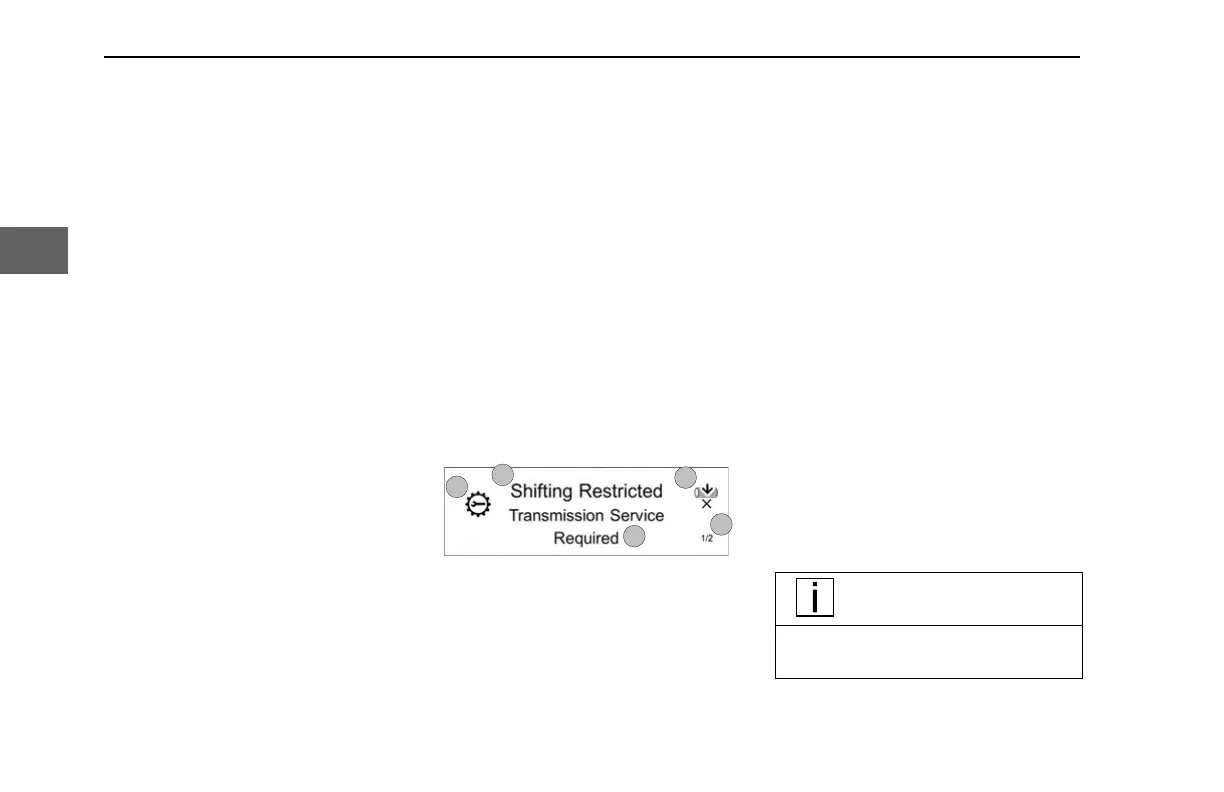
Popups
A popup communicates information. This
could be because a gauge indicates
outside of its normal operating range or to
notify the operator about a specific truck
condition. Popups can be red, amber or
white. Red and amber popups are totaled
in the Active Warnings Indicator at the top
of the display. A popup's characteristics
(color, brilliance, and whether it flashes or
has an audible alarm) depend on the
condition that generated the popup.
1. System – Symbol representing
affected system.
2.
Title – Notification.
3. Suppressibility – Indicates if the
current popup is suppressible using
Select.
4. Stack Size – The lower number
indicates how many popups are in
the stack (suppressible and non-
suppressible), and the upper, which
popup is being viewed.
5.
Instructions – Contains instructions
or elaborating information.
When multiple popups are present, each is
assigned a priority and placed in a stack.
Higher priority popups are placed towards
the front of the stack. The Select button
cycles through the active popups, allowing
each popup in the stack to be viewed.
Some popups, once viewed, are removed
from the stack; these popups are called
suppressible. Suppressible popups show
an “X” below the Select icon and typically
don't require an immediate response.
Suppress these popups using the Back/
Cancel button (or the Select when the
parking brake is set). Non-suppressible
popups cannot be removed from the stack
until the parking brake is set.
NOTE
The menu is not accessible until all
popups have been suppressed.
2
INDICATIONS - Popups
22 Y53-1349-1A1 (02/2022)
3



 To Next Page