12 Chapter 2 Installing the Gateway
Connecting the gateway to the Internet
You can connect the gateway to the Internet using the DSL Broadband port or the
Ethernet Broadband port.
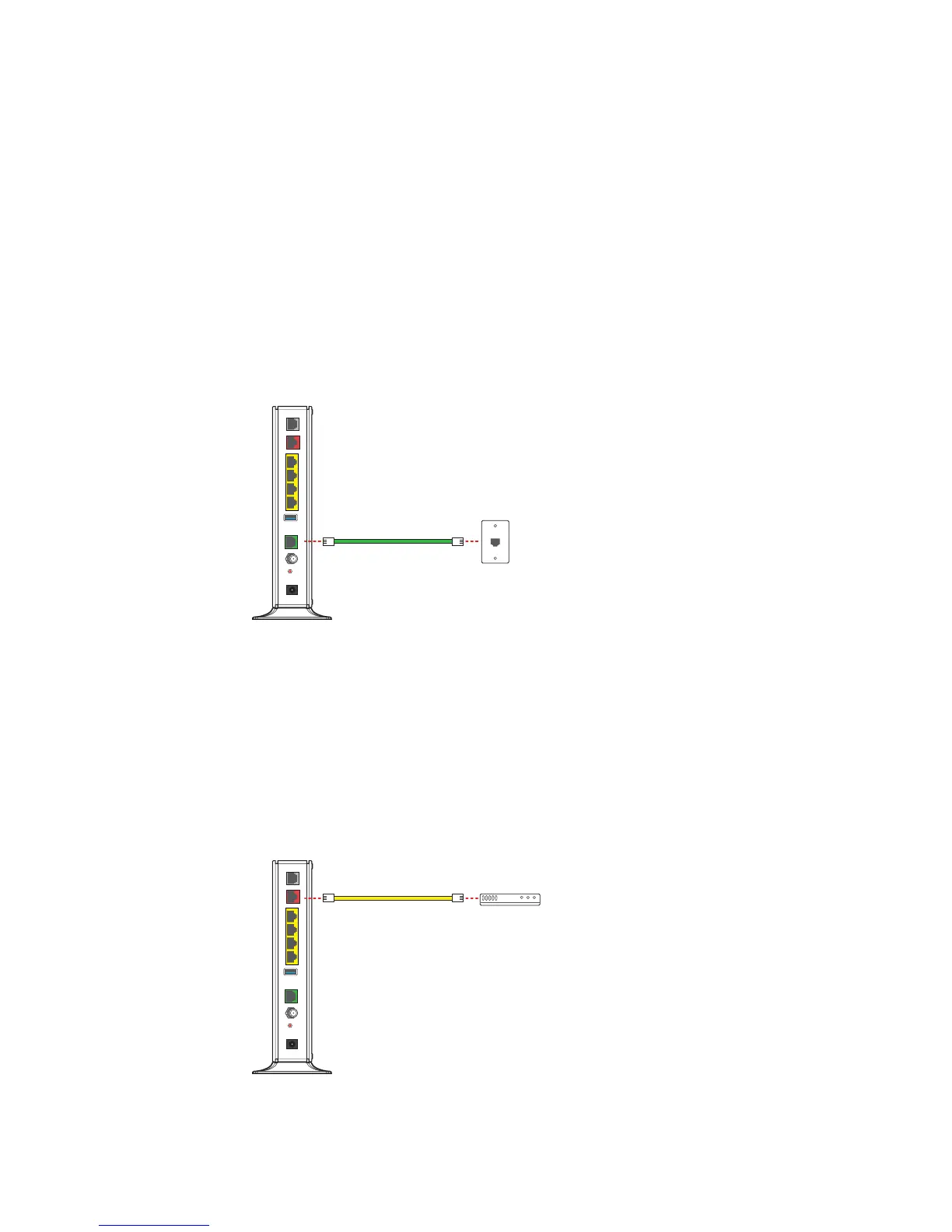
Connecting using the DSL port
Connect the gateway to the Internet through the DSL port.
1. Connect one end of a phone cord to the gray DSL port on the gateway.
2. Connect the other end of the phone cord to the wall outlet.
After the gateway recognizes the connection, the Broadband light blinks green for a
moment and then turns steady green.
Connecting using the Ethernet port
Connect the gateway to the Internet through the Ethernet port.
1. Connect one end of an Ethernet cable to the Ethernet port on the gateway.
2. Connect the other end of the Ethernet cable to the broadband device.
After the gateway recognizes the connection, the Broadband light blinks green for a
moment and then turns steady green.
LOCAL ETHERNET
USB
VOICE 1 & 2
POWER
RESET
CABLE
432
1
DSL
ETHERNET
BROADBAND
Phone outlet
DSL or phone cable
LOCAL ETHERNET
USB
VOICE 1 & 2
POWER
RESET
CABLE
432
1
DSL
ETHERNET
BROADBAND
Ethernet cable
Broadband device


 To Next Page