Copyright© 2003 Pacific Digital Corporation Page 28
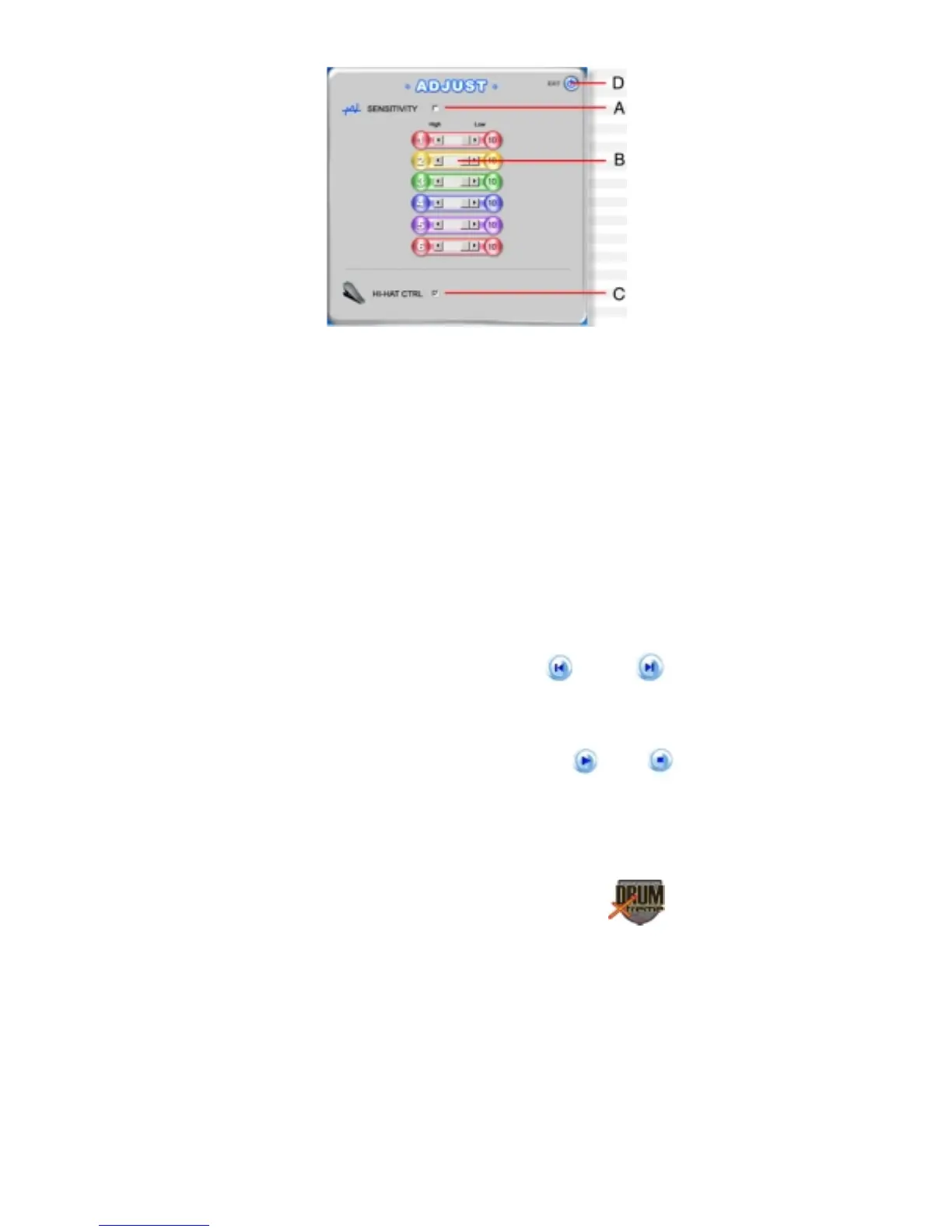
Figure 16 – Sensitivity Adjustment Panel
A. Sensitivity enable/disable: (a check-mark enables, an
empty check box without a check-mark disables).
B. Sensitivity adjustment: Click and hold the left button of
the mouse and “drag” the setting to either left (increase
sensitivity) or right (decrease sensitivity) to adjust
sensitivity controls for pads 1-6 (pads 1 to 6).
C. HI-HAT Control : enables/disables Hi-Hat Control (a
check-mark enables, an empty check box without a
check-mark disables).
D. EXIT: Closes the sensitivity adjustment control panel
and returns to the prior menu.
6. Selecting a music track:
After inserting CD, click “Previous Track ◄” or “Next Track ►” to
choose a selection.
7. Start / Stop Music Selection:
Click “PLAY ►” to start the music selection, or click “STOP ■” to
stop the music.


 To Next Page