Copyright© 2003 Pacific Digital Corporation Page 34
7.6 Music Game Menu
If you selected “Music Game”, from the main menu, the game
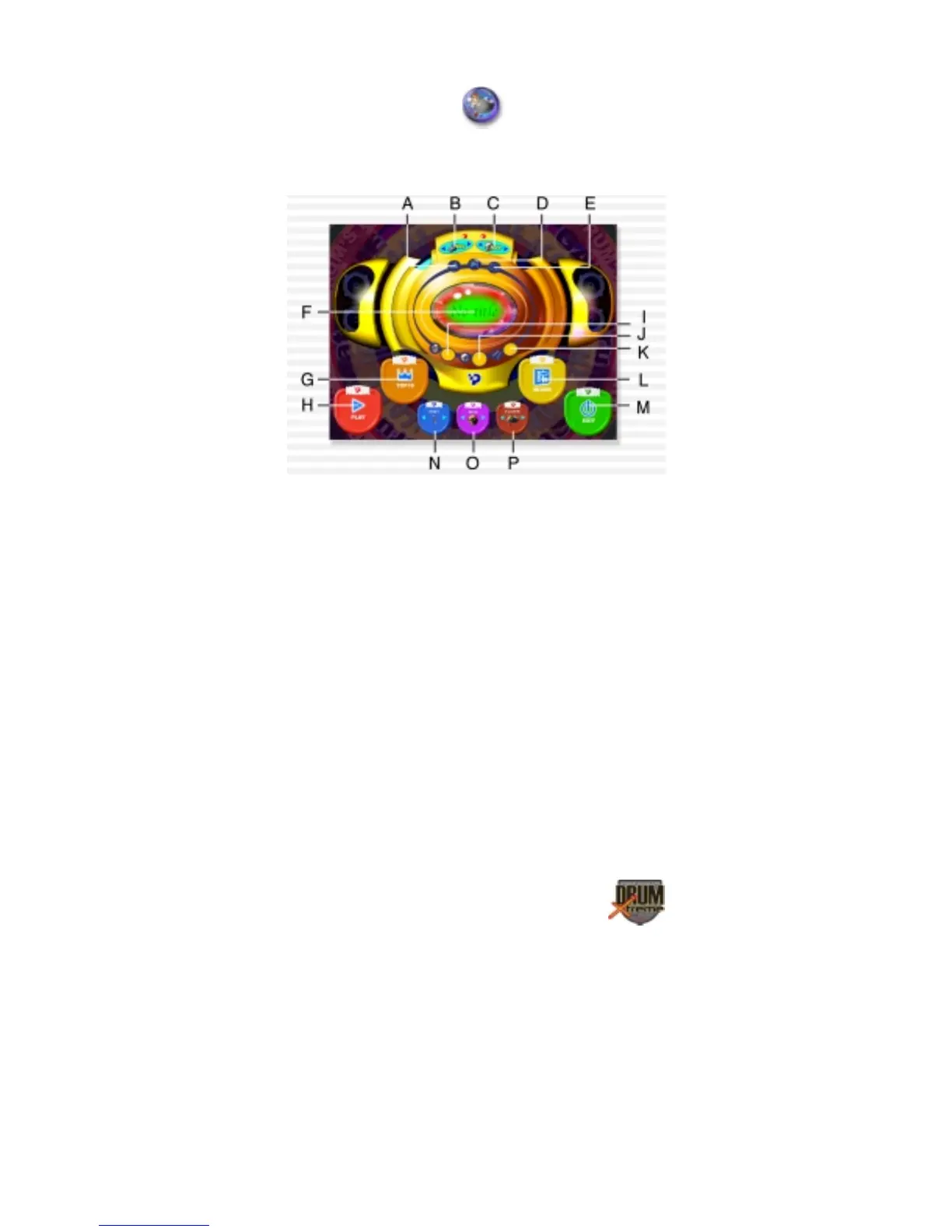
screen will appear as shown below. Each of the areas in the menu that
you can click with your mouse (shown as A – P) are summarized here
.
Figure 20 – Music Game Menu
A. Previous B. Joystick C. CD-ROM D. Next
E. Ready to use CD music
F. Displays name of music selection G. Rank
H. Play (Start Game)
I. Display of Master volume current setting (to adjust use
MIXER)
J. Display of Music volume current setting (to adjust use
MIXER)
K. Display of Drum volume current setting (to adjust use
MIXER)
L. MIXER M. Exit N. Selection of difficulty level
O. Skin P. Game mode
1. First insert the DrumXtreme Music CD disc into your CD-ROM
drive. After entering the game menu, select the joystick device


 To Next Page