ENGLISHDEUTSCH
2 CoNNECToRS & CONTROLS:
FRONT PANEL FEATURES
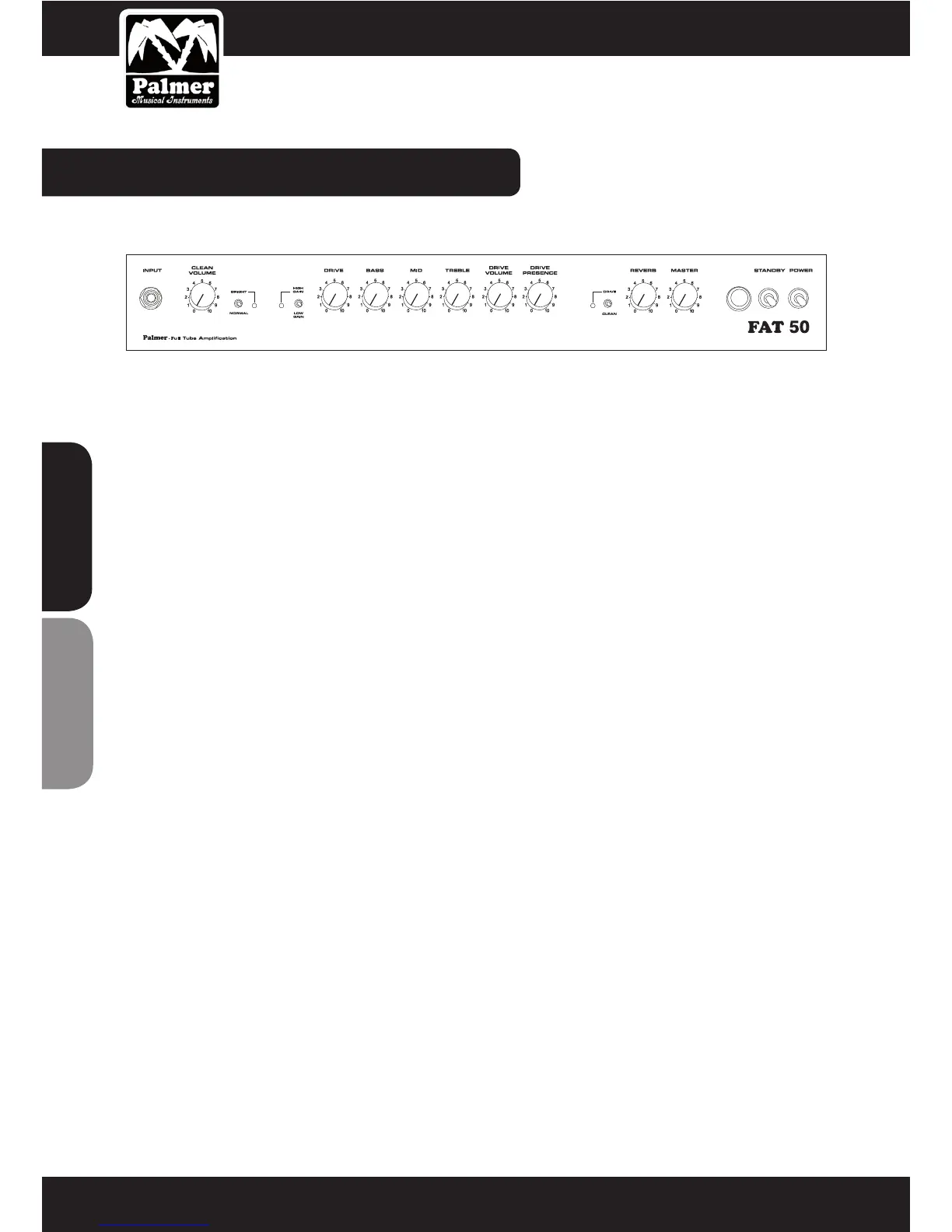
1 INPUT
Connect your guitar to this socket using a high quality instrument cable (for all guitar output levels).
2 CLEAN VOLUME
This controls the level of the CLEAN channel. High settings produce a mild overdrive for blues and crunch tones
when you are using high output pickups.
3 BRIGHT/ NORMAL
This switch adds top end sparkle to both channels (“bright“ position, the green LED is lit).
4 GAIN
Switching to “High Gain“ mode dramatically increases channel sensitivity turning CLEAN into the crunch channel,
and DRIVE into Heavy Lead for aggressive hard rock sounds and the ultimate solo tone.
This function is also footswitchable. Connecting the dedicated Palmer 4-on-the-oor switch to the “Gain Select“
socket on the rear panel defeats the front panel switch. The yellow LED lights when the High Gain mode is selec-
ted.
5 DRIVE
This controls the sensitivity of the DRIVE channel and the amount of overdrive.
Tone Stack (passive EQ)
The Mid and Treble controls are highly interactive, e.g. increasing the amount of treble decreases midrange con-
tent, and vice versa. This feature is common to most tube amps enabling extensive tone shaping for a wide range
of sounds.
6 BASS
This controls the amount of low frequencies in your sound.
Caution: When set to 0 (hard left) the bass control mutes the amp.
7 MID
This controls the amount of midrange in your sound.
8 TREBLE
This controls the amount of high frequencies in your sound.


 To Next Page