- 65 -
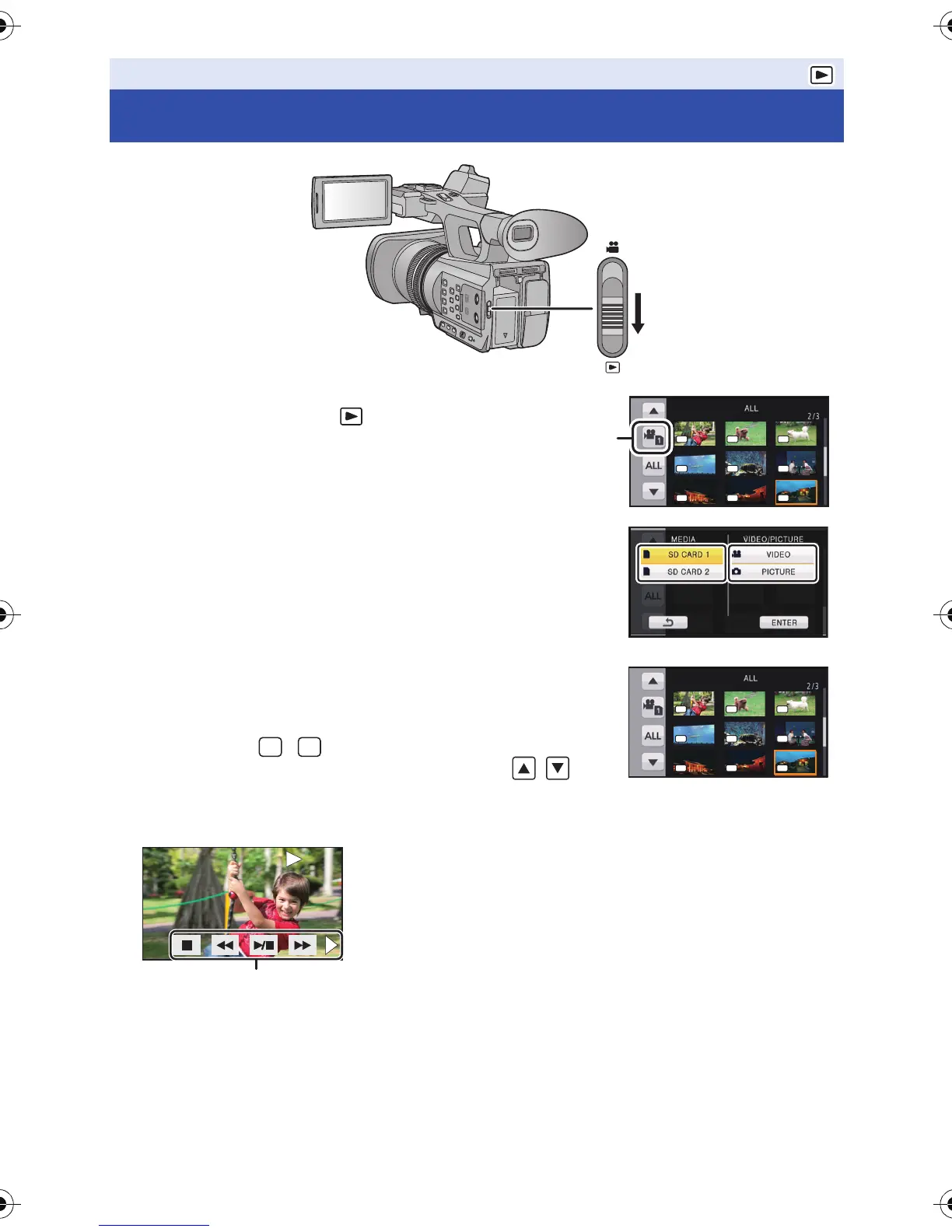
1 Change the mode to .
2 Touch the play mode select icon A.
3 Select the [MEDIA] and [VIDEO/PICTURE] you
wish to play back.
≥ Touch [ENTER].
4 Touch the scene or the still picture to be played
back.
≥ The recording format is displayed in the thumbnail display of the
motion pictures. ( , , etc.)
≥ Next (Previous) page can be displayed by touching / .
5 Select the playback operation by touching the operation icon.
Playback
Motion picture/Still picture playback
B Operation icon
≥ If you touch the screen while an operation icon is being
displayed or do not touch the icon for a certain period, it
will disappear. To display again, touch the screen.
101010 111111 121212
131313 141414 151515
161616 171717 181818
PH PH PH
PS PS HA
HE SA SA
10
10 11
11 12
12
13
13 14
14 15
15
16
16 17
17 18
18
PH PH PH
PS PS HA
HE SA SA
TCTC
00:00:00:00 00:00:00:00
TC
00:00:00:00
AG-AC90-VQT4M99_mst.book 65 ページ 2012年9月25日 火曜日 午後12時6分




 To Next Page