E-25
Power sources
Using the battery
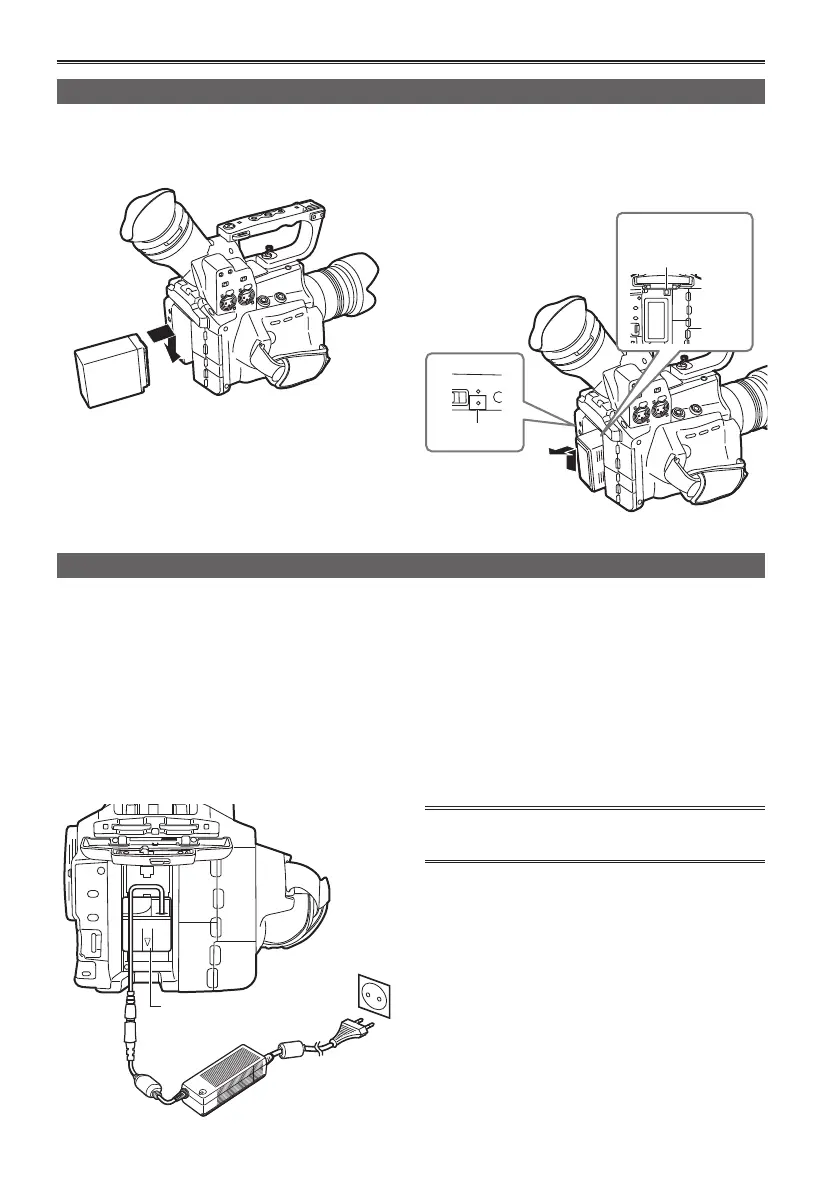
Installation
Insert the battery until it clicks into place.
Removal
1
Set the POWER switch to OFF, and check
that the mode lamp is off.
2
Remove the battery while pressing the
battery release button.
• Support the battery with your hand to ensure
that it will not fall.
Mode lamp
Battery
release button
CAM
ON
CH
LEVEL
.
PB
Using the AC adaptor
Installation
1
Connect the AC power supply cables to the
AC adaptor.
2
Plug the AC power supply cord into the
power outlet.
3
Insert the DC cord’s battery connector until
it clicks into place.
DC cord’s battery
connector
Removal
1
Set the POWER switch to OFF, and check
that the mode lamp is off.
2
Remove the DC cord’s battery connector
while pressing the battery release button.
3
Disconnect the AC power supply cord from
the power outlet.
• Disconnect the AC power supply cord from the
power outlet when the unit is not going to be used.







 To Next Page