E-26
Preparation
ENGLISH
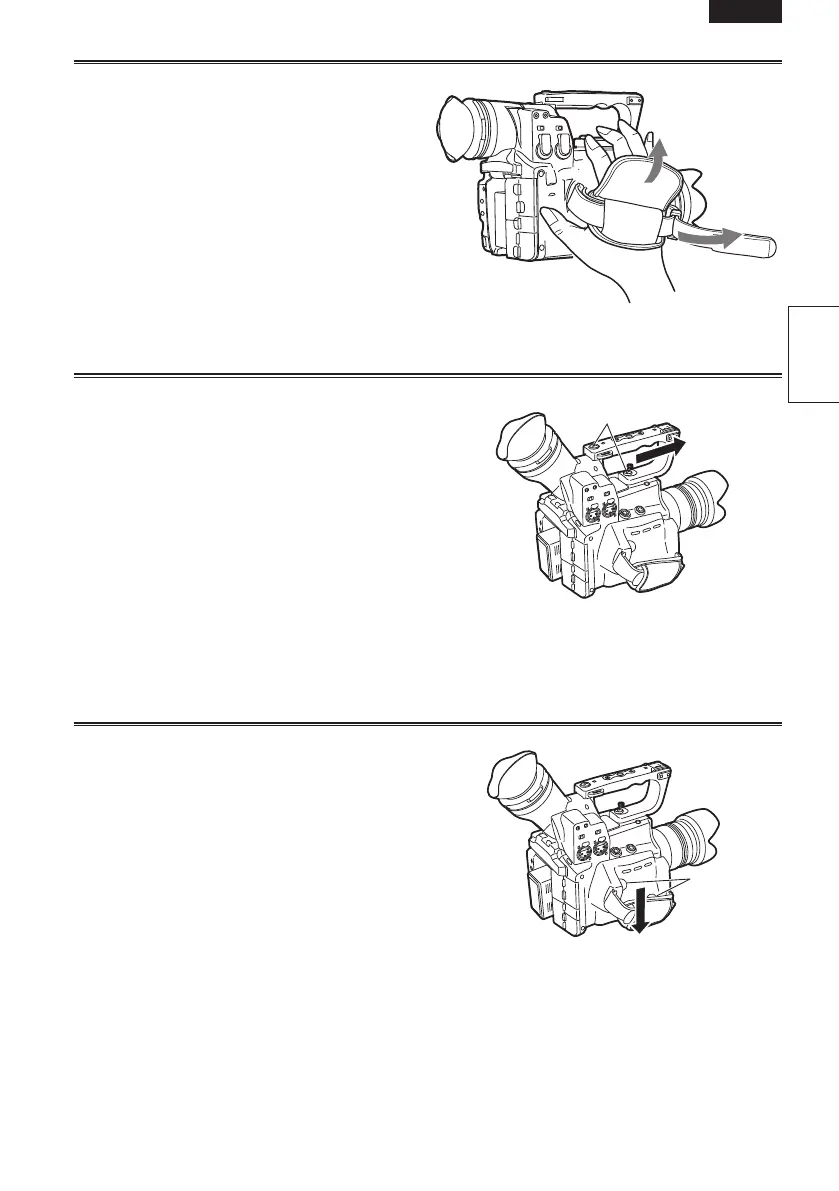
Adjusting the hand strap
Adjust the hand strap to suit your hand.
1
Open the cover and adjust the length.
2
Close the cover.
• Make sure the cover is fully closed.
Attaching/detaching the handle
Detaching the handle
1
Use a Philips-head screwdriver and remove
the two screws.
2
Slide in the direction of the arrow.
The handle will detach.
Attaching the handle
Carry out the reverse of the detaching procedure to
attach the handle.
• Ensure both screws are firmly fixed in place.
• When holding the handle, make sure the screws
are not loose.
Screws
Attaching/detaching the grip
Detaching the grip
1
Use a Philips-head screwdriver and remove
the two screws.
2
Slide in the direction of the arrow.
The grip will detach.
Attaching the grip
Carry out the reverse of the detaching procedure to
attach the grip.
• When attaching, ensure both screws are firmly
fixed in place.
Screws




 To Next Page