E-44
Menu Shooting
ENGLISH
Using the setup menus
Use the setup menus to change the settings to
suit the scenes you are shooting or what you are
recording.
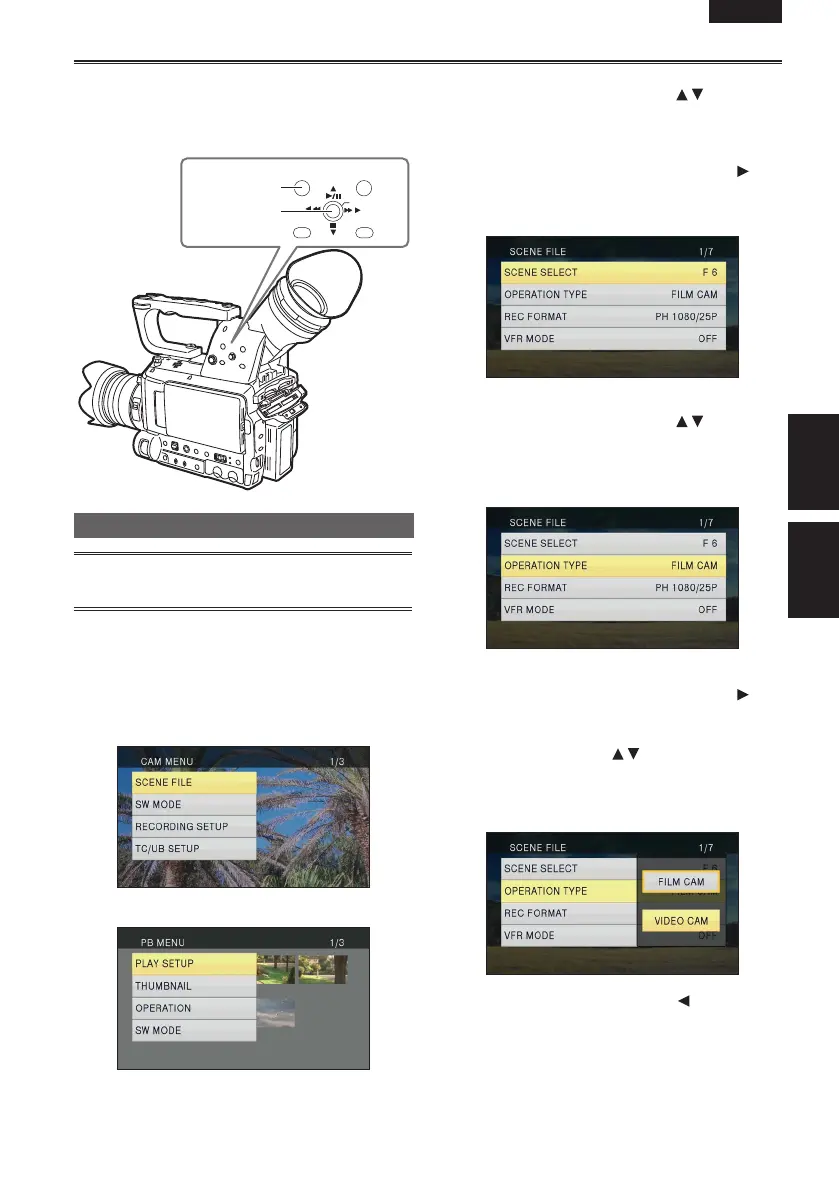
Operation
lever
MENU button
PUSH-ENTER
+–
Using the menus
• The menu items indicated in the gray
characters cannot be changed its settings.
1
When the unit is in other than playback or
recording mode, press the MENU button.
The following is displayed on the viewfinder and
LCD monitor.
CAM mode (Example)
PB mode (Example)
2
Tilt the Operation lever in the directions
to move the yellow cursor to the function
you wish to set.
3
Push the Operation lever (or tilt in the
direction) to display the setting items.
Example:
4
Tilt the Operation lever in the directions
to move the yellow cursor to the item you
wish to set.
Example:
5
Push the Operation lever (or tilt in the
direction) to set the item.
To change values or other parameters, tilt the
Operation lever in the
directions. Select the
item to be set, and then push the OPERATION
lever to confirm.
Example:
• Tilt the Operation lever in the direction to
return to the previous menu.
Menu





 To Next Page