E-5
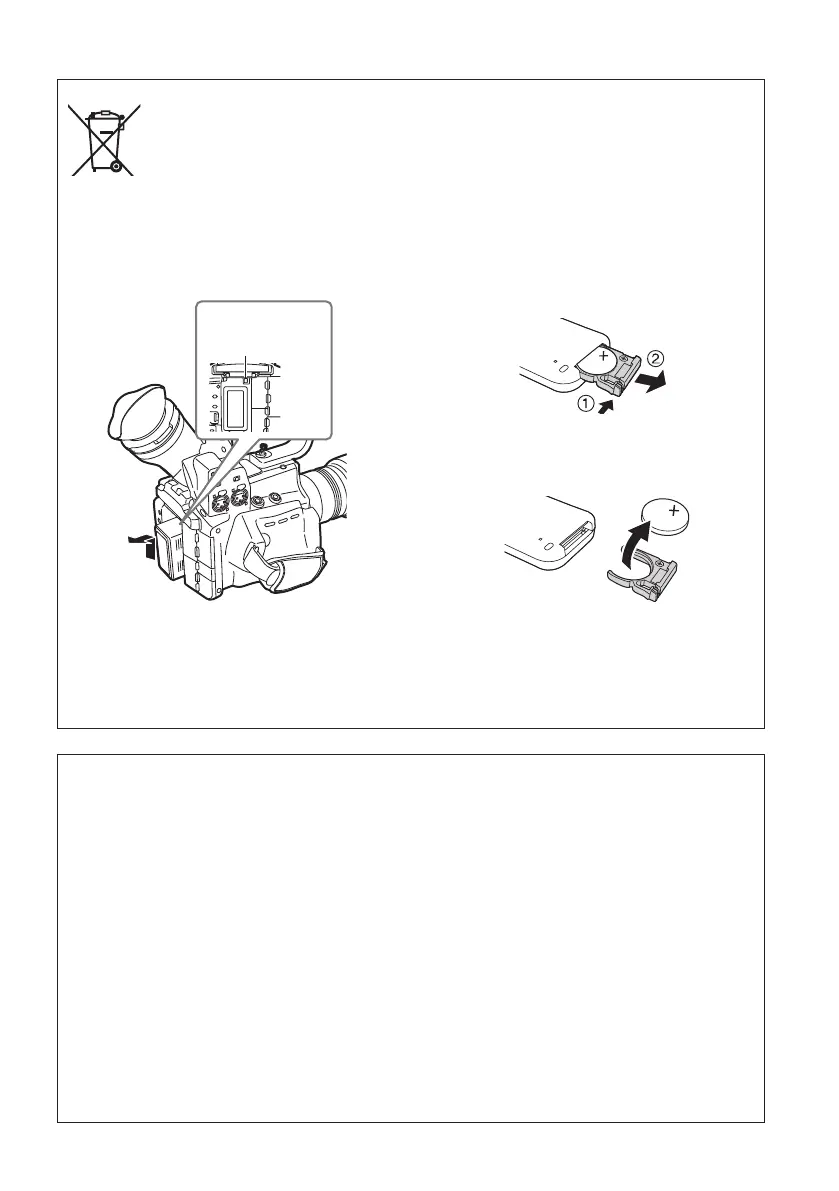
To remove the battery
Main Power Battery (Lithium ion Battery)
(Refer to page E-25 for the detail.)
Press the battery release button.
EU
Back-up Battery (Lithium Battery)
• For the removal of the battery for disposal at
the end of its service life, please consult your
dealer.
Battery
release button
Remote Control Battery (Lithium Battery)
1) Push the catch in the direction shown by
arrow
1 to remove the holder.
2) Remove the button-type battery from the
battery holder..
Note regarding the Power Management function specified under COMMISSION REGULATION
(EC) No 1275/2008 implementing Directive 2009/125/EC of the European Parliament and of the
Council.
This device is designed and manufactured for use at a broadcasting station and/or in a similar
environment.
This device is not equipped with a Power Management function or the Power Management function is
set to OFF as it will prevent the device from fulfilling its intended purpose for the reasons below.
1. If the device is a Studio Camera, a Weather Camera, a Mixer or other processor:
A Power Management function may cause the device to suddenly stop during recording or while On
Air.
2. If the device is a Studio Monitor:
A Power Management function may cause video for the confirmation of whether a signal is normal,
or whether the signal has been lost, to be un-viewable.
3. If the device is a Camera Recorder:
A professional camera recorder must be able to start quickly at any time, but a Power Management
function will cause an increase in the time taken to resume from Stand-by mode.





 To Next Page