71
Displays
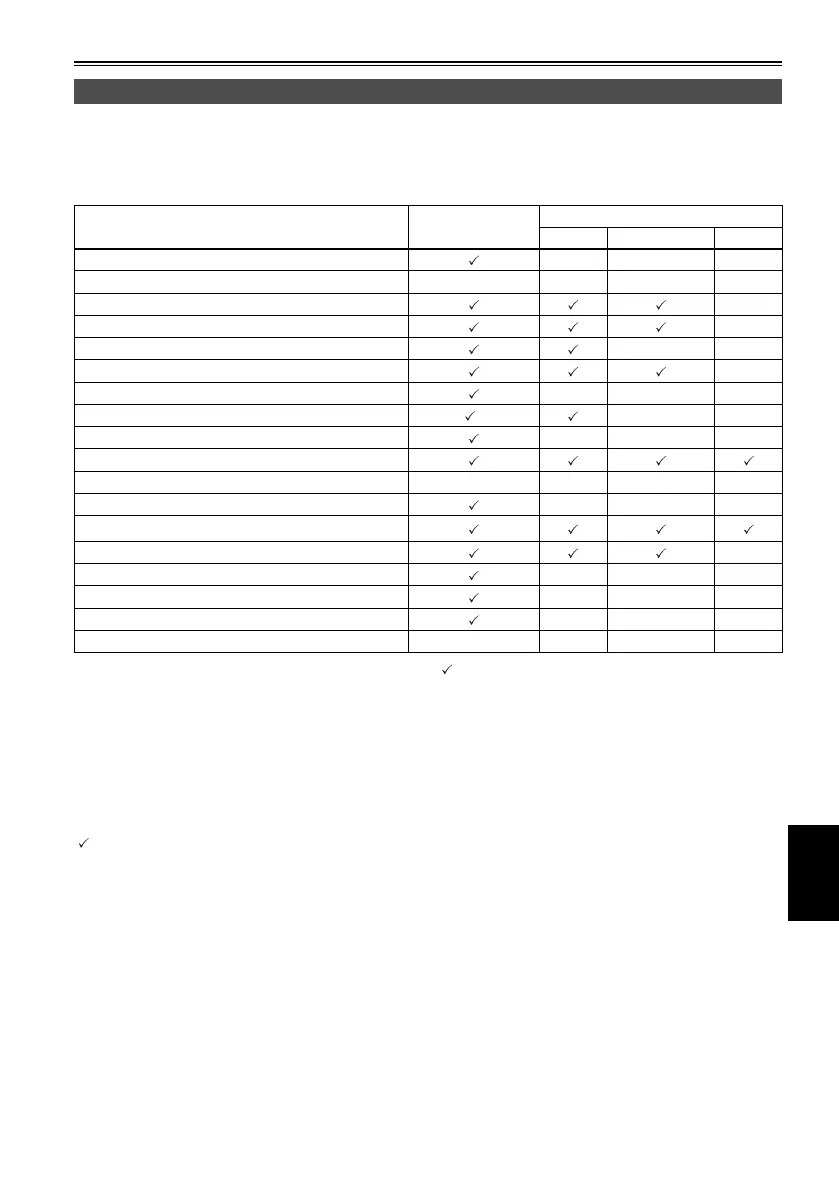
Selecting what is to be displayed on the screen
The following items appearing on the LCD monitor screen are displayed when [MENU/MODE CHK] is held
down or when a setting for the “OTHER DISPLAY” item (Page 80) on the setting menu “DISPLAY SETUP”
screen has been selected.
Item displayed MODE CHECK
OTHER DISPLAY item setting
ALL PARTIAL OFF
1 Time code displays ———
2 Warning information — — — —
3 System format displays
x
4 System frequency displays
x
5 1394TC display
xx
6 Squeeze recording display
x
7 Date and time display
———
8 Playback frame rate display
∗
xx
9 Audio level meter display
———
10 USB HOST display
11 Text memo, shot mark displays — — — —
12 Information display
———
13 Operation status displays
14 Repeat playback setting display x
15 Remaining battery charge display
———
16 Remaining media memory displays
———
17 Media information displays
———
18 Monitor volume level meter — — — —
: Displayed
x : Not displayed
— : Displayed by another setting
“
” in the MODE CHECK column indicates the items which are displayed when [MENU/MODE CHK] is
held down.
∗
The FRAME RATE is not displayed when the 60i format is used.



 To Next Page