Setting for Displaying the Camera Icon
① On the MV screen by AW-HS50, the camera icon ( ) is displayed at the lower left of the image from a remote
camera being controlled by AW-RP50.
Menu: (9) SETUP > [2] SW LINK => 5. CAMSEL => [On] * Default: [Off]
Setting for Displaying the Camera Information
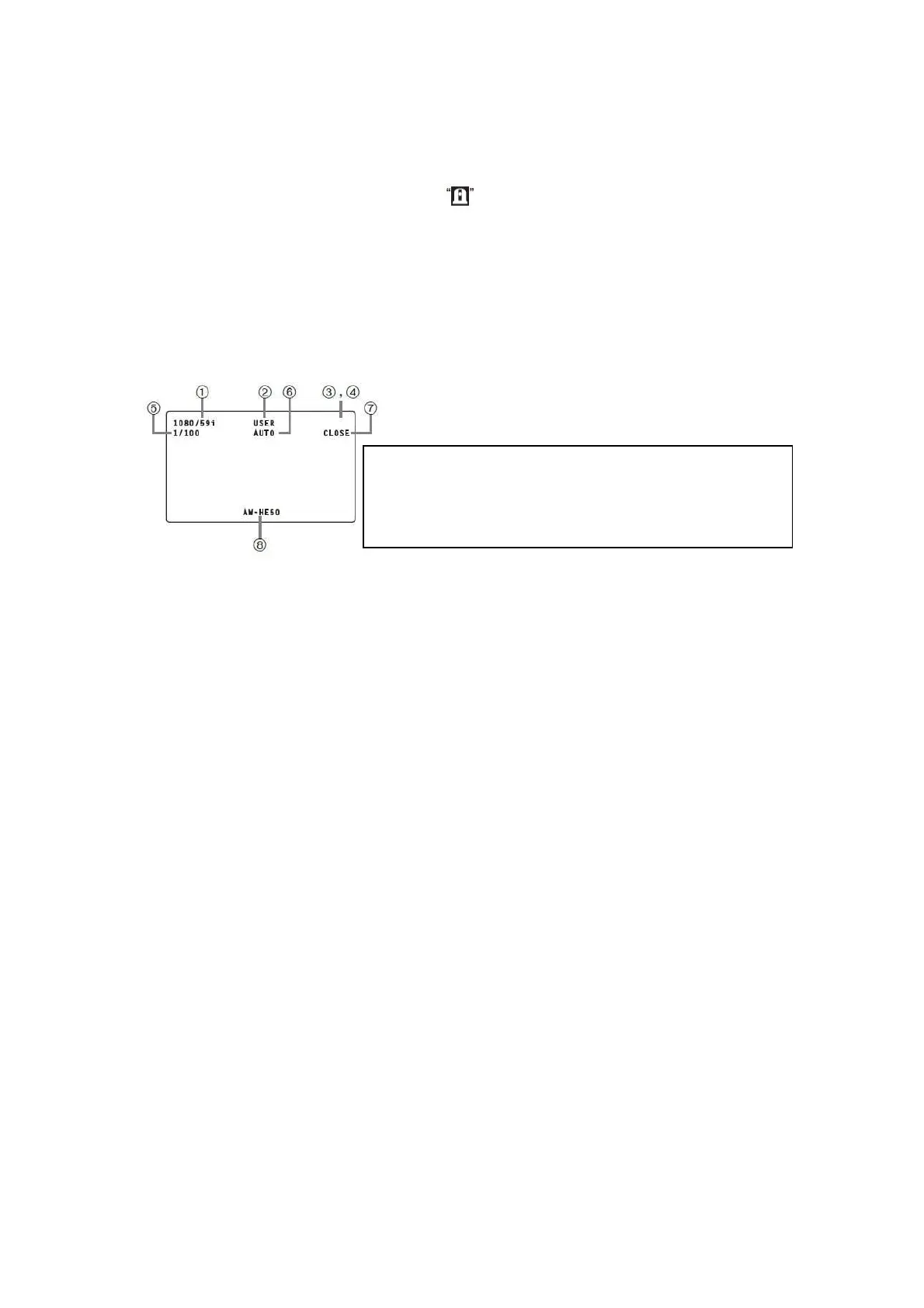
① On a monitor connected with AW-HS50, the information of a remote camera can be displayed at a time.
Menu: (9) SETUP > [3] SW DISP => 1. CAMINF => [On] * Default: [Off]
* In addition, if you need to show/hide each item of camera information, please set the following settings individually.
(Fig.5-①) Video Format => Menu: (9) SETUP > [3] SW DISP => 2. FORMAT => [On] * Default: [Off]
(Fig.5-②) Scene File Setting Value => Menu: (9) SETUP > [3] SW DISP => 4. SCENE => [On] * Default: [Off]
(Fig.5-③) Filter Information => Menu: (9) SETUP > [3] SW DISP => 8. FILTER => [On] * Default: [Off]
(Fig.5-④) Remote Camera Alarm Info => Menu: (9) SETUP > [3] SW DISP => 9. ALARM => [On] * Default: [Off]
(Fig.5-⑤) Shutter Information => Menu: (9) SETUP > [3] SW DISP => 6. SHUTTER => [On] * Default: [Off]
(Fig.5-⑥) Gain Value => Menu: (9) SETUP > [3] SW DISP => 5. GAIN => [On] * Default: [Off]
(Fig.5-⑦) Iris Value => Menu: (9) SETUP > [3] SW DISP => 7. IRIS => [On] * Default: [Off]
(Fig.5-⑧) Remote Camera Name => Menu: (9) SETUP > [3] SW DISP => 3. CAMNAME => [On] * Default: [Off]
* To display the remote camera name, the menu setting on AW-HS50 needs to be set as follows:
AW-HS50 Menu setting: [10] Input Menu > SDI-IN1 – 4: [4. Name Type] => [CAM Name]
Setting for On-Air Tally Information
① Setting to let AW-RP50 receive the tally information from AW-HS50 through the network
Menu: (9) SETUP > [2] SW LINK => 6. TALLY_IP => [On] * Default: [Off]
② Setting to let AW-RP50 instruct the remote cameras to send an OA tally output
Menu: (8) CAMERA > [3] TALLY => 1. TALLY OUT => [On] * Default: [Off]
③ Enable the tally output setting on the remote cameras.
Ex.: AW-HE40 ・・・ Menu: System > Others > Others2/4 > Tally => [Enable] * Default: [Enable]
- This information is not displayed on SDI-OUT1.
- This information is not displayed on Pos3 – Pos6 of the 6-Split MV screen.
- This information is not displayed on Pos3 – Pos10 of the 10-Split MV screen.
- If a camera is connected via serial connection with AW-RP50, the information
of this camera is displayed only when it is selected.
- ③ & ⑦ are not displayed when the camera is AW-HE130/120//60/50/40 or
AW-UE70.
(Figure 5: Details of Remote Camera Information Displayed)










 To Next Page