Operating Instructions (Additional Features)
26
• Clicking [<Back] takes you back to the previous page.
• Clicking [Cancel] takes you back to the Trigger page without saving
changes.
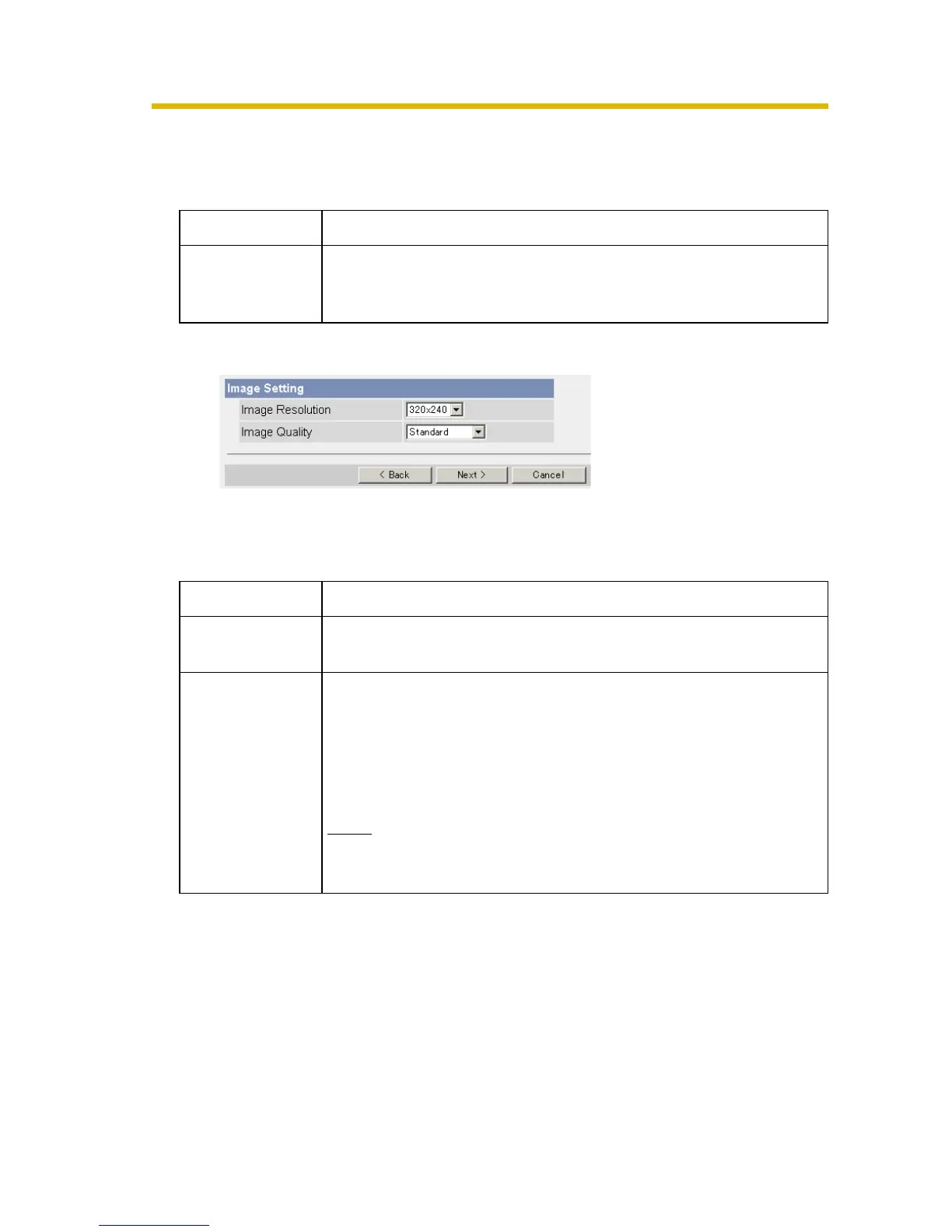
6. Set the image settings, and click [Next>].
• Clicking [<Back] takes you back to the previous page.
• Clicking [Cancel] takes you back to the Trigger page without saving
changes.
Setting Description
Lens Position
When Triggered
• Set [Move to alarm position] or Preset 1-20 to move the
lens to the Home Position or the alarm position when the
alarm signal is detected.
Setting Description
Image
Resolution
• Select image resolution (640 × 480, 320 × 240 (default) or
160 × 120 pixels) to buffer or transfer.
Image Quality • Select the image quality.
[Favor Clarity] optimizes for good quality.
[Standard] offers standard quality. (Default)
[Favor Motion] optimizes for enhanced motion.
[Mobile Phone] is for a transfer to a mobile phone.
Note
640 × 480 pixels cannot be set for a transfer to a mobile
phone.






 To Next Page