12
Getting Started
Preparation
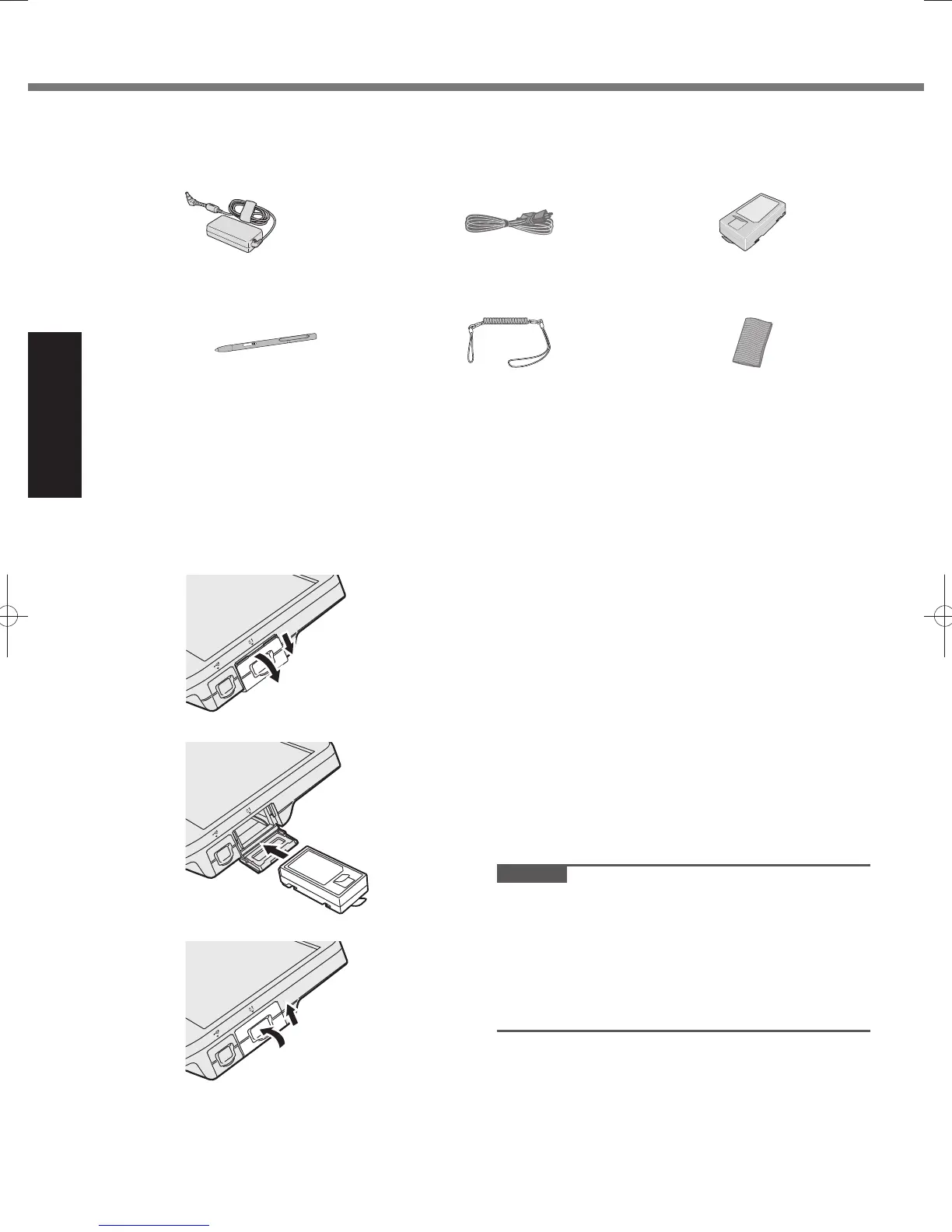
Confirmation ■
1 Check and identify the supplied accessories.
If you do not find the described accessories, contact Panasonic Technical Support.
AC Adaptor
•
. . . . . . . . . . . . 1 AC Cord
•
. . . . . . . . . . . . . . . 1 Battery Packs
•
. . . . . . . . . . 2
Model No: CF-AA6373A Model No: CF-VZSU53AW
Digitizer Pen
•
. . . . . . . . . . . 1 Tether
•
. . . . . . . . . . . . . . . . . 1 Soft Cloth
•
. . . . . . . . . . . . . 1
Model No: CF-VNP011AU
OPERATING INSTRUCTIONS (This book)
•
. . . . . . . . . . . . . . . . . . . . . . . . . . . . . . . . . . . . . . 1
Product Recovery DVD-ROM Windows
•
®
7 Professional SP 1 . . . . . . . . . . . . . . . . . . . . . . 1
2 Read the LIMITED USE LICENSE AGREEMENT before breaking the seal on the computer’s packaging
(
page 26).
Inserting the Battery Packs ■
Insert the battery pack to 2 battery cases.
1
1 Slide the battery cover and open it.
2 Insert the battery pack until it securely fits the
connector.
3 Close the battery cover.
4 Slide the battery cover until it clicks.
CAUTION
The computer does not operate without the battery
●
cover locked.
Make sure the latch is securely locked. Otherwise the
●
battery pack may fall when you carry the computer.
Do not touch the terminals of the battery pack and the
●
computer. Doing so can make the terminals dirty or
damaged, and may cause malfunction of the battery
pack and the computer.
2
3
4
DFQW5523ZACF-H2mk1.indb12DFQW5523ZACF-H2mk1.indb12 2011/06/2214:21:032011/06/2214:21:03










 To Next Page