25
Troubleshooting
Display ■
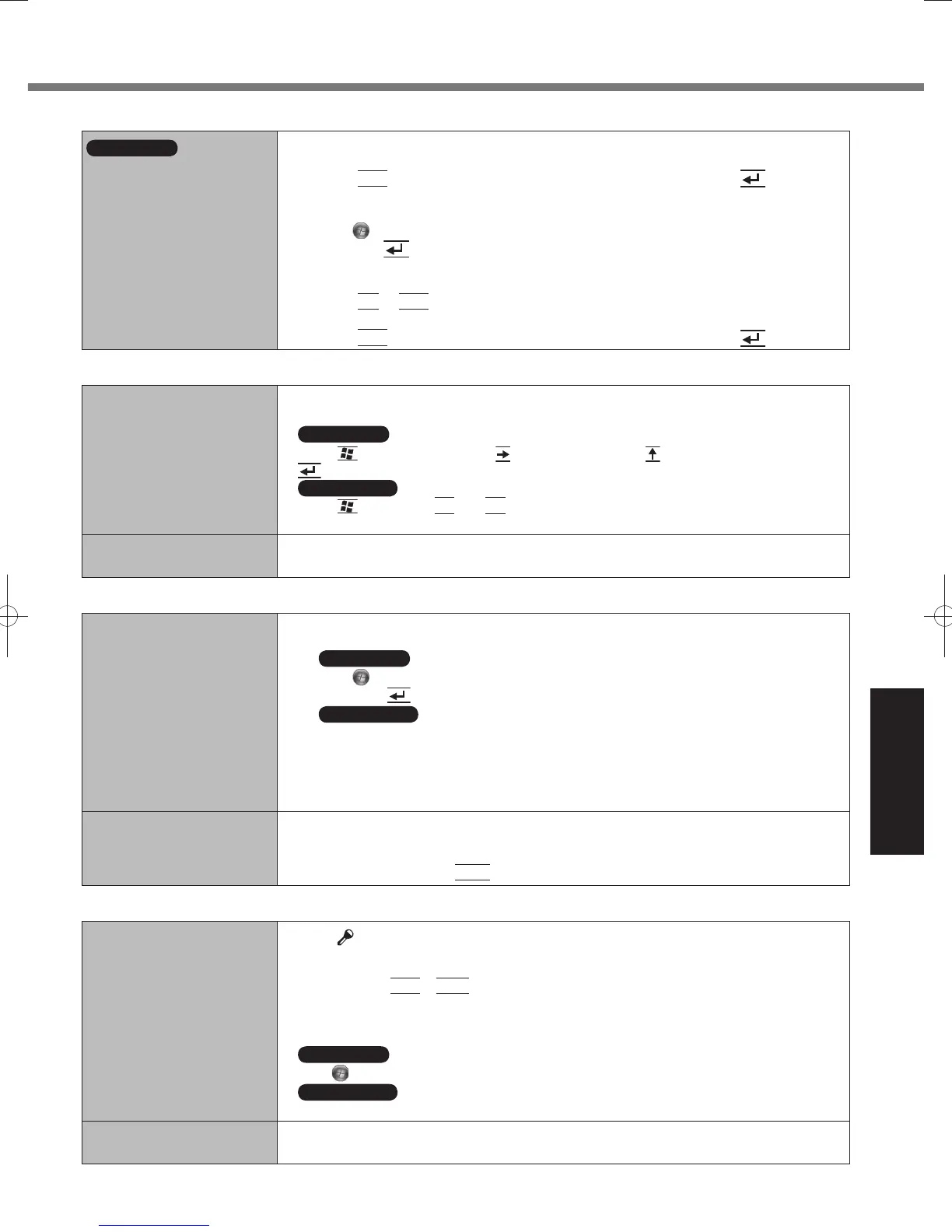
Windows 7
<Only for model with GPS>
The cursor cannot be
controlled properly.
Operate the following steps.
●
1
Set [GPS] to [Disabled] in the [Advanced - Serial Port Settings] of the Setup Utility.
2 Press
F10
and select [Yes] at the confirmation message, and press (Enter).
The computer will restart.
3 Log on to Windows as an administrator.
4 Click
(Start) and input “c:\util\drivers\gps\GPS.reg” in [Search programs and files],
and press
(Enter).
5 Click [Yes], click [Yes] and click [OK].
Then restart the computer.
6 Press
F2
or
Del
while [Panasonic] boot screen is displayed.
7 Set [GPS] to [Enabled] in the [Advanced] - [Serial Port Settings].
8 Press
F10
and select [Yes] at the confirmation message, and press (Enter).
Screen Operation ■
The cursor does not work. When using the external mouse, connect it correctly.
●
Restart the computer using the keyboard.
●
Windows 7
Press (Windows) and press two times, and press to select [Restart] and press
(Enter).
Windows XP
Press (Windows),
U
and
R
to select [Restart].
If the computer does not respond to keyboard commands, read “No response.” (
●
below).
Cannot point the correct
position.
Perform the screen calibration (
●
page 15).
On-screen Document ■
The document of PDF
format is not displayed.
Install Adobe Reader.
●
1 Log on to Windows as an administrator.
2
Windows 7
Click (Start) and input “c:\util\reader\Pinstall.bat” in [Search for programs and files]
then press
(Enter).
Windows XP
Click [start] - [Run], input “c:\util\reader\Pinstall.bat”, then click [OK].
Follow the on-screen instructions.
3 Update Adobe Reader to its latest version.
If your computer is connected to the internet, start up Adobe Reader and click [Help] -
[Check for Updates].
Cannot close full screen
mode of Adobe Reader.
Click [Edit] - [Preferences] - [Full Screen] and add the check mark to [Show navigation
●
bar] before starting full screen mode.
If you started full screen mode without above setting, connect the external keyboard to
●
the computer, then press
Esc
.
Others ■
No response.
Press[
●
] button to open Task Manager and close the software application that is not
responding.
An input screen (e.g., password input screen at startup) may be hidden behind another
●
window. Press
Alt
+
Tab
to check.
Press the power switch for 4 seconds or longer to shut down the computer, and then
●
press the power switch to turn it on. If the application program does not work normally,
uninstall and reinstall the program. To uninstall:
Windows 7
Click (Start) - [Control Panel] - [Uninstall a program].
Windows XP
Click [start] - [Control Panel] - [Add or Remove Programs].
The battery indicator lights
in red.
Connect the AC adaptor to charge the battery. The computer may not enter hibernation,
●
even if [Hibernate] is selected as the action when the battery level becomes low.
DFQW5523ZACF-H2mk1.indb25DFQW5523ZACF-H2mk1.indb25 2011/06/2214:21:102011/06/2214:21:10










 To Next Page