EasyManua.ls Logo

Panasonic CQ-DF201U - Clock BASIOS

Panasonic CQ-DF201U
72 pages
Print Icon
To Next Page IconTo Next Page
To Previous Page IconTo Previous Page
Loading...
9
SDF
16
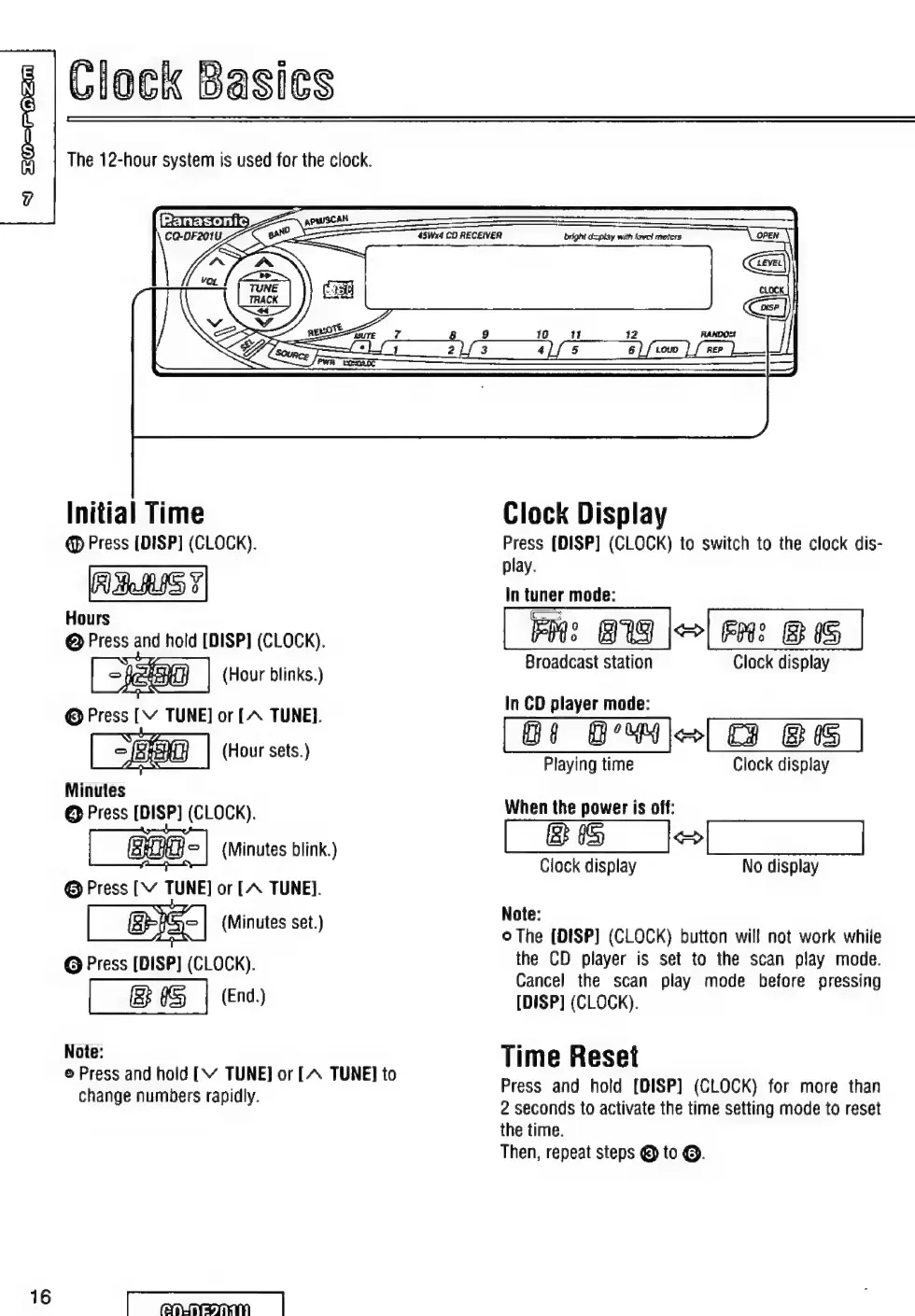
Clock
Basies
The
12-hour
system
is
used
for
the
clock.
Initial
Time
O
Press
[DISP]
(CLOCK).
Hours
@
Press
and
hold
[DISP]
(CLOCK).
|
XD
|
(Hour
blinks.
Minutes
@
Press
[DISP]
(CLOCK).
(Minutes
blink.)
O
Press
[Y
TUNE]
or
[A
TUNE].
EE
|
(Minutes
set.)
G
Press
[DISP]
(CLOCK).
IS
|
(End)
Note:
©
Press
and
hold
[V
TUNE]
or
[A
TUNE]
to
change
numbers
rapidly.
nite
=
ee
ES
45Wx4
CD
RECEIVER
bright
display
with
kovet
meters
(open
Y
caz
tt
7
o
i
ee
En
9
19
11
RANDO
Clock
Display
Press
[DISP]
(CLOCK)
to
switch
to
the
clock
dis-
play.
In
tuner
mode:
E:
BN
|>|
Fm:
BIS
|
Broadcast
station
Clock
display
In
CD
player
mode:
Di
BU
>
B
15
Playing
time
Clock
display
When
the
power
is
off:
[BE
jo]
Clock
display
No
display
Note:
o
The
[DISP]
(CLOCK)
button
will
not
work
while
the
CD
player
is
set
to
the
scan
play
mode.
Cancel
the
scan
play
mode
before
pressing
[DISP]
(CLOCK).
Time
Reset
Press
and
hold
[DISP]
(CLOCK)
for
more
than
2
seconds
to
activate
the
time
setting
mode
to
reset
the
time.
Then,
repeat
steps
O
to
©.

Table of Contents