EasyManua.ls Logo

Panasonic CQ-DF201U - Troubleshooting

Panasonic CQ-DF201U
72 pages
Print Icon
To Next Page IconTo Next Page
To Previous Page IconTo Previous Page
Loading...
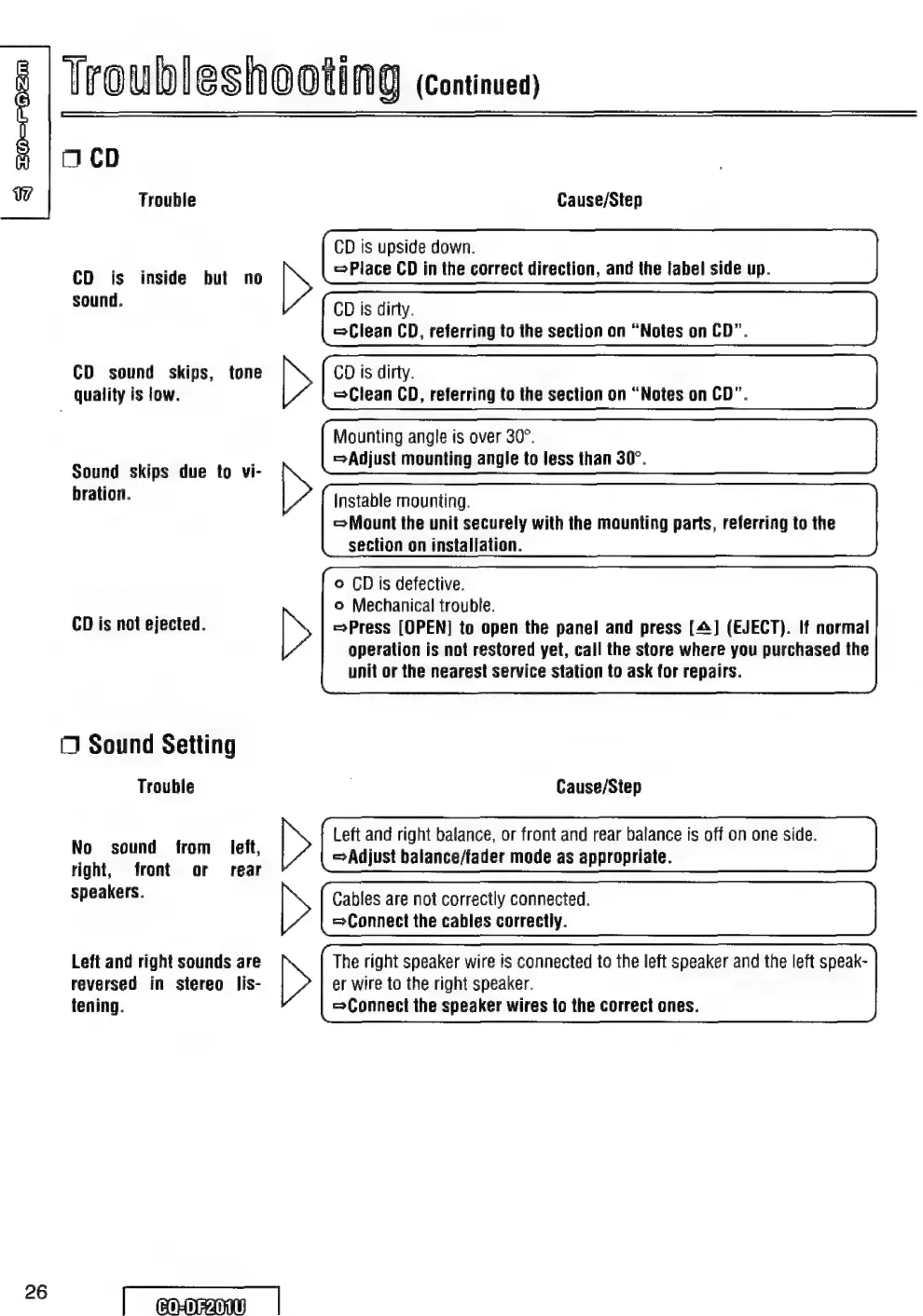
Troubleshooting
(Continued)
O
CD
Uy
Trouble
Cause/Step
CD
is
upside
down.
>
Place
CD
in
the
correct
direction,
and
the
label
side
up.
CD
is
dirty.
Clean
CD,
referring
to
the
section
on
“Notes
on
CD”.
CD
is
dirty.
Clean
CD,
referring
to
the
section
on
“Notes
on
CD”.
Mounting
angle
is
over
30°.
=Adjust
mounting
angle
to
less
than
30°.
CD
is
inside
but
no
sound.
CD
sound
skips,
tone
quality
is
low.
Sound
skips
due
to
vi-
bration.
Instable
mounting.
Mount
the
unit
securely
with
the
mounting
parts,
referring
to
the
section
on
installation.
©
CD
is
defective.
o
Mechanical
trouble.
Press
[OPEN]
to
open
the
panel
and
press
[4]
(EJECT).
If
normal
operation
is
not
restored
yet,
call
the
store
where
you
purchased
the
unit
or
the
nearest
service
station
to
ask
for
repairs.
CD
is
not
ejected.
NZ
NA
NT
NE
O
Sound
Setting
Trouble
Cause/Step
N
df
left
Left
and
right
balance,
or
front
and
rear
balance
is
off
on
one
side.
da
son
Ton:
dem;
>Adjust
balance/fader
mode
as
appropriate.
right,
front
or
rear
speakers.
>
Cables
are
not
correctly
connected.
Connect
the
cables
correctly.
Left
and
right
sounds
are
The
right
speaker
wire
is
connected
to
the
left
speaker
and
the
left
speak-
reversed
in
stereo
lis-
tening.
er
wire
to
the
right
speaker.
Connect
the
speaker
wires
to
the
correct
ones.
ES
|
cromo
|

Table of Contents