EasyManua.ls Logo

Panasonic CQDF802 - Page 6

Panasonic CQDF802
12 pages
Print Icon
To Next Page IconTo Next Page
To Previous Page IconTo Previous Page
Loading...
E
N
G
L
I
S
H
12
CQ-DF802W
27
E
N
G
L
I
S
H
11
CQ-DF802W
26
CD Player (Continued)
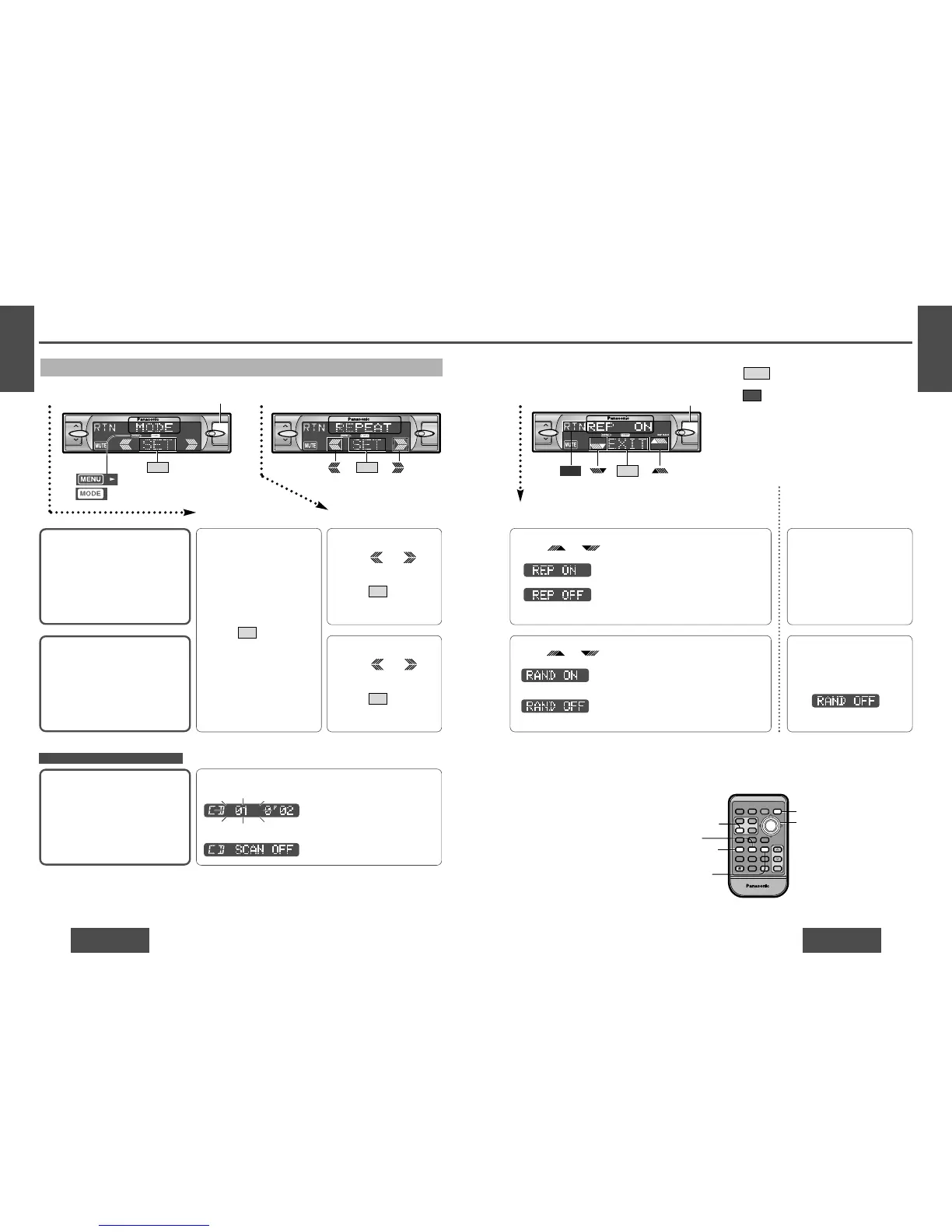
Menu Setting on CD Player Mode
Random Play
Default: RAND OFF
Repeat Play
Default: REP OFF
Press /["] or [#] to change setting.
12 3Menu Submenu Setting
Scan Play
Default: Off
1 Press /
[%] or [$] to select
RANDOM.
2 Press /[SET] to set.
SET
or
1 Press /
[%] or [$] to select
REPEAT.
2 Press /[SET] to set.
SET
: All the available track plays in a random
sequence.
: Cancel
Press /["] or [#] to change setting.
: Repeat the current track.
: Cancel
Direct setting on the re-
mote control unit when the
menu is not displayed
Press [4] (RANDOM) to
change setting.
On: RAND lights.
Off:
(Displayed for 2 seconds.)
Press [6] (REPEAT) to change
setting.
(When you press a button, the
screen on the left is displayed
for 2 seconds.)
Note:
Press /[MENU]/[MENU], [DISP] (display) to
return to the regular mode.
Press /[RET] (RETURN) to return to the previ-
ous display.
REP: Lights during repeat play.
RAND: Lights during random play.
RTN
EXIT
or
or
Only for the remote control unit
Press [5] (SCAN) to change setting.
On: The rst 10 seconds of each track plays in sequence.
Off: Cancel
or
: Lights during menu play setting.
: Lights during CD player menu mode.
[%] [$]
(Menu/submenu)
["] [#]
(Setting)
[SET]
[MENU]
[4] (RANDOM)
[5] (SCAN)
[6] (REPEAT)
[DISP] (Display)
RANDOM
SCAN
REPEAT
Car Audio
PWR
DISP
NUMBER
123
456
789
0
DIM
BAND
RET
MENU
SET
SOURCE
FACE
S A
MUTE
VOL
RETURN
DIMMER
Blinks.
VOL
MENU
SET
[MENU]
BAND
APM/
;
/
1
MOSFET
50W
X
4
VOL
MENU
SET
(Submenu)
BAND
APM/
;
/
1
BAND
APM/
;
/
1
1
2
112
MOSFET
50W
X
4
VOL
MENU
EXIT
MOSFET
50W
X
4
[MENU]
RTN
(Setting)
BAND
APM/
;
/
1
3 Setting
1 Press [MENU] during CD
playing to display MODE.
2 Press /[SET] to set.
SET
1 Menu 2 Submenu
When the menu is not displayed
(Displayed for 2 seconds.)

Related product manuals