E
N
G
L
I
S
H
22
CQ-DF802W
37
E
N
G
L
I
S
H
21
CQ-DF802W
36
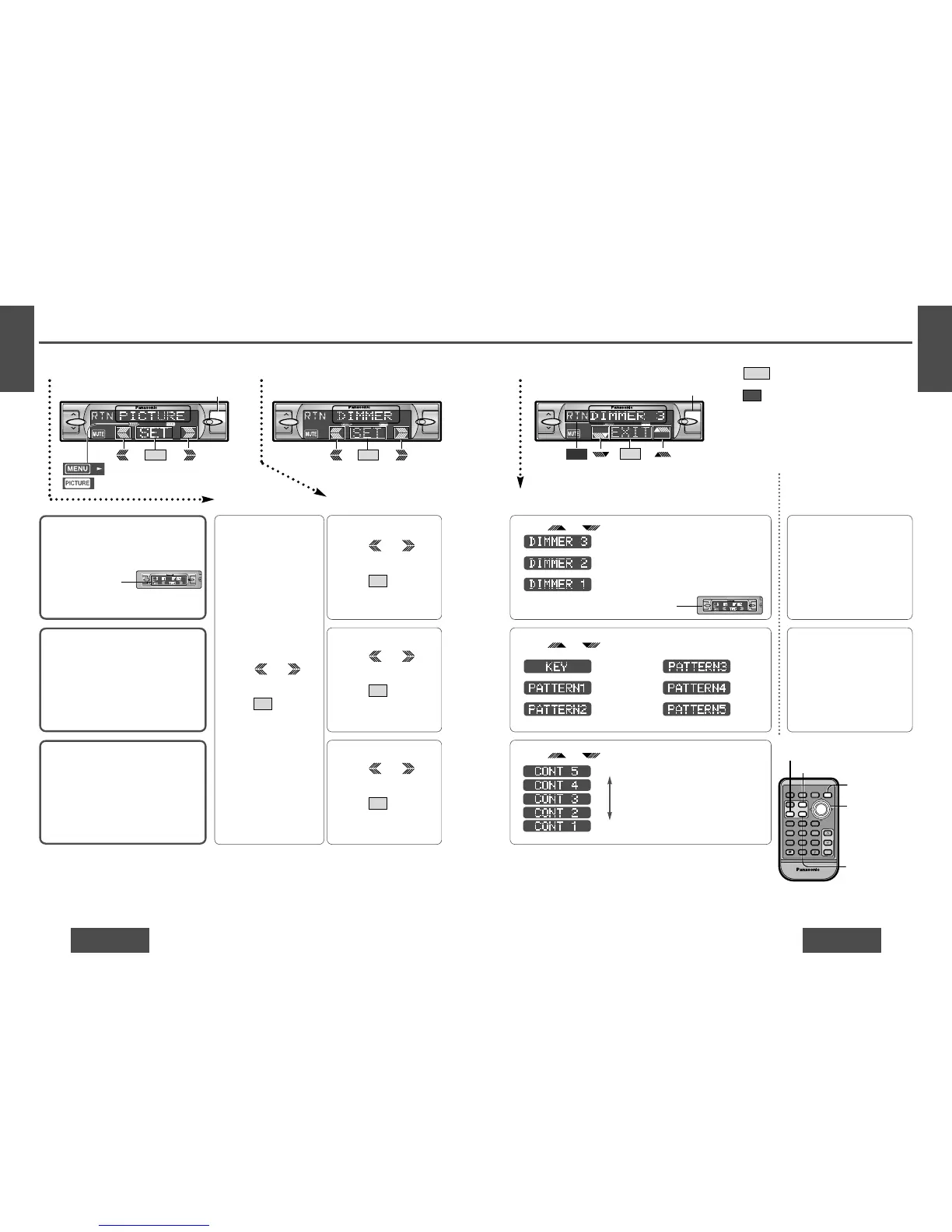
Picture (Display) Settings [PICTURE]
Dimmer (display brightness
setting range)
The brightness of just
the display area of the
front panel changes.
Default: DIMMER 3
Setting range: DIMMER 1 to 3
Spectrum Analyzer (S·A)
Display Pattern
Default: KEY
Variety: KEY, PATTERN 1 to 5
12Menu Submenu
Contrast
Allows you to adjust the display contrasts
for better viewing.
Default: CONT 3
Setting range: CONT 1 to 5
1 Press /
[%] or [$] to select
“DIMMER”.
2 Press /[SET] to set.
SET
1 Press /
[%] or [$] to select
“S·A”.
2 Press /[SET] to set.
SET
1 Press /
[%] or [$] to select
“CONTRAST”.
2 Press /[SET] to set.
SET
1 Press [MENU].
2 Press /
[%] or [$] to select
“PICTURE”.
3 Press /[SET] to set.
SET
Press /["] or [#] to change setting.
3 Setting
Press /["] or [#] to change setting.
Press /["] or [#] to change setting.
Direct setting on the re-
mote control unit when the
menu is not displayed
Press [DIM] (DIMMER) to
change setting.
(When you press a button,
the screen on the left is dis-
played for 2 seconds.)
Press [S·A] to change setting.
(When you press a button,
the screen on the left is dis-
played for 2 seconds.)
: Bright
: Medium
: Dark
Note:
≥ Press /[MENU]/[MENU], [DISP] (display) to
return to the regular mode.
≥ Press /[RET] (RETURN) to return to the previ-
ous display.
≥ Press Spectrum Analyzer display on S
·
A setting to
return to the previous display.
RTN
EXIT
: Lights during menu play setting.
: Lights during PICTURE mode.
1 Menu 2 Submenu 3 Setting
Level up
Level down
: S·A off (regular
display)
: S·A 1
: S·A 2
: S·A 3
: S·A 4
: S·A 5
(See page 32 for information on changing
the brightness of the entire front panel.)



 To Next Page