E
N
G
L
I
S
H
20
CQ-DF802W
35
E
N
G
L
I
S
H
19
CQ-DF802W
34
Audio and Sound Settings [AUDIO] (Continued)
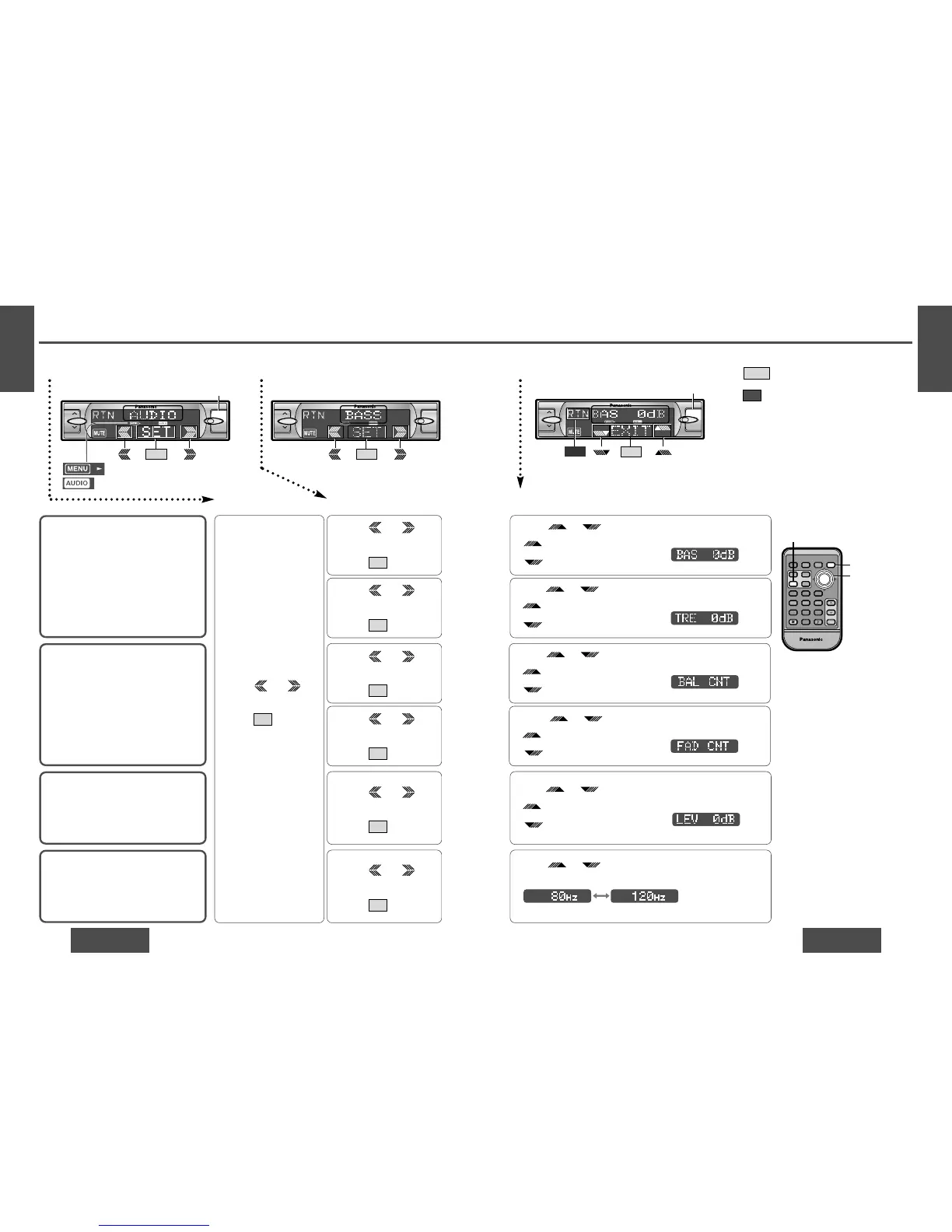
Bass and Treble
You can adjust the bass and treble sound.
Default: BAS (Bass) 0 dB
TRE (Treble) 0 dB
Setting range: j12 dB to i12 dB
(by 2 dB)
Balance and Fader
You can adjust the sound balance among
the front, rear, right and left speakers.
Default: BAL (Balance) CNT (Center)
FAD (Fader) CNT (Center)
Setting range: 15 levels each
Subwoofer Level
You can change the subwoofer volume level.
Default: 0 dB
Setting range: j∞ (subwoofer mute),
j6 dB to i6 dB (by 2 dB)
Subwoofer Low Pass Filter
Select the upper limit frequency of the
sound from subwoofer.
Default: 120 Hz
Setting range: 120 Hz/80 Hz
12Menu Submenu
1 Press [MENU].
2 Press /
[%] or [$] to select
“AUDIO”.
3 Press /[SET] to set.
SET
1 Press /
[%] or [$] to select
“BASS”.
2 Press /[SET] to set.
SET
1 Press /
[%] or [$] to select
“TREBLE”.
2 Press /[SET] to set.
SET
1 Press /
[%] or [$] to select
“BALANCE”.
2 Press /[SET] to set.
SET
1 Press /
[%] or [$] to select
“FADER”.
2 Press /[SET] to set.
SET
1 Press /
[%] or [$] to select
“SUB-W LEV”.
2 Press /[SET] to set.
SET
1 Press /
[%] or [$] to select
“SUB-W FRQ”.
2 Press /[SET] to set.
SET
3 Setting
Press /["] or [#] to adjust the level.
/["] : Increase the bass.
/[#] : Decrease the bass.
Press /["] or [#] to adjust the level.
/["] : Increase the treble.
/[#] : Decrease the treble.
Press /["] or [#] to adjust the level.
/["] : Right enhanced.
/[#] : Left enhanced.
Press /["] or [#] to adjust the level.
/["] : Front enhanced.
/[#] : Rear enhanced.
Press /["] or [#] to adjust the level.
/["] : Increase the level.
/[#] : Decrease the level.
Press /["] or [#] to change the setting 120 Hz
or 80 Hz.
Note:
≥ Press /[MENU]/[MENU], [DISP] (display) to
return to the regular mode.
≥ Press /[RET] (RETURN) to return to the previ-
ous display.
RTN
EXIT
: Lights during menu play setting.
: Lights during AUDIO mode.



 To Next Page