EasyManua.ls Logo

Panasonic CS-2403KE - Remote Control Functions

Panasonic CS-2403KE
31 pages
Print Icon
To Next Page IconTo Next Page
To Previous Page IconTo Previous Page
Loading...
Remote
Control-Name
of
Each
Partand
Functions
f
of
©
PA
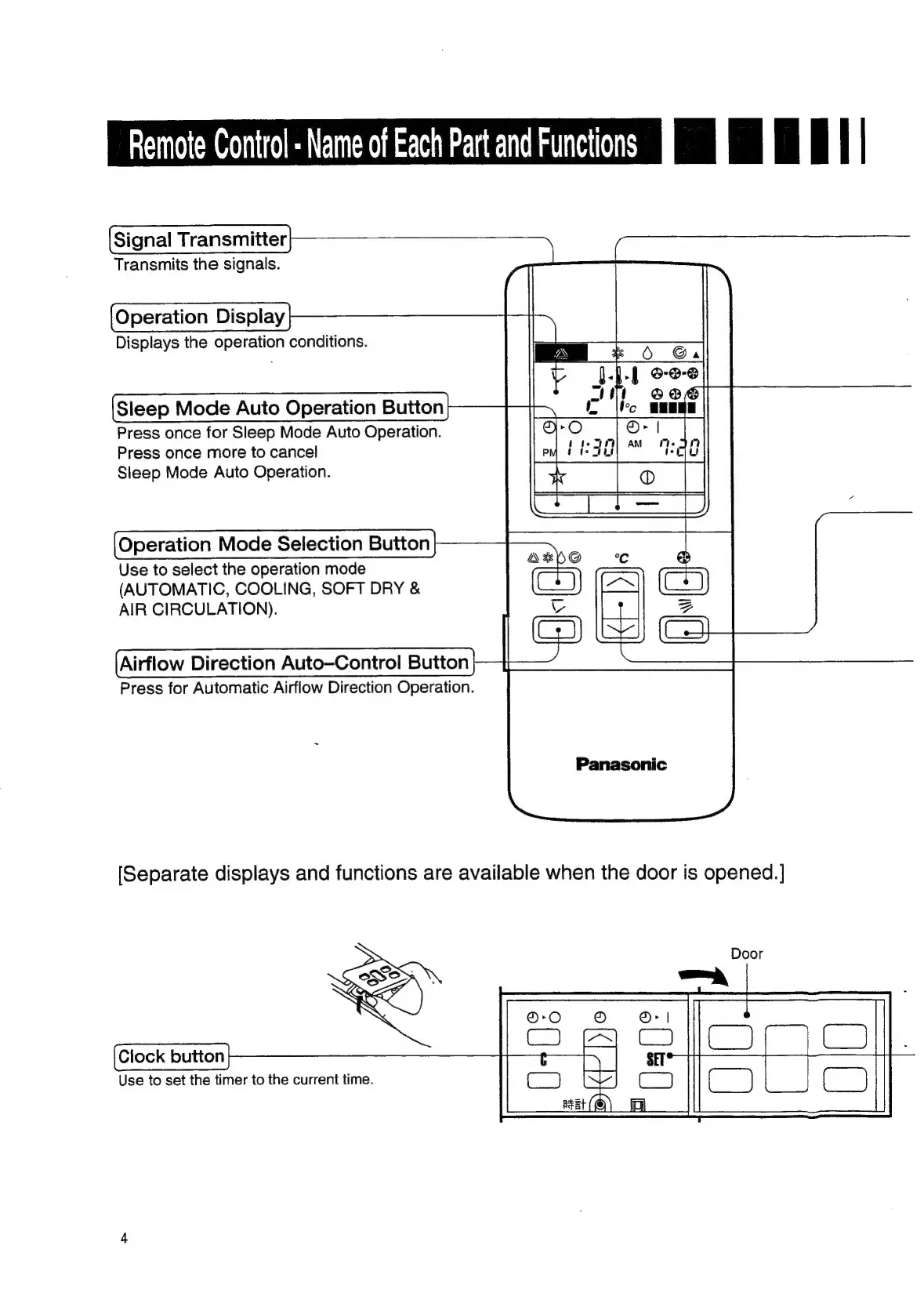
Signal
Transmitter
Transmits
the
signals.
Operation
Display
Displays
the
operation
conditions.
Sleep
Mode
Auto
Operation
Button
Press
once
for
Sleep
Mode
Auto
Operation.
Press
once
more
to
cancel
Sleep
Mode
Auto
Operation.
Operation
Mode
Selection
Button
Use
to
select
the
operation
mode
(AUTOMATIC,
COOLING,
SOFT
DRY
&
AIR
CIRCULATION).
Airflow
Direction
Auto—Control
Button
Press
for
Automatic
Airflow
Direction
Operation.
Panasonic
[Separate
displays
and
functions
are
available
when
the
door
is
opened.
]
Clock
button
Use
to
set
the
timer
to
the
current
time.

Related product manuals