EasyManua.ls Logo

Panasonic CS-2403KE - Page 8

Panasonic CS-2403KE
31 pages
Print Icon
To Next Page IconTo Next Page
To Previous Page IconTo Previous Page
Loading...
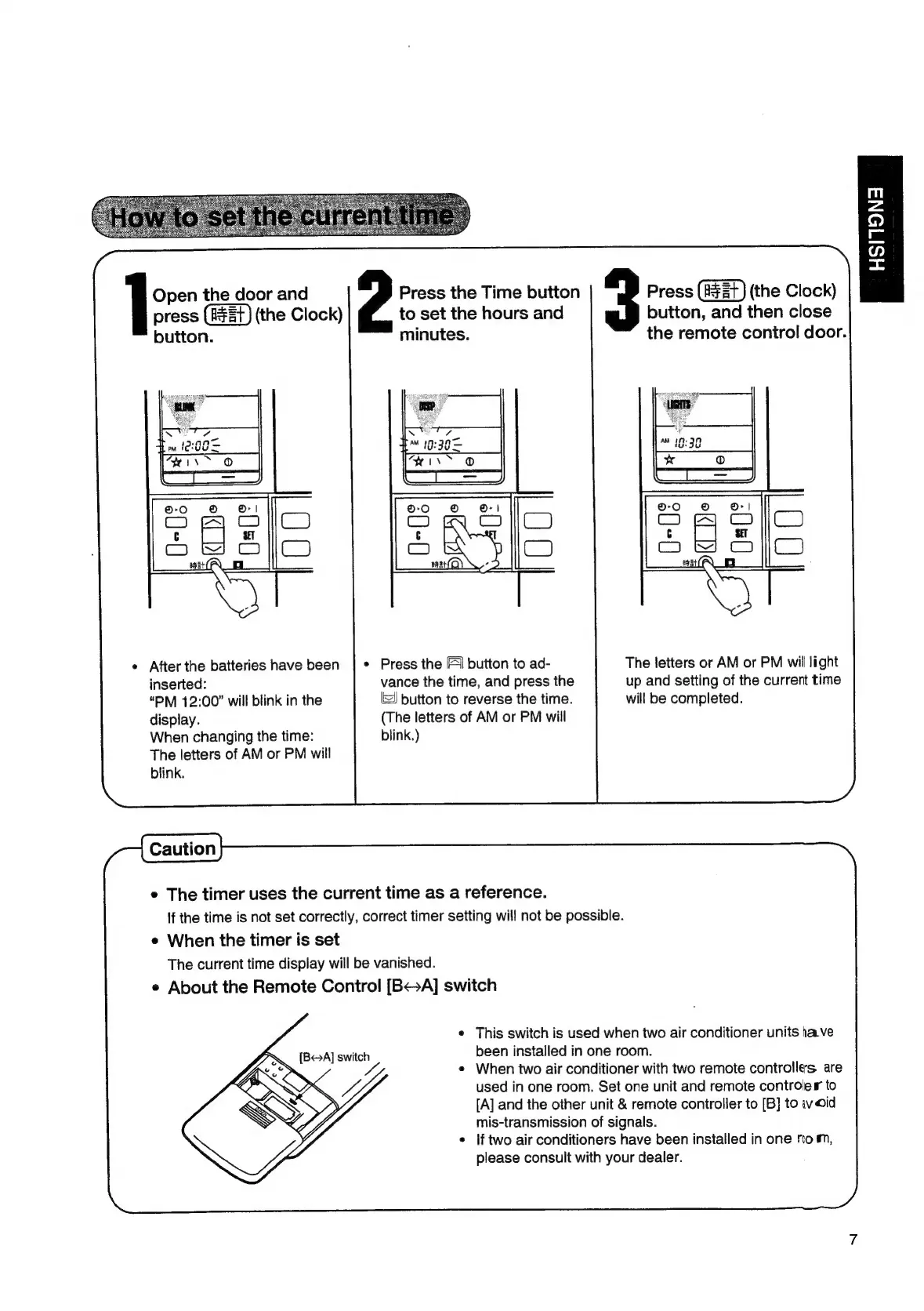
Open
the
door
and
press
(the
Clock)
button.
e
After
the
batteries
have
been
inserted:
“PM
12:00”
will
blink
in
the
display.
When
changing
the
time:
The
letters
of
AM
or
PM
will
blink.
HSITSNA
Press
the
Time
button
Press
(the
Clock)
to
set
the
hours
and
button,
and
then
close
minutes.
the
remote
control
door.
Press
the
[1
button
to
ad-
The
letters
or
AM
or
PM
wil
light
vance
the
time,
and
press
the
up
and
setting
of
the
current
time
button
to
reverse
the
time.
will
be
completed.
(The
letters
of
AM
or
PM
will
blink.)
e
The
timer
uses
the
current
time
as
a
reference.
If
the
time
is
not
set
correctly,
correct
timer
setting
will
not
be
possible.
e
When
the
timer
is
set
The
current
time
display
will
be
vanished.
e
About
the
Remote
Control
[B<>A]
switch
¢
This
switch
is
used
when
two
air
conditioner
units
have
been
installed
in
one
room.
When
two
air
conditioner
with
two
remote
controlles.
are
used
in
one
room.
Set
one
unit
and
remote
controler
to
[A]
and
the
other
unit
&
remote
controller
to
[B]
to
iwoid
mis-transmission
of
signals.
lf
two
air
conditioners
have
been
installed
in
one
rom,
please
consult
with
your
dealer.

Related product manuals