100
Nettverkstilkobling med AP-modus (metode 2)
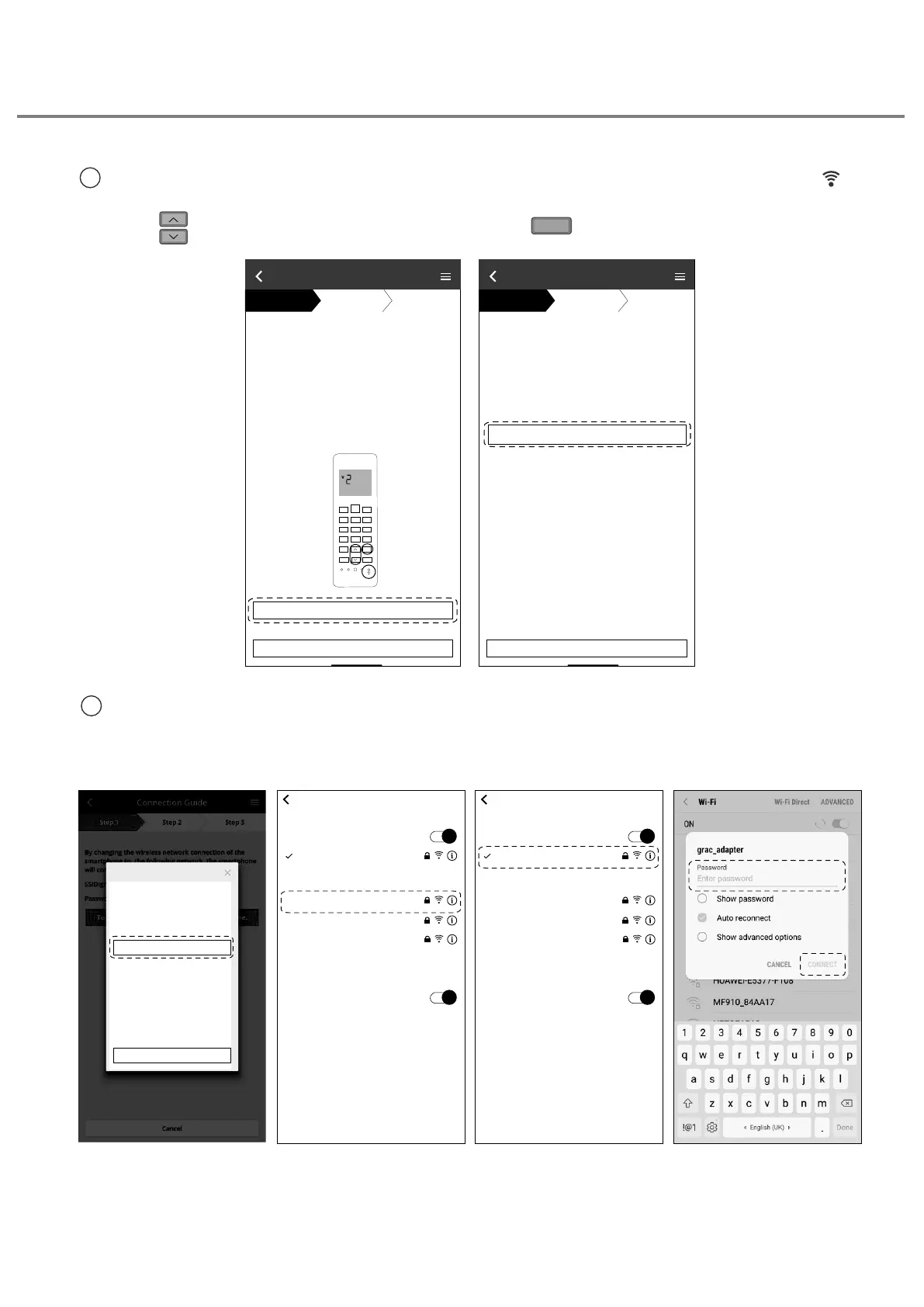
1
Sørg for at lysdioden for trådløst LAN er PÅ. Trykk og hold knappen for trådløst LAN i
5 sekunder inntil “1” vises på fjernkontrollen.
Trykk inntil “2” vises på fjernkontrollen og trykk
SET
mens du peker
mot
klimaanlegget.
2
Kopier passordet for senere bruk. Velg “Panasonic-CS-wirelessAP” fra smarttelefonens
Trådløst LAN-innstilling og skriv inn passordet du kopierte. Gå tilbake til “Panasonic
Comfort Cloud”-appen.
changing the wireless network connecƟon o
smartphone to the ollowing network.
D Panasonic--wirelessAP
Password acpswi
Connection Guide
Step 1
Step 2
Step 3
Cancel
To wireless network settings of the smartphone.
Wireless LAN LED is O during the connecƟon
setup, please enable again b pressing “Wireless
LAN” buƩon once beore proceeding to step 1 .
1. Press and hold “Wireless LAN” buƩon or secs
unƟl eas seƫng “1” is shown.
2. Press “up” or “down” buƩon unƟl Adance
seƫng “2” is shown.
. Point remote control to air-condiƟoner and
press “E” buƩon once.
. AŌer step 1
hae been done, tap“Next”.
Connection Guide
Step 1
Step 2
Step 3
Cancel
Next
To wireless network settings of the smartphone.
SET
CANCEL
elect the ollowing D rom the
network list in the wireless
ŶĞƚǁŽƌŬƐĞƫŶŐƐĂŶĚĞŶƚĞƌƚŚĞ
ƉĂƐƐǁŽƌĚ
^^/WĂŶĂƐŽŶŝĐͲ^ͲǁŝƌĞůĞƐƐW
WĂƐƐǁŽƌĚZĂĐϴƉƐǁŝ
ZĞƚƵƌŶƚŽƚŚŝƐĂƉƉůŝĐĂƟŽŶĂŌĞƌ
ĐŽŵƉůĞƟŶŐƚŚĞǁŝƌĞůĞƐƐŶĞƚǁŽƌŬ
ƐĞƫŶŐƐƚŽĐŽŶƟŶƵĞƚŚĞƐĞƚƵƉ
Copy password and next
Cancel (go back to previous screen)
tŝͲ&ŝ
ƌŽƵƚĞƌ^^/ϭ
,KK^EdtKZ<
ƌŽƵƚĞƌ^^/Ϯ
WĂŶĂƐŽŶŝĐͲ^ͲǁŝƌĞůĞƐƐW
ƌŽƵƚĞƌ^^/ϯ
KƚŚĞƌ
ƐŬƚŽ:ŽŝŶEĞƚǁŽƌŬƐ
<ŶŽǁŶŶĞƚǁŽƌŬǁŝůůďĞũŽŝŶĞĚĂƵƚŽŵĂƟĐĂůůLJ/ĨŶŽŬŶŽǁŶ
ŶĞƚǁŽƌŬĂƌĞĂǀĂŝůĂďůĞLJŽƵǁŝůůďĞĂƐŬĞĚďĞĨŽƌĞũŽŝŶŝŶŐĂ
ŶĞǁŶĞƚǁŽƌŬ
tŝͲ&ŝ
^ĞƫŶŐƐ
tŝͲ&ŝ
WĂŶĂƐŽŶŝĐͲ^ͲǁŝƌĞůĞƐƐW
,KK^EdtKZ<
ƌŽƵƚĞƌ^^/Ϯ
ƌŽƵƚĞƌ^^/ϭ
ƌŽƵƚĞƌ^^/ϯ
KƚŚĞƌ
ƐŬƚŽ:ŽŝŶEĞƚǁŽƌŬƐ
<ŶŽǁŶŶĞƚǁŽƌŬǁŝůůďĞũŽŝŶĞĚĂƵƚŽŵĂƟĐĂůůLJ/ĨŶŽŬŶŽǁŶ
ŶĞƚǁŽƌŬĂƌĞĂǀĂŝůĂďůĞLJŽƵǁŝůůďĞĂƐŬĞĚďĞĨŽƌĞũŽŝŶŝŶŐĂ
ŶĞǁŶĞƚǁŽƌŬ
tŝͲ&ŝ
^ĞƫŶŐƐ
Slik bruker du





 To Next Page