29
12.3.3 Powerful operation
● To cooling or heating the room faster comparing to normal operation. The POWERFUL operation can be active or
stop by pressing POWERFUL button on remote control.
● When powerful operation is active, the unit will continuously operate in POWERFUL mode until cancel the mode by
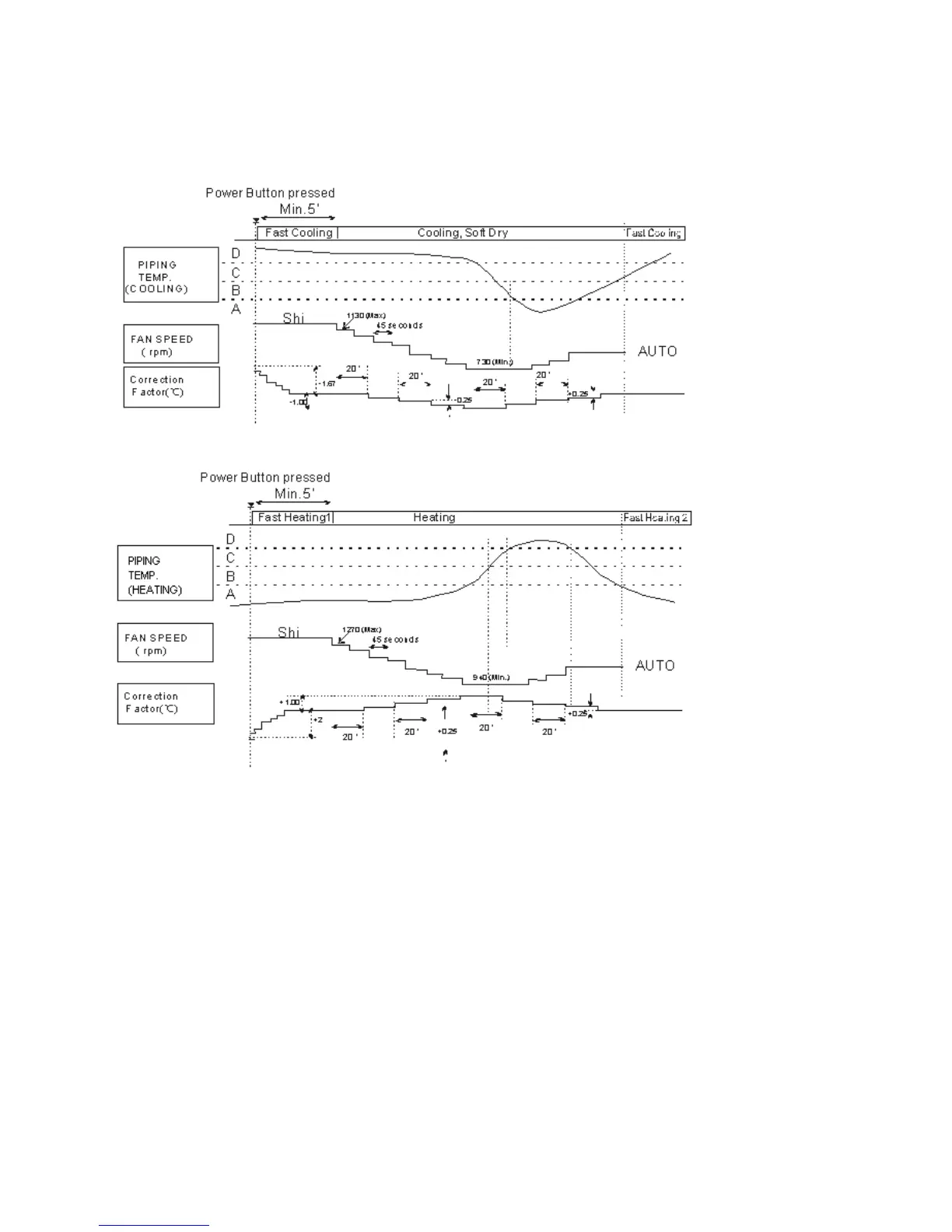
pressing POWERFUL button on remote control. Operation details are as the fig. below.
1. For cooling, soft Dry mode
2. For Heating mode:
Note: The value of A, B, C, D will change according to the indoor temperature.
12.3.4 AUTO COMFORT and ECONAVI
(1) Human Activity Sensor
A Human Activity infrared sensor is used to judge weather human is in or absent, and to judge human activity level
based on pulse within its limited range.
(2) AUTO COMFORT and ECONAVI operation
By pressing AUTO COMFORT or ECONAVI button on remote control, with detection of the human activity sensor the
unit makes adjustment of internal setting temperature and indoor fan speed automatically in order to maximize
comfort(AUTO COMFORT mode) or optimize energy saving(ECONAVI mode).
(3) AUTO COMFORT or ECONAVI stop conditions
Any of following operations will stop AUTO COMFORT or ECONAVI.
Press AUTO COMFORT button to turn off AUTO COMFORT operation.
Press ECONAVE button to turn the function OFF.
Press NO/OFF button to turn the unit OFF.
The time of timer-OFF achieves.
Press AUTO OFF/ON switch on indoor unit to turn off the unit.
Press POWERFUL button to switch to POWERFUL mode.



 To Next Page