EasyManua.ls Logo

Panasonic CU-M1403KE - Automatic Operation

Panasonic CU-M1403KE
31 pages
Print Icon
To Next Page IconTo Next Page
To Previous Page IconTo Previous Page
Loading...
Automatic
Operation
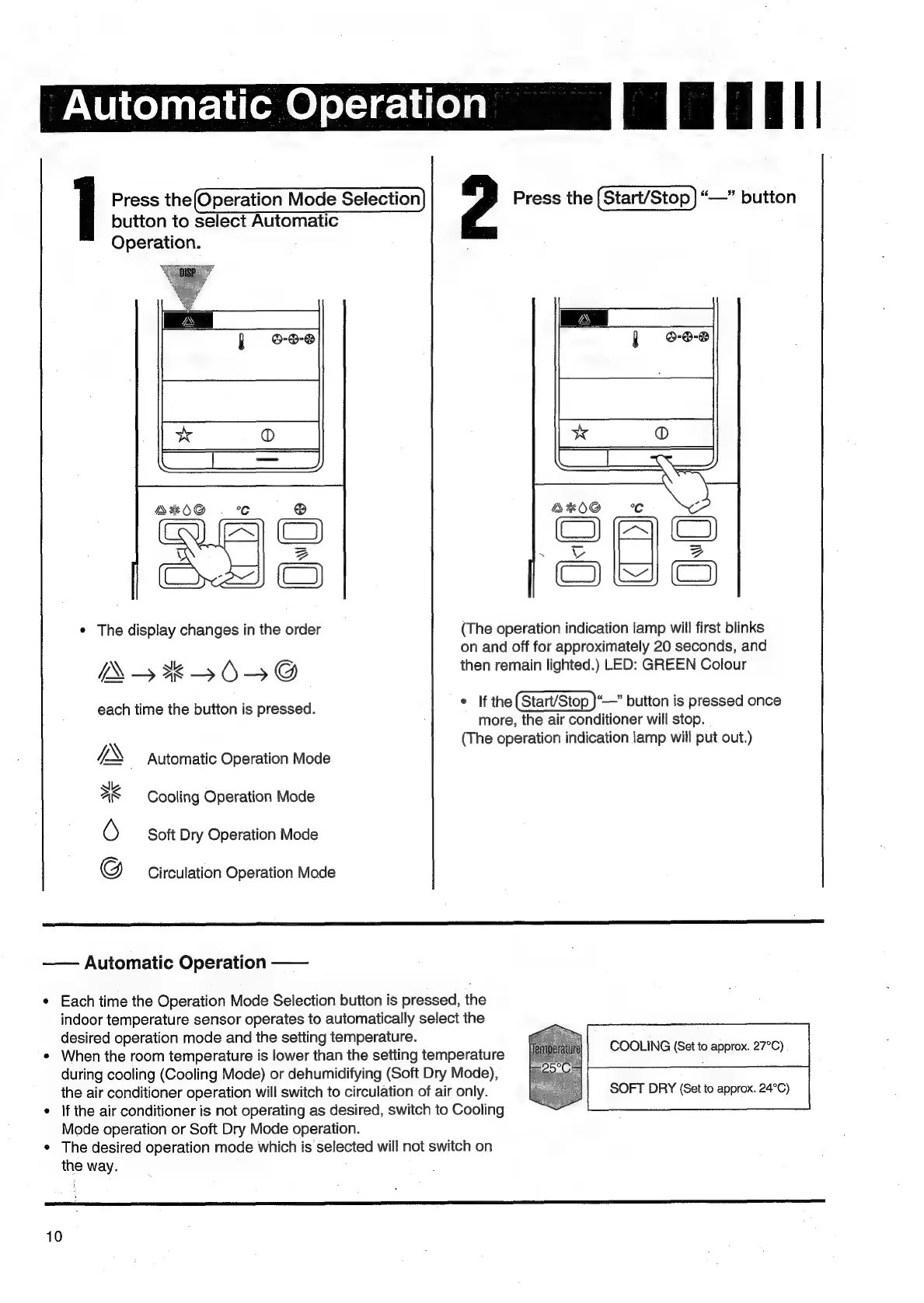
Press
the(Operation
Mode
Selection
Press
the
|
Start/Stop
|
“—”
button
button
to
select
Automatic
Operation.
AKO@
.
_@
(CA
C)
wy}
|
3
Cxr~w))
©)
¢
The
display
changes
in
the
order
(The
operation
indication
lamp
will
first
blinks
on
and
off
for
approximately
20
seconds,
and
sie
in li
:
YN
aoe
5
6)
=
@
then
remain
lighted.)
LED:
GREEN
Colour
each
time
the
button
is
pressed.
¢
If
the(Start/Stop
}“—”
button
is
pressed
once
more,
the
air
conditioner
will
stop.
\
(The
operation
indication
lamp
will
put
out.)
IX
_
Automatic
Operation
Mode
Cooling
Operation
Mode
Soft
Dry
Operation
Mode
N/.
@c
*
Circulation
Operation
Mode
——
Automatic
Operation
——
e
Each
time
the
Operation
Mode
Selection
button
is
pressed,
the
indoor
temperature
sensor
operates
to
automatically
select
the
desired
operation
mode
and
the
setting
temperature.
¢
When
the
room
temperature
is
lower
than
the
setting
temperature
during
cooling
(Cooling
Mode)
or
dehumidifying
(Soft
Dry
Mode),
the
air
conditioner
operation
will
switch
to
circulation
of
air
only.
SOFT
DRY
(Set
to
approx.
24°C)
*
|f
the
air
conditioner
is
not
operating
as
desired,
switch
to
Cooling
Mode
operation
or
Soft
Dry
Mode
operation.
¢
The
desired
operation
mode
which
is
selected
will
not
switch
on
the
way.
COOLING
(Set
to
approx.
27°C)
renee
Ec
ih
ES
10

Related product manuals