EasyManua.ls Logo

Panasonic CU-M1403KE - Soft Dry Operation

Panasonic CU-M1403KE
31 pages
Print Icon
To Next Page IconTo Next Page
To Previous Page IconTo Previous Page
Loading...
Cooling
Mode
and
Soft
Dry
Mode
Operation
fof
fT
Tim
Fine
adjustments
to
the
room
temperature
and
airflow
volume
to
be
made
by
selecting
Cooling
Mode
or
Soft
Dry
Mode.
After
first
selecting
the
mode,
just
press
the
Start/Stop
button
to
start
operation.
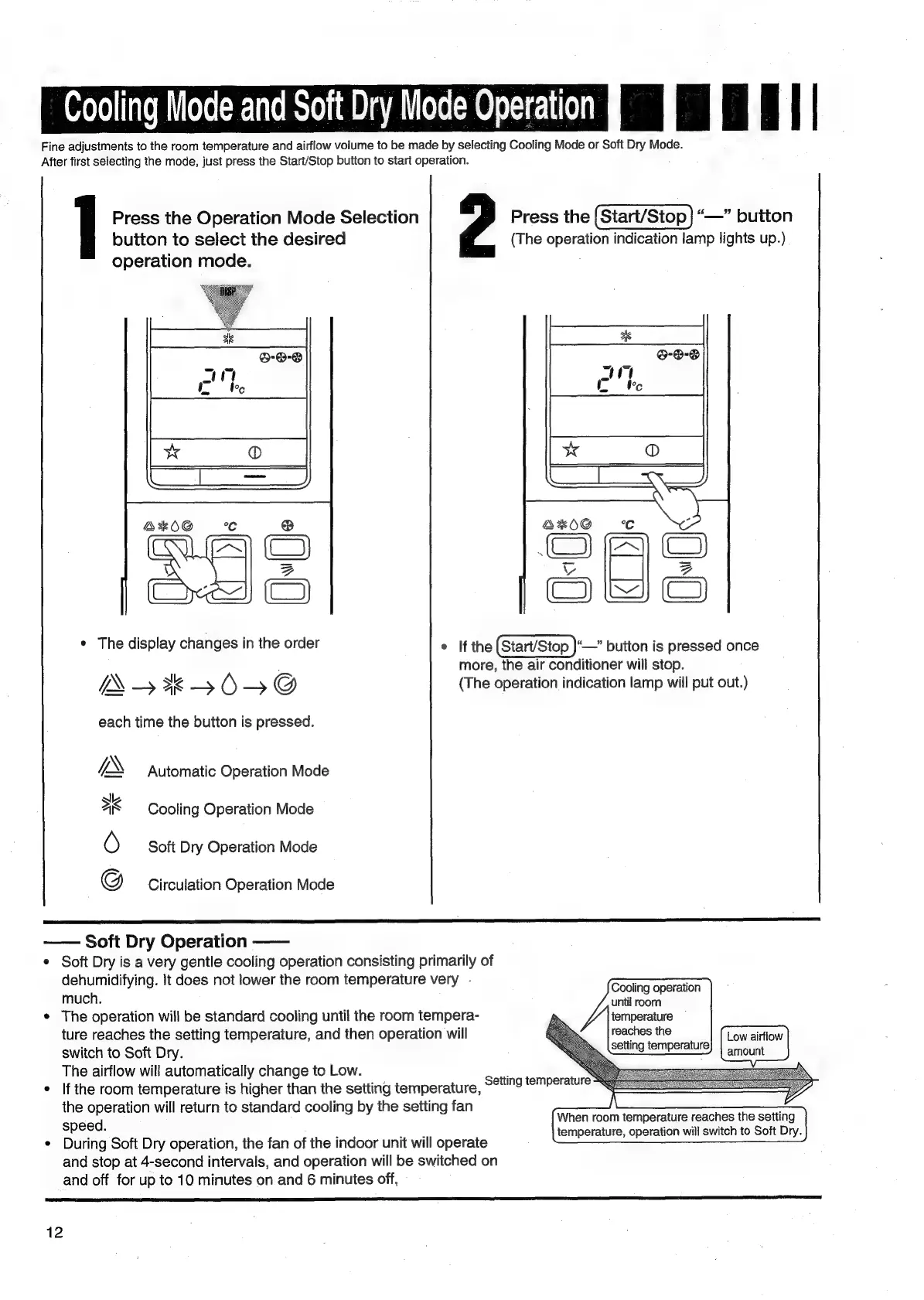
Press
the
Operation
Mode
Selection
Press
the
|
Start/Stop
|
“—”
button
button
to
select
the
desired
(The
operation
indication
lamp
lights
up.)
operation
mode.
AKOG
°c
@
=e
(C)
al
BZ
Cres)
CE)
*
The
display
changes
in
the
order
°
If
the
(Start/Stop
)—”
button
is
pressed
once
:
more,
the
air
conditioner
will
stop.
IW
4+*K>BUO>DG@
(The
operation
indication
lamp
will
put
out.)
each
time
the
button
is
pressed.
IX
Automatic
Operation
Mode
sk
as
Cooling
Operation
Mode
O
Soft
Dry
Operation
Mode
G
Circulation
Operation
Mode
Soft
Dry
Operation
¢
Soft
Dry
is
a
very
gentle
cooling
operation
consisting
primarily
of
dehumidifying.
lt
does
not
lower
the
room
temperature
very
-
much.
*
The
operation
will
be
standard
cooling
until
the
room
tempera-
ture
reaches
the
setting
temperature,
and
then
operation
will
switch
to
Soft
Dry.
The
airflow
will
automatically
change
to
Low.
¢
Ifthe
room
temperature
is
higher
than
the
setting
temperature,
the
operation
will
return
to
standard
cooling
by
the
setting
fan
speed.
¢
During
Soft
Dry
operation,
the
fan
of
the
indoor
unit
will
operate
and
stop
at
4-second
intervals,
and
operation
will
be
switched
on
and
off
for
up
to
10
minutes
on
and
6
minutes
off,
Cooling
operation
until
room
temperature
reaches
the
setting
temperature
Low
airflow
amount
When
room
temperature
reaches
the
setting
temperature,
operation
will
switch
to
Soft
Dry.
Setting
temperature
12

Related product manuals