EasyManua.ls Logo

Panasonic CU-M1403KE - Page 14

Panasonic CU-M1403KE
31 pages
Print Icon
To Next Page IconTo Next Page
To Previous Page IconTo Previous Page
Loading...
i
}
{
1
Hf
i
|
\
:
i
if
i
i
|
j
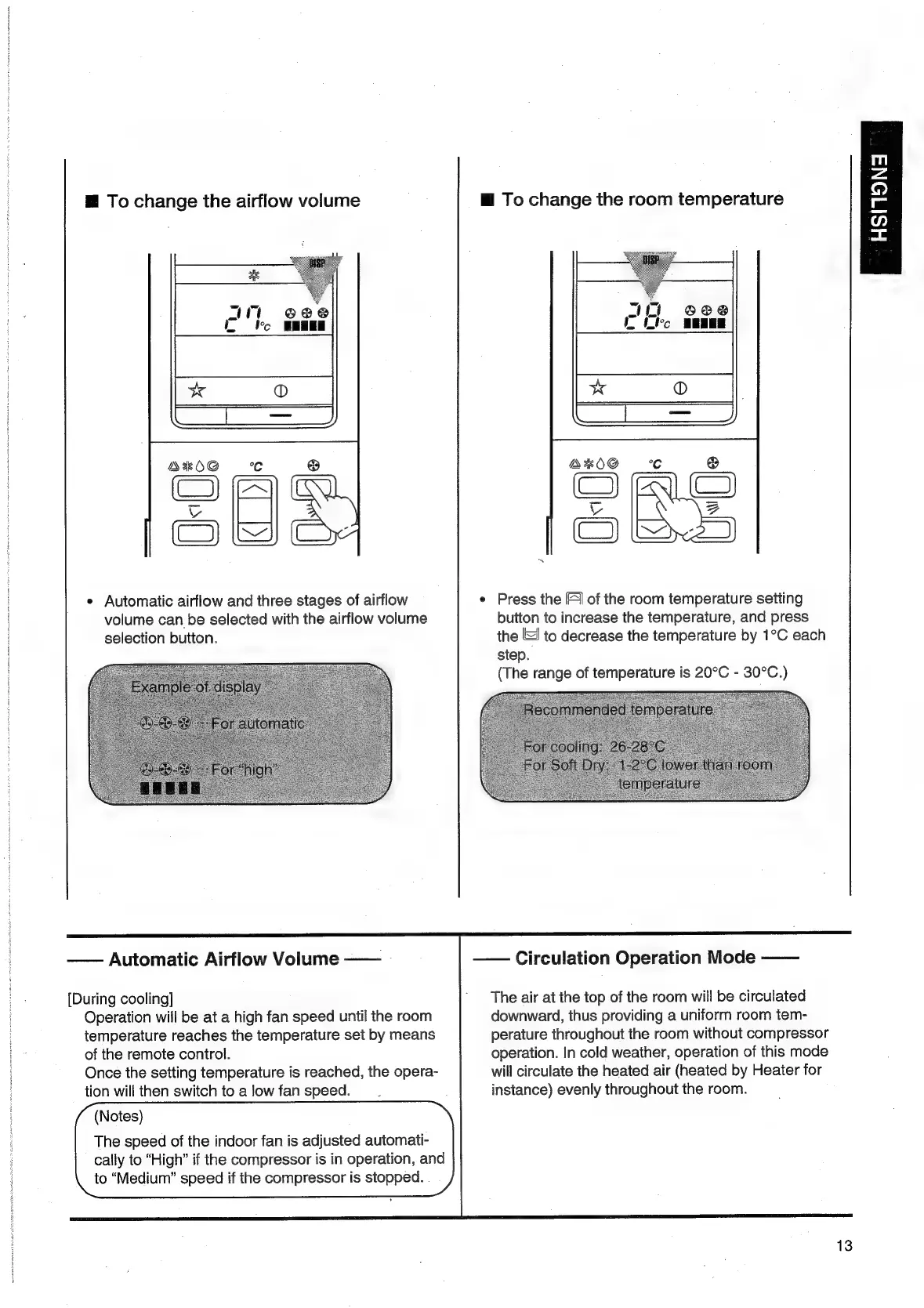
To
change
the
airflow
volume
a
4
feo
@8@
SESE
A*OG
°C
Cea
ou
e
Automatic
airflow
and
three
stages
of
airflow
volume
can
be
selected
with
the
airflow
volume
selection
button.
Automatic
Airflow
Volume
——
[During
cooling]
Operation
will
be
at
a
high
fan
speed
until
the
room
temperature
reaches
the
temperature
set
by
means
of
the
remote
control.
Once
the
setting
temperature
is
reached,
the
opera-
tion
will
then
switch
to
a
low
fan
speed.
(Notes)
The
speed
of
the
indoor
fan
is
adjusted
automati-
cally
to
“High”
if
the
compressor
is
in
operation,
and
to
“Medium”
speed
if
the
compressor
is
stopped.
.
——
Circulation
Operation
Mode
——
@
To
change
the
room
temperature
¢
Press
the
F)
of
the
room
temperature
setting
button
to
increase
the
temperature,
and
press
the
to
decrease
the
temperature
by
1°C
each
step.
(The
range
of
temperature
is
20°C
-
30°C.)
Sis
ee
eta
at
SS
ae
Sut
The
air
at
the
top
of
the
room
will
be
circulated
downward,
thus
providing
a
uniform
room
tem-
perature
throughout
the
room
without
compressor
operation.
In
cold
weather,
operation
of
this
mode
will
circulate
the
heated
air
(heated
by
Heater
for
instance)
evenly
throughout
the
room.
13
m
z
©.
i
=

Related product manuals