EasyManua.ls Logo

Panasonic CU-M1403KE - Page 18

Panasonic CU-M1403KE
31 pages
Print Icon
To Next Page IconTo Next Page
To Previous Page IconTo Previous Page
Loading...
Convenient
Operation
(Sleep
&
Circulation
Mode)
f
of
f
PEE
F
Giecalates.
the
room
aie
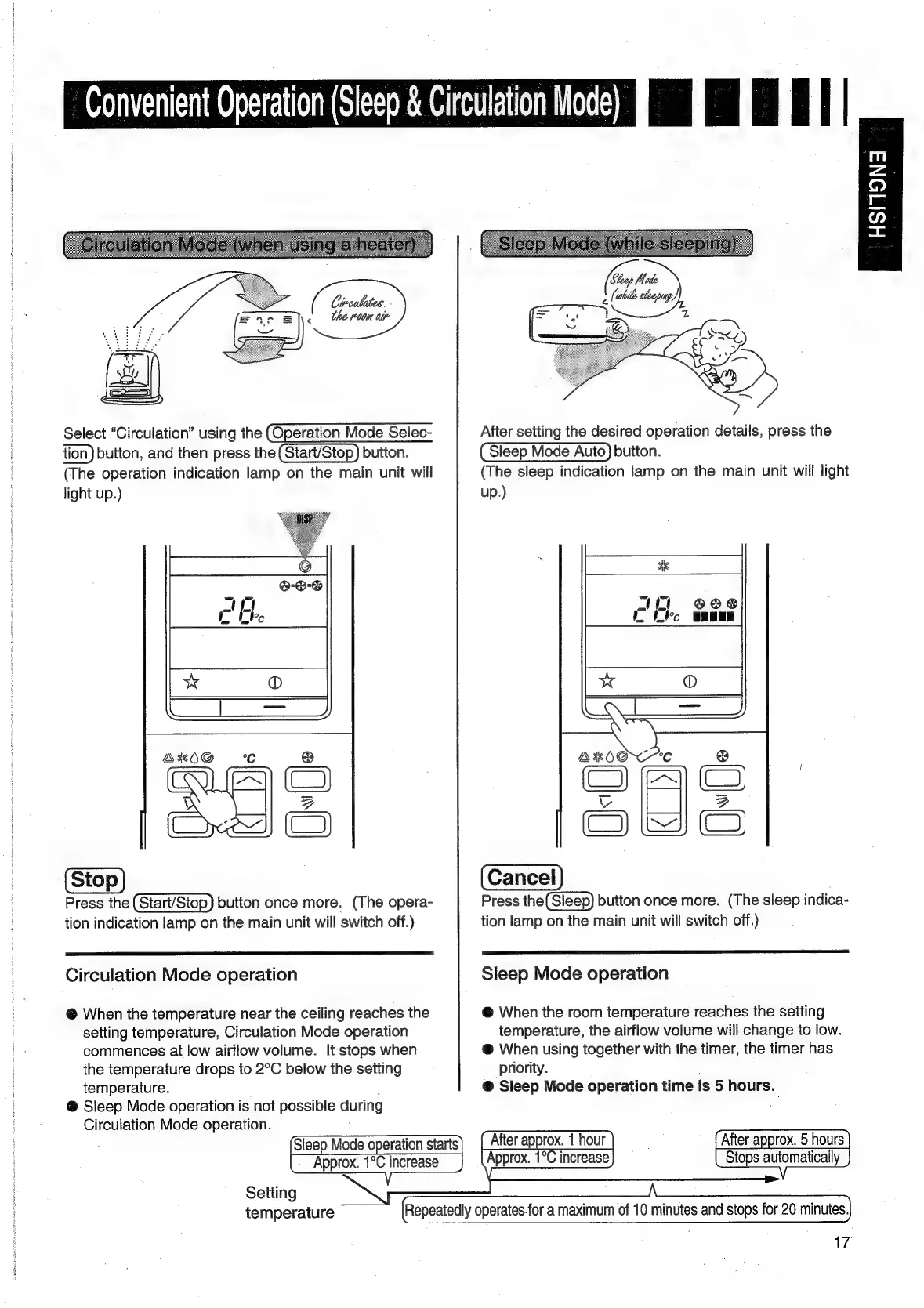
Select
“Circulation”
using
the
(Operation
Mode
Selec-
After
setting
the
desired
operation
details,
press
the
tion)
button,
and
then
press
the(Start/Stop)
button.
Sleep
Mode
Auto)
button.
(The
operation
indication
lamp
on
the
main
unit
will
(The
sleep
indication
lamp
on
the
main
unit
will
light
light
up.)
up.)
Press
the
(Start/Stop)
button
once
more.
(The
opera-
Press
the(Sleep)
button
once
more.
(The
sleep
indica-
tion
indication
lamp
on
the
main
unit
will
switch
off.)
tion
lamp
on
the
main
unit
will
switch
off.)
Circulation
Mode
operation
Sleep
Mode
operation
@
When
the
temperature
near
the
ceiling
reaches
the
@
When
the
room
temperature
reaches
the
setting
setting
temperature,
Circulation
Mode
operation
temperature,
the
airflow
volume
will
change
to
low.
commences
at
low
airflow
volume.
It
stops
when
@
When
using
together
with
the
timer,
the
timer
has
the
temperature
drops
to
2°C
below
the
setting
priority.
temperature.
@
Sleep
Mode
operation
time
is
5
hours.
@
Sleep
Mode
operation
is
not
possible
during
Circulation
Mode
operation.
Sleep
Mode
operation
starts
After
approx.
5
hours
Approx.
1°C
increase
Stops
automatically
Setting
temperature
|
Repeatedly
operates.for
a
maximum
of
10
minutes
and
stops
for
20
minutes.
17
After
ap
prox.
1
hour
Approx.
1°C
increase

Related product manuals