Advanced (Playback)
- 122 -
We recommend resizing to [ ] if you want to attach a picture to an e-mail or use it on a
website. (Pictures set to the minimum number of pixels for [ASPECT RATIO] cannot be
further reduced in size.)
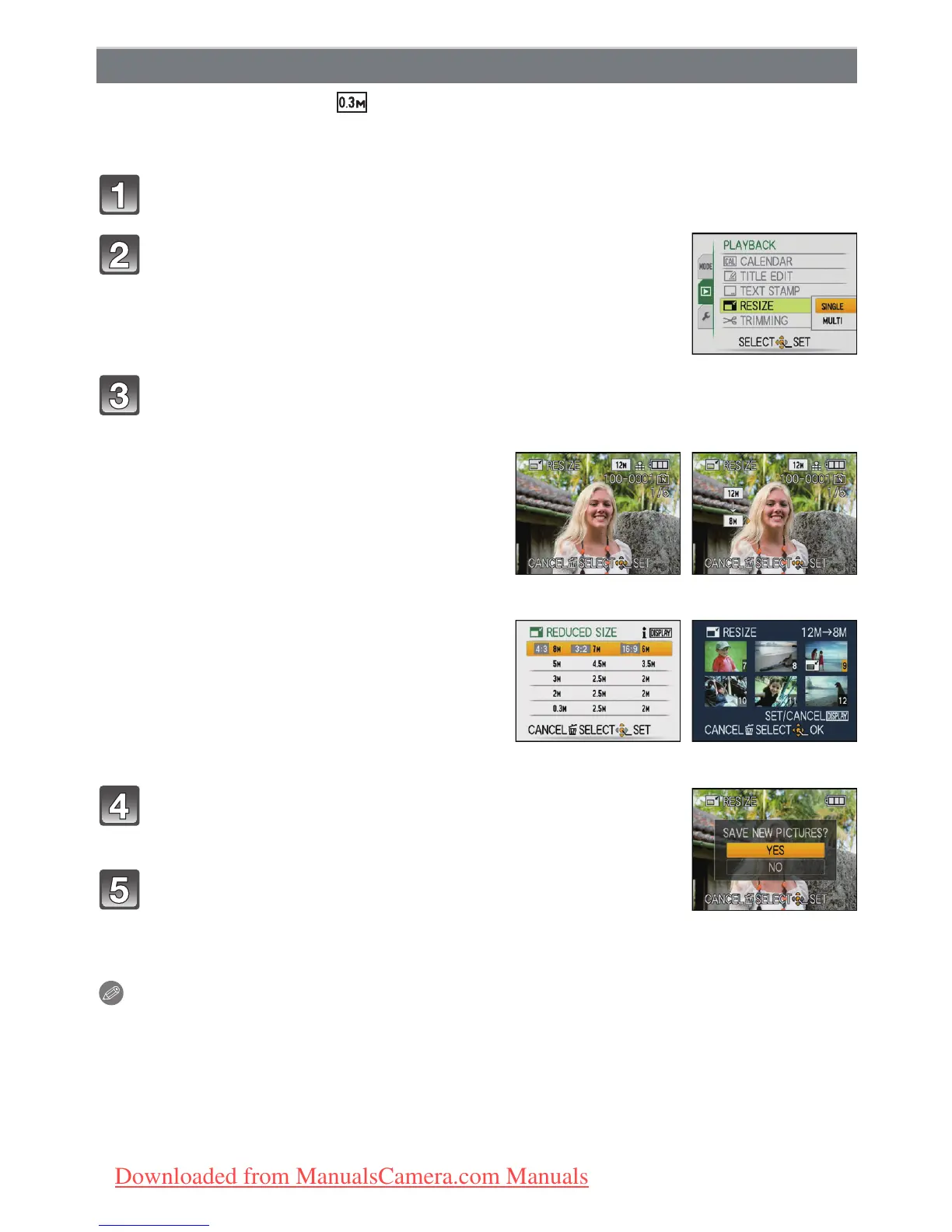
Select [RESIZE] on the [PLAYBACK] Mode menu. (P21)
Press 3 to select [YES] and then press [MENU/
SET].
Press [‚] to return to the menu screen.
¢
¢The menu screen is automatically restored when [MULTI] is
selected.
• Press [MENU/SET] to close the menu.
Note
•
You can set up to 50 pictures at one time in [MULTI].
• The picture quality of the resized picture will deteriorate.
• It may not be possible to resize pictures recorded with other equipment.
• Motion pictures, pictures with audio, and pictures stamped with [TEXT STAMP] cannot be
resized.
[RESIZE] Reducing the picture size (number of pixels)
Press 3/4 to select [SINGLE] or [MULTI] and then
press [MENU/SET].
Select the picture and size.
[SINGLE] setting
1 Press 2/1 to select the picture,
and then press [MENU/SET].
2 Press 2/1 to select the size
¢
, and
then press [MENU/SET].
¢ Only the sizes to which the pictures can
be resized is displayed.
[SINGLE]
[MULTI] setting
1 Press 3/4 to select the size, and
then press [MENU/SET].
•
When [DISPLAY] is pressed, an
explanation of resizing is displayed.
2 Press 3/4/2/1 to select the
picture, and then press [DISPLAY].
•
Repeat this step for each picture, and
press [MENU/SET] to set.
[MULTI]
Downloaded from ManualsCamera.com Manuals









 To Next Page