230
Wi-Fi/NFC
Using the NFC “Near Field Communication” function, you can easily transfer data
necessary for a Wi-Fi connection between this camera and the smartphone/tablet.
1 Launch “Image App” on your smartphone/tablet.
•
The screen for selecting the connection destination is displayed after the launch.
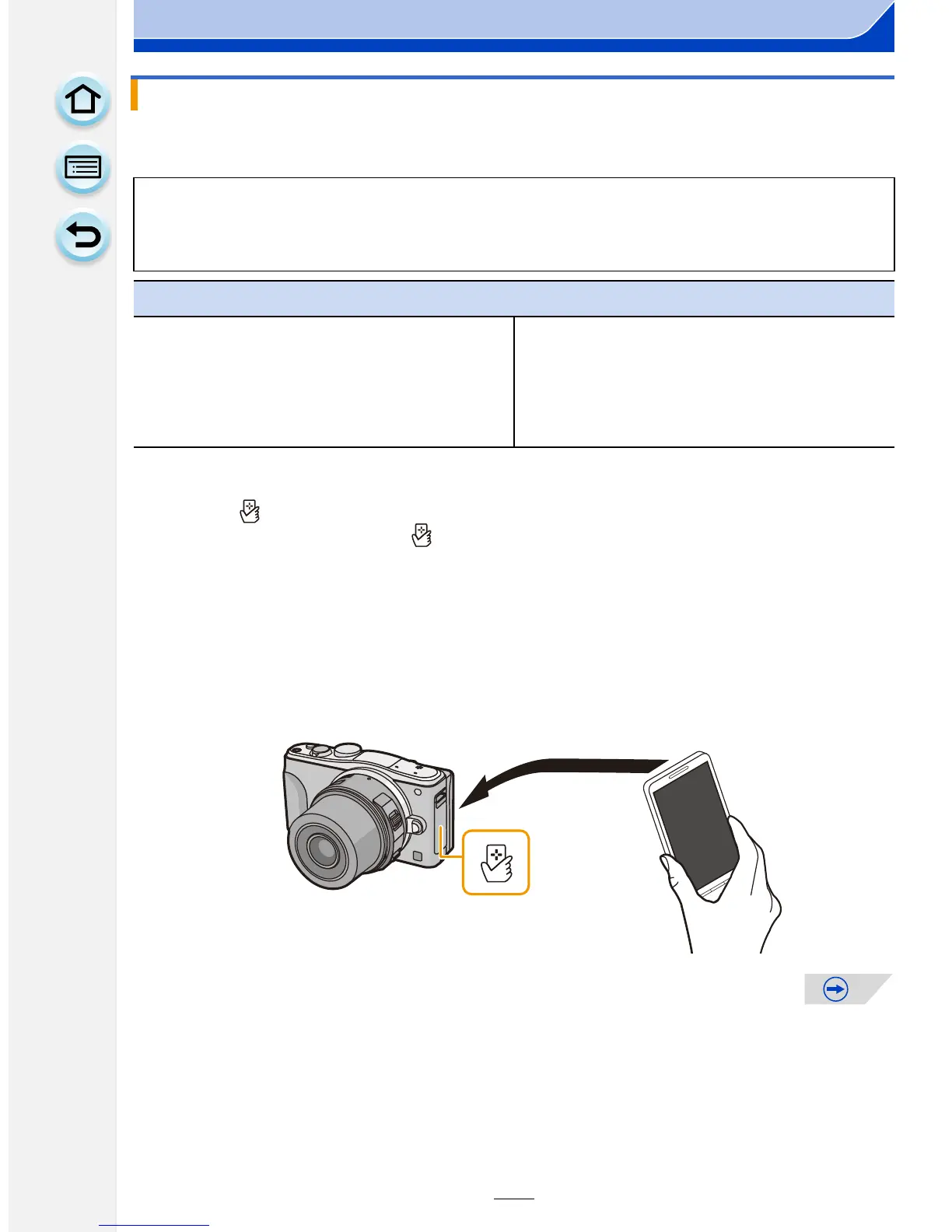
2 While [ ] is displayed on the connection screen of the “Image App”, touch
the smartphone/tablet to [ ] of this unit.
•
It may take time to complete the connection.
• When the smartphone/tablet has connected, an image of this camera will be displayed on
the smartphone/tablet.
• If a connection attempt by touching fails, restart the “Image App”, and then display the
screen in step
1 again.
• If a connection is established during single picture playback, the picture will be transferred
to the smartphone/tablet. (P233)
Connecting to a smartphone/tablet by using the NFC function
∫ Compatible models
This function can be used with the NFC compatible device with Android (OS version
2.3.3 or higher). (excluding some models)
Preparation:
(On the camera)
•
Set [NFC Operation] to [ON]. (P268)
(On your smartphone/tablet)
•
Check that your smartphone/tablet is a
compatible model.
• Turn on the Wi-Fi function.
• Install the “Image App” in advance. (P227)






 To Next Page